Tropical mood in accessories WordPress Theme


Beautiful Details Turns Fashion Copy Into Stable Page Content
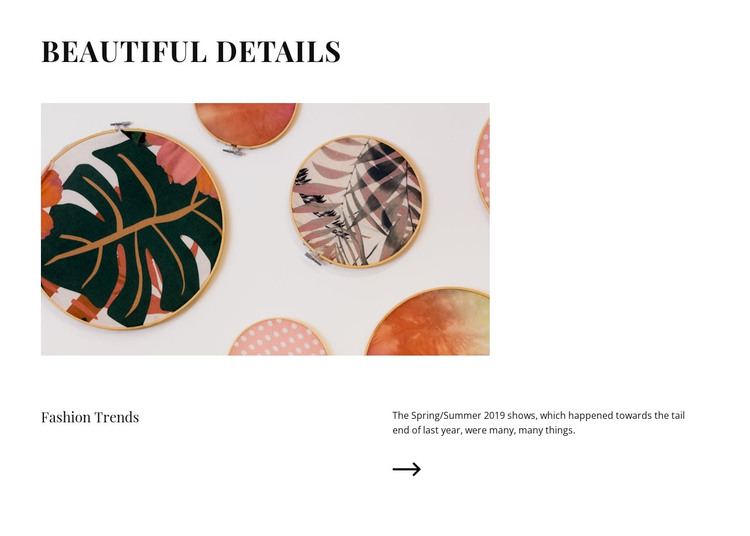
“Beautiful details” gives the section a clear editorial title, and the large image beneath it lets the visual subject arrive before the explanatory text. The lower content row then divides responsibility between the “Fashion Trends” label and the supporting paragraph, with the arrow icon adding a small directional motif below the copy. This hierarchy makes the section readable as a focused fashion feature rather than a loose collection of image and text elements.
For a WordPress-managed page, the block can provide stable, publishable content for a fashion or beauty area. Its paragraph includes a seasonal fashion reference that can be retained as editorial material or replaced with a current topic while the heading, image position, and two-column relationship remain intact. The arrangement supports page content that benefits from a strong visual introduction followed by a concise explanation, without requiring the section to carry unrelated site functions.
The restrained styling also gives the content a consistent visual container: the white background creates space around the image, black serif typography reinforces the editorial tone, and the left-aligned composition keeps the reading path controlled. Used within a broader WordPress theme context, the section can sit alongside other page content while remaining one reusable block. The surrounding site can provide navigation and additional content; this section contributes the fashion-story portion through its own established hierarchy.
Customize with Nicepage
Open this ready-made template in the WordPress Website Builder and customize it visually in the Nicepage editor. Replace demo content, edit page sections, and adapt the design to your project without rebuilding the template from scratch.
Edit Template Offline
2. Create a new page or select existing
3. Click Add new block, search for id 239836 and click enter
Edit Template Online
Create Awesome Websites


Free Nicepage Builder
Keywords
Manage and Edit This Theme in WordPress
Customize and Install the WordPress Theme
Start with this ready-made theme instead of building the WordPress design from scratch. Customize its layout, content, typography, images, sections, and other design elements visually in Nicepage editor, then export and install the WordPress Theme, Plugin, and Pages on your WordPress site. The Nicepage WordPress Plugin lets you continue working with the site after installation.
Edit the Theme Directly in WordPress
After installation, you can edit the WordPress Theme directly in WordPress with the Nicepage WordPress Plugin. Use Site Style to customize site Colors, Fonts, Header, Footer, Blog, and Post Page Templates while working within your WordPress website.
Edit WordPress Pages Visually
Use the Nicepage WordPress Plugin to edit page content directly from the WordPress admin area. Open a WordPress Page with Nicepage and visually change its text, images, sections, and other page elements while continuing to manage the Page through WordPress.
WordPress Content and Theme Integration
Use the customized theme with WordPress Pages, Posts, Blog and Post Templates, menus, widgets, and other CMS-managed content. Shared theme elements such as Colors, Fonts, Header, Footer, Blog, and Post Page Templates can be managed as part of the overall site design, while WordPress provides the CMS environment for managing site content.
This workflow combines a ready-made WordPress Theme with visual customization, direct theme editing in WordPress, and continued content management through the Nicepage WordPress Plugin.