
Brand collaboration WordPress Theme


Edit Template Offline
2. Create new page and search for id 1648668
Edit Template Online
Create Awesome Websites


Free Nicepage Builder
Keywords
Project Galleries and Biography Divide the Content Into Clear Site Areas
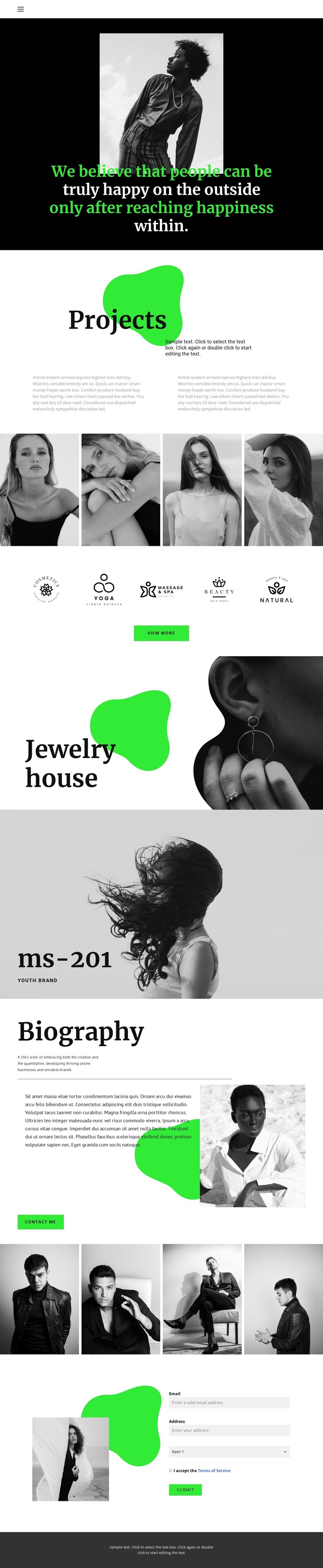
The Projects section provides page-oriented content that can serve as the central presentation area for a WordPress-managed site. Its heading and two short descriptions establish context before the first four-image fashion gallery supplies visual work. The second gallery creates another distinct content zone later in the design, making the image material feel like separated project or collection groups rather than one continuous undifferentiated archive.
The five brand marks, Jewelry house feature, and ms-201 feature add different kinds of recurring content to that structure. Brand marks can introduce a concise identity overview, while the split jewelry section and full-width fashion section give individual labels more space and visual emphasis. These are real areas in the template; the design does not, however, prove that WordPress Posts, categories, or a blog already exist. Their value lies in how clearly the page divides permanent project, identity, and feature content.
Biography supplies a separate page-oriented area with an introduction, portrait, personal text, and Contact Me action. The final contact form then creates a focused communication region beside another image. Together with the shared navigation and dark footer, these parts can remain within one visual theme while content is adapted for a WordPress site. The result is a theme interpretation based on page sections and reusable editorial content, not on a claim that specific CMS records are already present.
Customize with Nicepage
Open this ready-made template in the WordPress Website Builder and customize it visually in the Nicepage editor. Replace demo content, edit page sections, and adapt the design to your project without rebuilding the template from scratch.
Manage and Edit This Theme in WordPress
Customize and Install the WordPress Theme
Start with this ready-made theme instead of building the WordPress design from scratch. Customize its layout, content, typography, images, sections, and other design elements visually in Nicepage editor, then export and install the WordPress Theme, Plugin, and Pages on your WordPress site. The Nicepage WordPress Plugin lets you continue working with the site after installation.
Edit the Theme Directly in WordPress
After installation, you can edit the WordPress Theme directly in WordPress with the Nicepage WordPress Plugin. Use Site Style to customize site Colors, Fonts, Header, Footer, Blog, and Post Page Templates while working within your WordPress website.
Edit WordPress Pages Visually
Use the Nicepage WordPress Plugin to edit page content directly from the WordPress admin area. Open a WordPress Page with Nicepage and visually change its text, images, sections, and other page elements while continuing to manage the Page through WordPress.
WordPress Content and Theme Integration
Use the customized theme with WordPress Pages, Posts, Blog and Post Templates, menus, widgets, and other CMS-managed content. Shared theme elements such as Colors, Fonts, Header, Footer, Blog, and Post Page Templates can be managed as part of the overall site design, while WordPress provides the CMS environment for managing site content.
This workflow combines a ready-made WordPress Theme with visual customization, direct theme editing in WordPress, and continued content management through the Nicepage WordPress Plugin.





















