
Massimo Dutti WordPress Theme


Edit Template Offline
2. Create new page and search for id 18673
Edit Template Online
Create Awesome Websites


Free Nicepage Builder
Keywords
Gallery and Arrival Content Give the Theme Clear Page-Oriented Areas
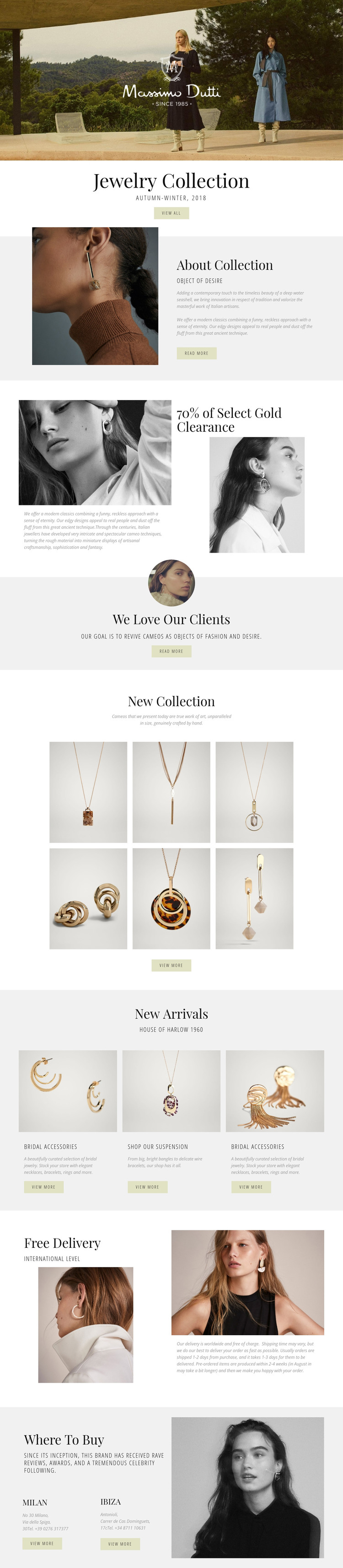
The design separates several kinds of permanent content that can work naturally in a WordPress-managed jewelry site. The Jewelry Collection and About Collection sections provide page-oriented material for explaining a range or its visual story, while the clearance feature supplies a separate promotional context. The six-image New Collection gallery can represent a visual collection area, and the three New Arrivals cards offer a repeatable pattern for product-focused or editorial content without claiming that WordPress posts or product records already exist in the template.
The subject matter also creates useful relationships between content areas. Bridal accessories, bracelets, rings, and necklaces can guide separate collection topics, while the image-led presentation keeps those areas within the same visual direction. Free Delivery adds a service-information role that can sit alongside shopping content, and Where To Buy provides location-focused information for Milan and Ibiza. The hero, centered headings, split sections, and restrained actions give permanent pages a recognizable shared character, while the gallery and cards provide places where content can be expanded or refreshed. This makes the design suitable as a WordPress theme concept for a jewelry retailer that needs both stable collection information and recurring arrival or promotional content. The key value is the mapping between the existing page areas and an organized content environment, not an assumption that specific WordPress structures are already present.
Customize with Nicepage
Open this ready-made template in the WordPress Website Builder and customize it visually in the Nicepage editor. Replace demo content, edit page sections, and adapt the design to your project without rebuilding the template from scratch.
Manage and Edit This Theme in WordPress
Customize and Install the WordPress Theme
Start with this ready-made theme instead of building the WordPress design from scratch. Customize its layout, content, typography, images, sections, and other design elements visually in Nicepage editor, then export and install the WordPress Theme, Plugin, and Pages on your WordPress site. The Nicepage WordPress Plugin lets you continue working with the site after installation.
Edit the Theme Directly in WordPress
After installation, you can edit the WordPress Theme directly in WordPress with the Nicepage WordPress Plugin. Use Site Style to customize site Colors, Fonts, Header, Footer, Blog, and Post Page Templates while working within your WordPress website.
Edit WordPress Pages Visually
Use the Nicepage WordPress Plugin to edit page content directly from the WordPress admin area. Open a WordPress Page with Nicepage and visually change its text, images, sections, and other page elements while continuing to manage the Page through WordPress.
WordPress Content and Theme Integration
Use the customized theme with WordPress Pages, Posts, Blog and Post Templates, menus, widgets, and other CMS-managed content. Shared theme elements such as Colors, Fonts, Header, Footer, Blog, and Post Page Templates can be managed as part of the overall site design, while WordPress provides the CMS environment for managing site content.
This workflow combines a ready-made WordPress Theme with visual customization, direct theme editing in WordPress, and continued content management through the Nicepage WordPress Plugin.





















