Fast Food Menu WordPress Theme


Stable Food Content for a WordPress-Managed Page
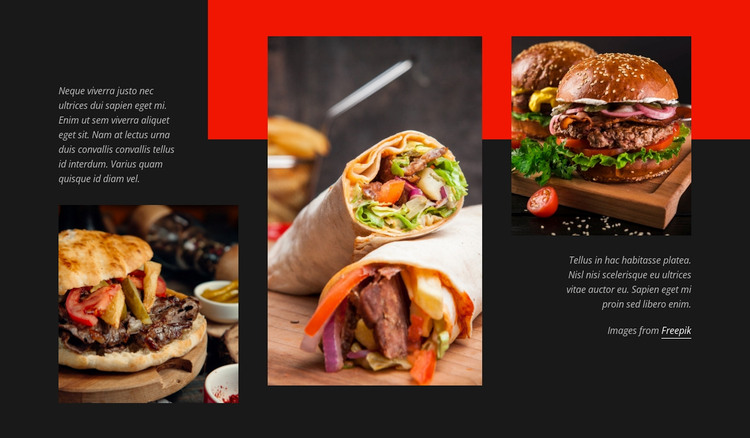
The three photographs give this section a durable page-content role: a burger, a filled wrap, and another burger dish are presented as a coordinated food gallery rather than as time-sensitive entries. Their vertical columns and staggered positions create a repeatable visual pattern, while the supporting paragraphs beside the outer images provide space for descriptive or introductory copy. The image credit label remains a small supporting detail within the same content area.
Within a WordPress-managed project, this block can fit a stable restaurant, menu, or food-presentation page. The dark charcoal background provides a consistent container for the section, and the vivid red horizontal shape can serve as a local accent that relates the gallery to other visual treatments in the project. Because the block is static and has no confirmed form or dynamic content component, its main contribution is the arrangement of publishable text and imagery.
The surrounding WordPress project can manage other pages and content types around this section, while this block preserves its focused gallery role. It is therefore best understood as reusable page content that can sit within a broader theme and page structure. Its value comes from the concrete relationship between food photography, side copy, staggered columns, and contrast—not from assuming that CMS elements already exist inside the block.
Customize with Nicepage
Open this ready-made template in the WordPress Website Builder and customize it visually in the Nicepage editor. Replace demo content, edit page sections, and adapt the design to your project without rebuilding the template from scratch.
Edit Template Offline
2. Create a new page or select existing
3. Click Add new block, search for id 107393 and click enter
Edit Template Online
Create Awesome Websites


Free Nicepage Builder
Keywords
Manage and Edit This Theme in WordPress
Customize and Install the WordPress Theme
Start with this ready-made theme instead of building the WordPress design from scratch. Customize its layout, content, typography, images, sections, and other design elements visually in Nicepage editor, then export and install the WordPress Theme, Plugin, and Pages on your WordPress site. The Nicepage WordPress Plugin lets you continue working with the site after installation.
Edit the Theme Directly in WordPress
After installation, you can edit the WordPress Theme directly in WordPress with the Nicepage WordPress Plugin. Use Site Style to customize site Colors, Fonts, Header, Footer, Blog, and Post Page Templates while working within your WordPress website.
Edit WordPress Pages Visually
Use the Nicepage WordPress Plugin to edit page content directly from the WordPress admin area. Open a WordPress Page with Nicepage and visually change its text, images, sections, and other page elements while continuing to manage the Page through WordPress.
WordPress Content and Theme Integration
Use the customized theme with WordPress Pages, Posts, Blog and Post Templates, menus, widgets, and other CMS-managed content. Shared theme elements such as Colors, Fonts, Header, Footer, Blog, and Post Page Templates can be managed as part of the overall site design, while WordPress provides the CMS environment for managing site content.
This workflow combines a ready-made WordPress Theme with visual customization, direct theme editing in WordPress, and continued content management through the Nicepage WordPress Plugin.