Organic natural food WordPress Theme


Edit Template Offline
2. Create new page and search for id 36877
Edit Template Online
Create Awesome Websites


Free Nicepage Builder
Keywords
Editorial Guidance and Repeated Content Suit a Managed Theme
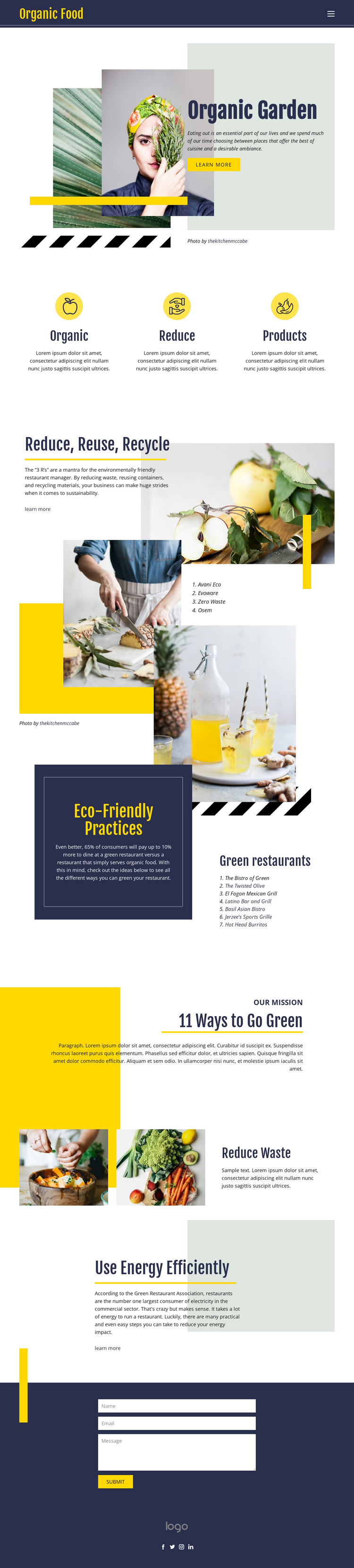
The page-oriented content is divided into clear editorial areas that can remain useful as a WordPress site develops. Organic Garden establishes the main subject through introductory copy and collage imagery, while the Organic, Reduce, and Products feature row provides a concise set of recurring themes. The longer Reduce, Reuse, Recycle section adds explanatory text and a numbered list, giving the design a natural place for practical sustainability content rather than only a promotional headline.
Eco-Friendly Practices and the 11 Ways to Go Green mission section introduce two additional content relationships. One connects environmental responsibility with restaurants through a neighboring list, while the other frames the subject as a broader mission. Reduce Waste and Use Energy Efficiently can serve as focused page content or future editorial topics, although the template analysis does not verify an existing blog, post system, or WordPress-specific structure. The interpretation is therefore based on the design’s content areas, not a claim that posts already exist.
The centered contact form supplies a permanent inquiry area with name, email, and message inputs, while the header navigation and social footer represent shared site elements. In a WordPress project, these page-oriented sections can continue to present a consistent visual system as content is revised or expanded. The result is a theme interpretation grounded in the template’s editorial organization rather than in a generic CMS label.
Customize with Nicepage
Open this ready-made template in the WordPress Website Builder and customize it visually in the Nicepage editor. Replace demo content, edit page sections, and adapt the design to your project without rebuilding the template from scratch.
Manage and Edit This Theme in WordPress
Customize and Install the WordPress Theme
Start with this ready-made theme instead of building the WordPress design from scratch. Customize its layout, content, typography, images, sections, and other design elements visually in Nicepage editor, then export and install the WordPress Theme, Plugin, and Pages on your WordPress site. The Nicepage WordPress Plugin lets you continue working with the site after installation.
Edit the Theme Directly in WordPress
After installation, you can edit the WordPress Theme directly in WordPress with the Nicepage WordPress Plugin. Use Site Style to customize site Colors, Fonts, Header, Footer, Blog, and Post Page Templates while working within your WordPress website.
Edit WordPress Pages Visually
Use the Nicepage WordPress Plugin to edit page content directly from the WordPress admin area. Open a WordPress Page with Nicepage and visually change its text, images, sections, and other page elements while continuing to manage the Page through WordPress.
WordPress Content and Theme Integration
Use the customized theme with WordPress Pages, Posts, Blog and Post Templates, menus, widgets, and other CMS-managed content. Shared theme elements such as Colors, Fonts, Header, Footer, Blog, and Post Page Templates can be managed as part of the overall site design, while WordPress provides the CMS environment for managing site content.
This workflow combines a ready-made WordPress Theme with visual customization, direct theme editing in WordPress, and continued content management through the Nicepage WordPress Plugin.