Healthy and fresh food WordPress Theme


Edit Template Offline
2. Create new page and search for id 61312
Edit Template Online
Create Awesome Websites


Free Nicepage Builder
Keywords
Produce Content and Editorial Sections Create a WordPress-Friendly Page Basis
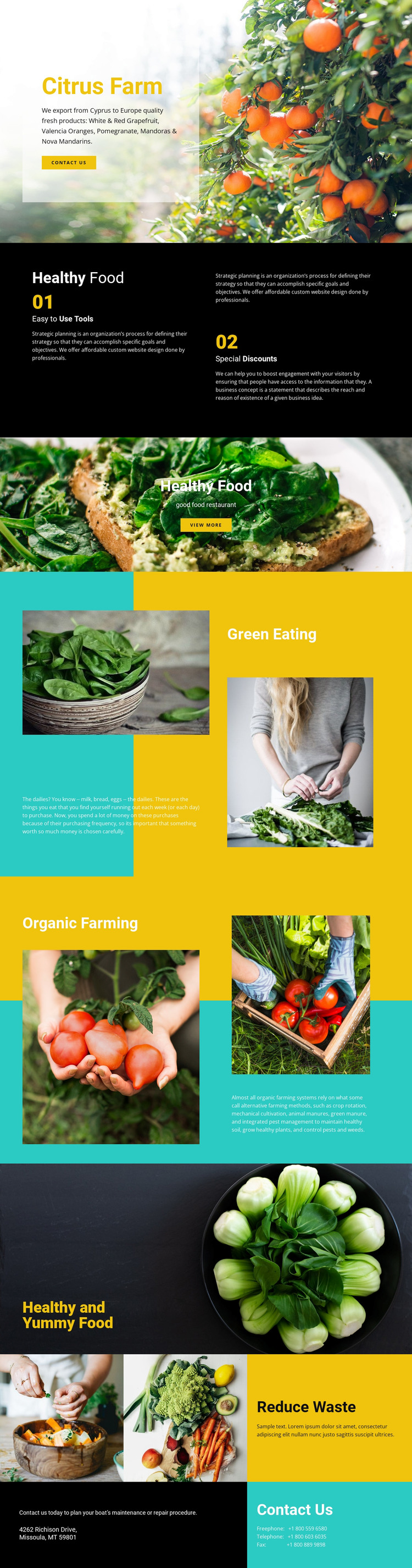
The permanent page content is already divided into areas that can support a WordPress-oriented project. The produce offering gives the design a clear subject through White & Red Grapefruit, Valencia Oranges, Pomegranate, and Mandoras & Nova Mandarins. These named categories can be interpreted alongside the Green Eating and Organic Farming sections, which provide broader explanatory space rather than repeating the same product message. Prepared-food photography adds another visual content layer and keeps the presentation connected to food beyond the farm image alone.
The Reduce Waste feature creates a separate sustainability-oriented area, while the Contact Us block provides a closing page region for an invitation and displayed telephone and address information. Together, these sections distinguish ongoing content themes from shared presentation elements such as the strong yellow and turquoise panels, black contrast area, and large agricultural photographs. In a WordPress-managed site, permanent page content could retain this visual system while additional editorial material is developed around the same subject. This does not claim that posts, categories, or blog structures already exist in the template; it explains how the verified page areas can accommodate page content and future publishing needs. The theme interpretation therefore centers on content continuity: produce information, farming context, sustainability, food imagery, and contact details remain connected within one recognizable design.
Customize with Nicepage
Open this ready-made template in the WordPress Website Builder and customize it visually in the Nicepage editor. Replace demo content, edit page sections, and adapt the design to your project without rebuilding the template from scratch.
Manage and Edit This Theme in WordPress
Customize and Install the WordPress Theme
Start with this ready-made theme instead of building the WordPress design from scratch. Customize its layout, content, typography, images, sections, and other design elements visually in Nicepage editor, then export and install the WordPress Theme, Plugin, and Pages on your WordPress site. The Nicepage WordPress Plugin lets you continue working with the site after installation.
Edit the Theme Directly in WordPress
After installation, you can edit the WordPress Theme directly in WordPress with the Nicepage WordPress Plugin. Use Site Style to customize site Colors, Fonts, Header, Footer, Blog, and Post Page Templates while working within your WordPress website.
Edit WordPress Pages Visually
Use the Nicepage WordPress Plugin to edit page content directly from the WordPress admin area. Open a WordPress Page with Nicepage and visually change its text, images, sections, and other page elements while continuing to manage the Page through WordPress.
WordPress Content and Theme Integration
Use the customized theme with WordPress Pages, Posts, Blog and Post Templates, menus, widgets, and other CMS-managed content. Shared theme elements such as Colors, Fonts, Header, Footer, Blog, and Post Page Templates can be managed as part of the overall site design, while WordPress provides the CMS environment for managing site content.
This workflow combines a ready-made WordPress Theme with visual customization, direct theme editing in WordPress, and continued content management through the Nicepage WordPress Plugin.