Creative taste in plate WordPress Theme


Edit Template Offline
2. Create new page and search for id 161307
Edit Template Online
Create Awesome Websites


Free Nicepage Builder
Keywords
Menu entries and editorial food sections suit managed page content
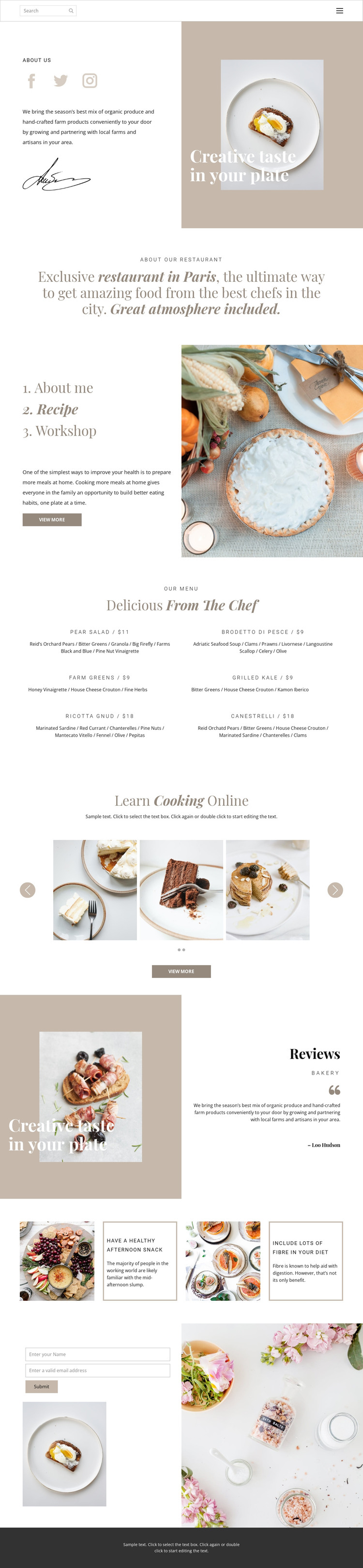
The six-dish menu gives the design a clear page-oriented content area. Each repeated entry contains a dish name, ingredient description, and price, so restaurant information can be understood as structured content rather than as decoration within the hero. The about section and positioning statement provide permanent identity content, supported by food imagery, social links, and the “Creative taste in your plate” slogan.
The page also includes content that can be interpreted through a more editorial WordPress use case. Recipe and Workshop topics introduce cooking education, while the “Learn Cooking Online” section combines supporting text, a two-slide food image carousel, and a view-more action. The two food wellness panels extend that direction with repeated image-and-copy cards. Reviews add attributed testimonial-style material, but the sample wording and name should be treated as demonstration content rather than verified business history.
The name-and-email inquiry form and shared navigation complete the practical page areas. In a WordPress project, these regions can support permanent restaurant pages and additional published material while retaining the same visual direction. This is a content interpretation of the verified design: it does not claim that WordPress Posts, categories, or blog structures already exist in the template.
Customize with Nicepage
Open this ready-made template in the WordPress Website Builder and customize it visually in the Nicepage editor. Replace demo content, edit page sections, and adapt the design to your project without rebuilding the template from scratch.
Manage and Edit This Theme in WordPress
Customize and Install the WordPress Theme
Start with this ready-made theme instead of building the WordPress design from scratch. Customize its layout, content, typography, images, sections, and other design elements visually in Nicepage editor, then export and install the WordPress Theme, Plugin, and Pages on your WordPress site. The Nicepage WordPress Plugin lets you continue working with the site after installation.
Edit the Theme Directly in WordPress
After installation, you can edit the WordPress Theme directly in WordPress with the Nicepage WordPress Plugin. Use Site Style to customize site Colors, Fonts, Header, Footer, Blog, and Post Page Templates while working within your WordPress website.
Edit WordPress Pages Visually
Use the Nicepage WordPress Plugin to edit page content directly from the WordPress admin area. Open a WordPress Page with Nicepage and visually change its text, images, sections, and other page elements while continuing to manage the Page through WordPress.
WordPress Content and Theme Integration
Use the customized theme with WordPress Pages, Posts, Blog and Post Templates, menus, widgets, and other CMS-managed content. Shared theme elements such as Colors, Fonts, Header, Footer, Blog, and Post Page Templates can be managed as part of the overall site design, while WordPress provides the CMS environment for managing site content.
This workflow combines a ready-made WordPress Theme with visual customization, direct theme editing in WordPress, and continued content management through the Nicepage WordPress Plugin.