
Model business card WordPress Theme


Edit Template Offline
2. Create new page and search for id 1393817
Edit Template Online
Create Awesome Websites


Free Nicepage Builder
Keywords
Permanent Profile Content Can Surround Repeating Portfolio Material
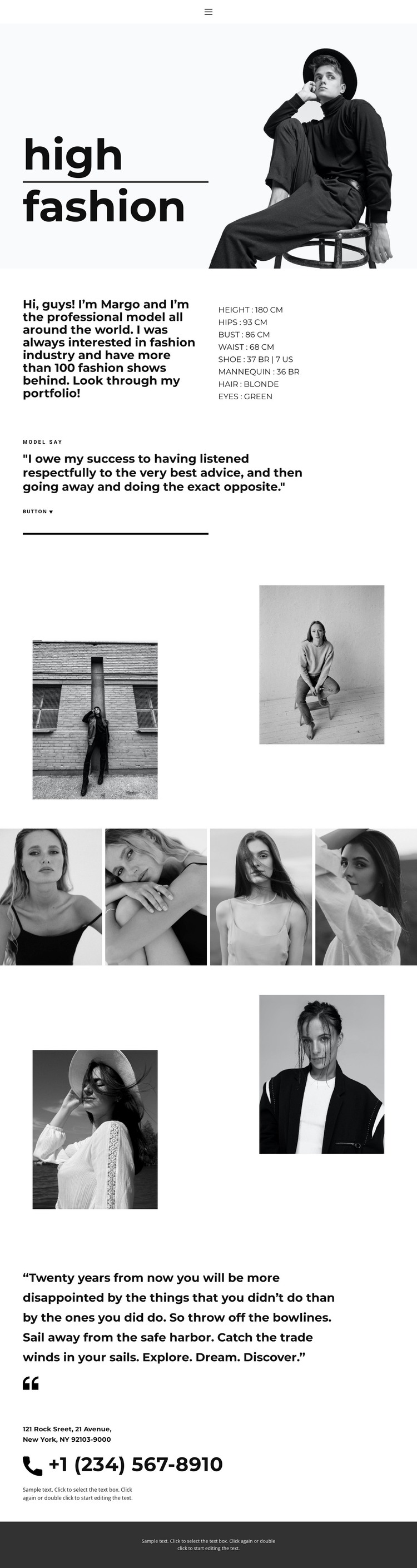
The biography and measurement section gives the design a strong page-oriented content core. A WordPress-managed profile could use the split arrangement to keep narrative information alongside structured details such as height, hips, bust, waist, shoe, mannequin, hair, and eye information. These facts are visible in the template as sample profile content; they should not be treated as verified credentials beyond the page itself.
The visual regions create a different content relationship. The two asymmetric photograph pairs can frame selected portfolio work, while the four-image gallery offers a repeated collection area that could accompany additional project or editorial material in a broader site. The quotation sections provide separate spaces for statements, helping distinguish personal voice from image content. Navigation and the closing phone contact then connect the profile presentation to a possible inquiry path.
This makes the design suitable for a WordPress-oriented content environment where permanent profile information and changing portfolio material need to share one theme direction. The source does not verify WordPress Posts, categories, or blog structures, so those should not be presented as existing elements of the template. If WordPress editing is required, the WordPress Plugin is an optional product bridge for the CMS environment.
Customize with Nicepage
Open this ready-made template in the WordPress Website Builder and customize it visually in the Nicepage editor. Replace demo content, edit page sections, and adapt the design to your project without rebuilding the template from scratch.
Manage and Edit This Theme in WordPress
Customize and Install the WordPress Theme
Start with this ready-made theme instead of building the WordPress design from scratch. Customize its layout, content, typography, images, sections, and other design elements visually in Nicepage editor, then export and install the WordPress Theme, Plugin, and Pages on your WordPress site. The Nicepage WordPress Plugin lets you continue working with the site after installation.
Edit the Theme Directly in WordPress
After installation, you can edit the WordPress Theme directly in WordPress with the Nicepage WordPress Plugin. Use Site Style to customize site Colors, Fonts, Header, Footer, Blog, and Post Page Templates while working within your WordPress website.
Edit WordPress Pages Visually
Use the Nicepage WordPress Plugin to edit page content directly from the WordPress admin area. Open a WordPress Page with Nicepage and visually change its text, images, sections, and other page elements while continuing to manage the Page through WordPress.
WordPress Content and Theme Integration
Use the customized theme with WordPress Pages, Posts, Blog and Post Templates, menus, widgets, and other CMS-managed content. Shared theme elements such as Colors, Fonts, Header, Footer, Blog, and Post Page Templates can be managed as part of the overall site design, while WordPress provides the CMS environment for managing site content.
This workflow combines a ready-made WordPress Theme with visual customization, direct theme editing in WordPress, and continued content management through the Nicepage WordPress Plugin.





















