Dine in Elegant Style WordPress Theme


Permanent Menu Content Anchored by a Dining Image
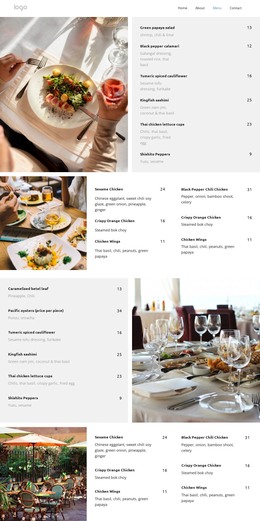
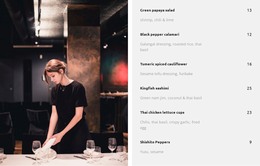
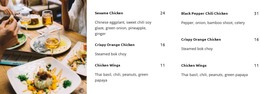
The menu panel reads as stable page-oriented content rather than a time-based stream. It presents six named dishes—Green papaya salad, Black pepper calamari, Turmeric spiced cauliflower, Kingfish sashimi, Thai chicken lettuce cups, and Shishito Peppers—and gives each one an ingredient description and numeric price. That makes the block suitable for a restaurant menu area that visitors can return to as part of a broader WordPress-managed page.
The visual arrangement keeps this content connected to its setting. A dark restaurant photograph fills the left side, while the light gray panel on the right organizes the dish information in a vertical sequence. Bold names establish the menu scan path, muted descriptions provide supporting detail, and right-aligned prices make comparison easier. The static interaction means the six entries remain available together, without requiring visitors to operate a carousel or expand hidden panels.
In a WordPress-oriented project, the section can function as a reusable page-content region while other parts of the site handle reservations, contact information, restaurant background, or regularly updated material. The broader CMS environment can surround the block with its own publishing structure, but the section’s role stays specific: it presents a defined group of menu choices through one image-led, two-column layout. This distinction keeps the visual block useful without treating it as an entire theme.
Customize with Nicepage
Open this ready-made template in the WordPress Website Builder and customize it visually in the Nicepage editor. Replace demo content, edit page sections, and adapt the design to your project without rebuilding the template from scratch.
Edit Template Offline
2. Create a new page or select existing
3. Click Add new block, search for id 6332515 and click enter
Edit Template Online
Create Awesome Websites


Free Nicepage Builder
Keywords
Manage and Edit This Theme in WordPress
Customize and Install the WordPress Theme
Start with this ready-made theme instead of building the WordPress design from scratch. Customize its layout, content, typography, images, sections, and other design elements visually in Nicepage editor, then export and install the WordPress Theme, Plugin, and Pages on your WordPress site. The Nicepage WordPress Plugin lets you continue working with the site after installation.
Edit the Theme Directly in WordPress
After installation, you can edit the WordPress Theme directly in WordPress with the Nicepage WordPress Plugin. Use Site Style to customize site Colors, Fonts, Header, Footer, Blog, and Post Page Templates while working within your WordPress website.
Edit WordPress Pages Visually
Use the Nicepage WordPress Plugin to edit page content directly from the WordPress admin area. Open a WordPress Page with Nicepage and visually change its text, images, sections, and other page elements while continuing to manage the Page through WordPress.
WordPress Content and Theme Integration
Use the customized theme with WordPress Pages, Posts, Blog and Post Templates, menus, widgets, and other CMS-managed content. Shared theme elements such as Colors, Fonts, Header, Footer, Blog, and Post Page Templates can be managed as part of the overall site design, while WordPress provides the CMS environment for managing site content.
This workflow combines a ready-made WordPress Theme with visual customization, direct theme editing in WordPress, and continued content management through the Nicepage WordPress Plugin.