Manage sugar in food WordPress Theme


Edit Template Offline
2. Create new page and search for id 14382
Edit Template Online
Create Awesome Websites


Free Nicepage Builder
Keywords
Recipe Imagery and Repeated Advice Blocks Suit Page-Based Health Content
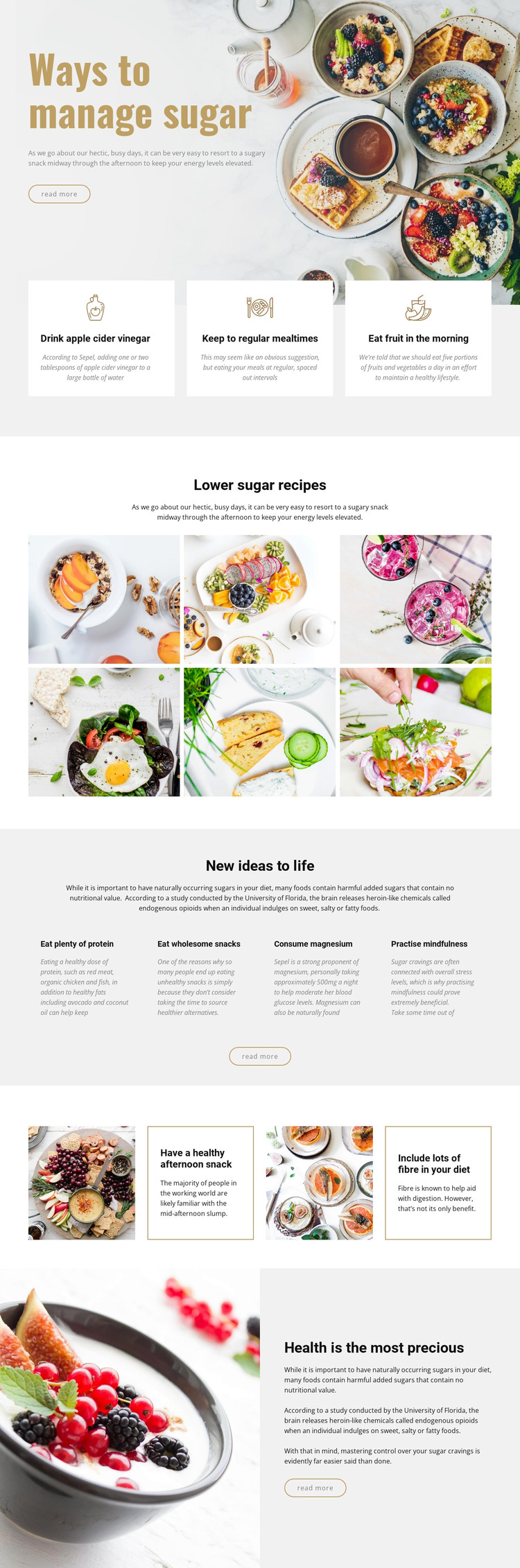
The design separates several kinds of content that can be interpreted naturally within a WordPress-managed site. The opening block and final health panel work as durable page content, framing the subject with a large photograph, explanatory copy, and read-more actions. Between them, the three strategy cards and four lifestyle columns create repeated informational units that could be expanded as the site develops more guidance about meals, snacks, protein, magnesium, mindfulness, or fibre.
The six-image lower-sugar recipe gallery provides a strong visual content area alongside those page-oriented sections. It can be understood with the recipe subject rather than treated as a generic decoration, while the two split panels give specific eating suggestions a separate presentation. This combination leaves room for a site to add regularly updated editorial material around the same visual system without claiming that blog posts or categories already exist in the template. The mustard accents, pale surfaces, bold headings, and compact copy can continue across permanent health pages and additional published content, helping new material remain connected to the original design character. The WordPress interpretation therefore centers on organizing and extending the page’s advice, recipe imagery, and recurring content units, not on replacing the design with a generic CMS workflow.
Customize with Nicepage
Open this ready-made template in the WordPress Website Builder and customize it visually in the Nicepage editor. Replace demo content, edit page sections, and adapt the design to your project without rebuilding the template from scratch.
Manage and Edit This Theme in WordPress
Customize and Install the WordPress Theme
Start with this ready-made theme instead of building the WordPress design from scratch. Customize its layout, content, typography, images, sections, and other design elements visually in Nicepage editor, then export and install the WordPress Theme, Plugin, and Pages on your WordPress site. The Nicepage WordPress Plugin lets you continue working with the site after installation.
Edit the Theme Directly in WordPress
After installation, you can edit the WordPress Theme directly in WordPress with the Nicepage WordPress Plugin. Use Site Style to customize site Colors, Fonts, Header, Footer, Blog, and Post Page Templates while working within your WordPress website.
Edit WordPress Pages Visually
Use the Nicepage WordPress Plugin to edit page content directly from the WordPress admin area. Open a WordPress Page with Nicepage and visually change its text, images, sections, and other page elements while continuing to manage the Page through WordPress.
WordPress Content and Theme Integration
Use the customized theme with WordPress Pages, Posts, Blog and Post Templates, menus, widgets, and other CMS-managed content. Shared theme elements such as Colors, Fonts, Header, Footer, Blog, and Post Page Templates can be managed as part of the overall site design, while WordPress provides the CMS environment for managing site content.
This workflow combines a ready-made WordPress Theme with visual customization, direct theme editing in WordPress, and continued content management through the Nicepage WordPress Plugin.