Find Your Match WordPress Theme


Paired Product Panels for Stable Page Content
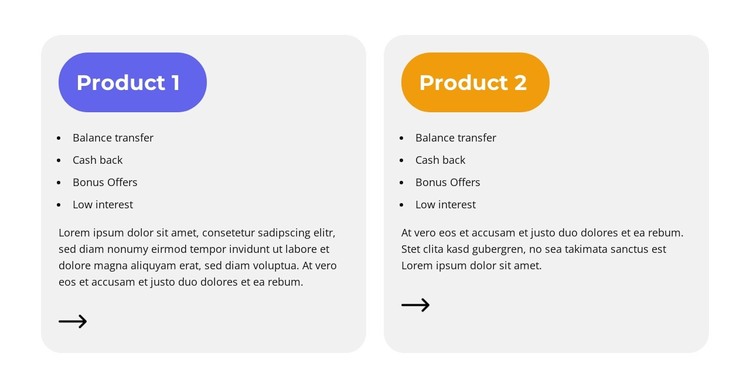
The two equal cards read as a compact area for permanent product or plan information within a WordPress-managed page. Each panel follows the same content sequence: a colored rounded label, four feature points, a descriptive paragraph, and an arrow icon near the lower edge. This repeated pattern makes the options easy to compare while keeping each one visually self-contained. The purple and orange labels provide separate recognition without changing the shared presentation logic.
The four-item lists can carry concise differences between the options, while the paragraphs allow more context beneath the scan-friendly details. The supplied descriptions include placeholder wording, so the final WordPress page content should replace that text with accurate product explanations. The arrow icons can remain visual cues or connect to deeper product information when links are assigned in the surrounding project.
For a WordPress Theme context, the block works as a reusable content region for a stable products or plans area rather than as a publishing structure of its own. It can fit a page that explains available choices while other sections handle introductory information, detailed product content, or contact actions. The matching card hierarchy also makes future content editing more controlled: each option retains the same visual path while its label, list, and paragraph are updated for the intended offering.
Customize with Nicepage
Open this ready-made template in the WordPress Website Builder and customize it visually in the Nicepage editor. Replace demo content, edit page sections, and adapt the design to your project without rebuilding the template from scratch.
Edit Template Offline
2. Create a new page or select existing
3. Click Add new block, search for id 6560654 and click enter
Edit Template Online
Create Awesome Websites


Free Nicepage Builder
Keywords
Manage and Edit This Theme in WordPress
Customize and Install the WordPress Theme
Start with this ready-made theme instead of building the WordPress design from scratch. Customize its layout, content, typography, images, sections, and other design elements visually in Nicepage editor, then export and install the WordPress Theme, Plugin, and Pages on your WordPress site. The Nicepage WordPress Plugin lets you continue working with the site after installation.
Edit the Theme Directly in WordPress
After installation, you can edit the WordPress Theme directly in WordPress with the Nicepage WordPress Plugin. Use Site Style to customize site Colors, Fonts, Header, Footer, Blog, and Post Page Templates while working within your WordPress website.
Edit WordPress Pages Visually
Use the Nicepage WordPress Plugin to edit page content directly from the WordPress admin area. Open a WordPress Page with Nicepage and visually change its text, images, sections, and other page elements while continuing to manage the Page through WordPress.
WordPress Content and Theme Integration
Use the customized theme with WordPress Pages, Posts, Blog and Post Templates, menus, widgets, and other CMS-managed content. Shared theme elements such as Colors, Fonts, Header, Footer, Blog, and Post Page Templates can be managed as part of the overall site design, while WordPress provides the CMS environment for managing site content.
This workflow combines a ready-made WordPress Theme with visual customization, direct theme editing in WordPress, and continued content management through the Nicepage WordPress Plugin.