Fashionable looks WordPress Theme


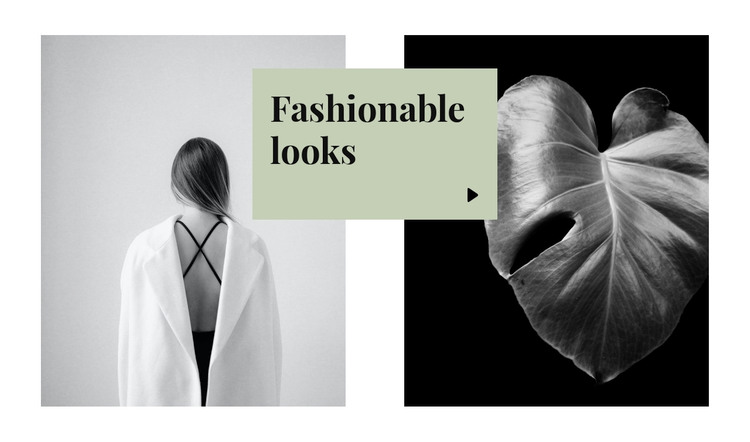
Image-Led Fashion Content for a Managed Page Section
The two monochrome image panels make this block suitable for stable, page-oriented fashion content rather than a changing feed or a complex interactive module. Their equal-height arrangement gives the section a balanced frame, while the pale-green card overlaps the inner edges and brings the main label forward. The visible heading, “Fashionable looks,” is set in a large bold serif style, so the block communicates its topic through both content and typography. A small arrow-like icon adds a restrained visual cue without changing the section’s static behavior.
In a WordPress-managed page, this design can serve as one reusable content area within a wider fashion or beauty presentation. The surrounding project may contain other page sections for descriptions, collections, editorial material, or contact information, while this block remains focused on its paired imagery and central callout. Its value lies in preserving a recognizable visual arrangement as the page content around it develops. The overlap also gives the section a stronger editorial identity than a basic two-column image row, helping a stable page section feel intentional without presenting the block itself as a complete theme or site.
Customize with Nicepage
Open this ready-made template in the WordPress Website Builder and customize it visually in the Nicepage editor. Replace demo content, edit page sections, and adapt the design to your project without rebuilding the template from scratch.
Edit Template Offline
2. Create a new page or select existing
3. Click Add new block, search for id 237924 and click enter
Edit Template Online
Create Awesome Websites


Free Nicepage Builder
Keywords
Manage and Edit This Theme in WordPress
Customize and Install the WordPress Theme
Start with this ready-made theme instead of building the WordPress design from scratch. Customize its layout, content, typography, images, sections, and other design elements visually in Nicepage editor, then export and install the WordPress Theme, Plugin, and Pages on your WordPress site. The Nicepage WordPress Plugin lets you continue working with the site after installation.
Edit the Theme Directly in WordPress
After installation, you can edit the WordPress Theme directly in WordPress with the Nicepage WordPress Plugin. Use Site Style to customize site Colors, Fonts, Header, Footer, Blog, and Post Page Templates while working within your WordPress website.
Edit WordPress Pages Visually
Use the Nicepage WordPress Plugin to edit page content directly from the WordPress admin area. Open a WordPress Page with Nicepage and visually change its text, images, sections, and other page elements while continuing to manage the Page through WordPress.
WordPress Content and Theme Integration
Use the customized theme with WordPress Pages, Posts, Blog and Post Templates, menus, widgets, and other CMS-managed content. Shared theme elements such as Colors, Fonts, Header, Footer, Blog, and Post Page Templates can be managed as part of the overall site design, while WordPress provides the CMS environment for managing site content.
This workflow combines a ready-made WordPress Theme with visual customization, direct theme editing in WordPress, and continued content management through the Nicepage WordPress Plugin.