The best professional stylists WordPress Theme



Portrait imagery gives permanent page content a clear subject
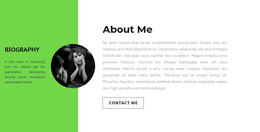
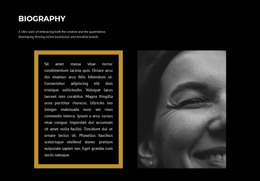
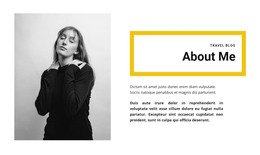
The left-side portrait establishes a human point of focus, while the right-side biography turns that visual introduction into stable page content. The orange “About the stylist” heading overlaps the lower-right area of the image, so the title feels attached to the person being introduced rather than separated from the profile text. Bold dark lettering and generous spacing make the biography easy to scan as a dedicated about area within a longer page.
For a WordPress-managed page, the section can hold a lasting introduction to a stylist or photographer while other content is maintained around it. Its biography identifies Vincent as an experienced all-round photographer, notes a move to Stirling at the end of 2017, and mentions photography and marketing degrees. These details give the content a profile-oriented role without requiring the block to carry services, portfolio entries, or contact actions itself.
The split portrait-and-text structure also creates a consistent visual pattern for permanent page content: the image supplies recognition, and the paragraph supplies context. A broader WordPress project can place related work, services, or contact information in neighboring sections, leaving this block to perform one focused introductory task. Its static layout keeps the content relationship stable while the surrounding page provides the wider publishing context.
Customize with Nicepage
Open this ready-made template in the WordPress Website Builder and customize it visually in the Nicepage editor. Replace demo content, edit page sections, and adapt the design to your project without rebuilding the template from scratch.
Edit Template Offline
2. Create a new page or select existing
3. Click Add new block, search for id 227009 and click enter
Edit Template Online
Create Awesome Websites


Free Nicepage Builder
Keywords
Manage and Edit This Theme in WordPress
Customize and Install the WordPress Theme
Start with this ready-made theme instead of building the WordPress design from scratch. Customize its layout, content, typography, images, sections, and other design elements visually in Nicepage editor, then export and install the WordPress Theme, Plugin, and Pages on your WordPress site. The Nicepage WordPress Plugin lets you continue working with the site after installation.
Edit the Theme Directly in WordPress
After installation, you can edit the WordPress Theme directly in WordPress with the Nicepage WordPress Plugin. Use Site Style to customize site Colors, Fonts, Header, Footer, Blog, and Post Page Templates while working within your WordPress website.
Edit WordPress Pages Visually
Use the Nicepage WordPress Plugin to edit page content directly from the WordPress admin area. Open a WordPress Page with Nicepage and visually change its text, images, sections, and other page elements while continuing to manage the Page through WordPress.
WordPress Content and Theme Integration
Use the customized theme with WordPress Pages, Posts, Blog and Post Templates, menus, widgets, and other CMS-managed content. Shared theme elements such as Colors, Fonts, Header, Footer, Blog, and Post Page Templates can be managed as part of the overall site design, while WordPress provides the CMS environment for managing site content.
This workflow combines a ready-made WordPress Theme with visual customization, direct theme editing in WordPress, and continued content management through the Nicepage WordPress Plugin.