
Fashion for Woman WordPress Theme


Edit Template Offline
2. Create new page and search for id 16997
Edit Template Online
Create Awesome Websites


Free Nicepage Builder
Keywords
Category Pages and Featured Items Fit a WordPress Content Structure
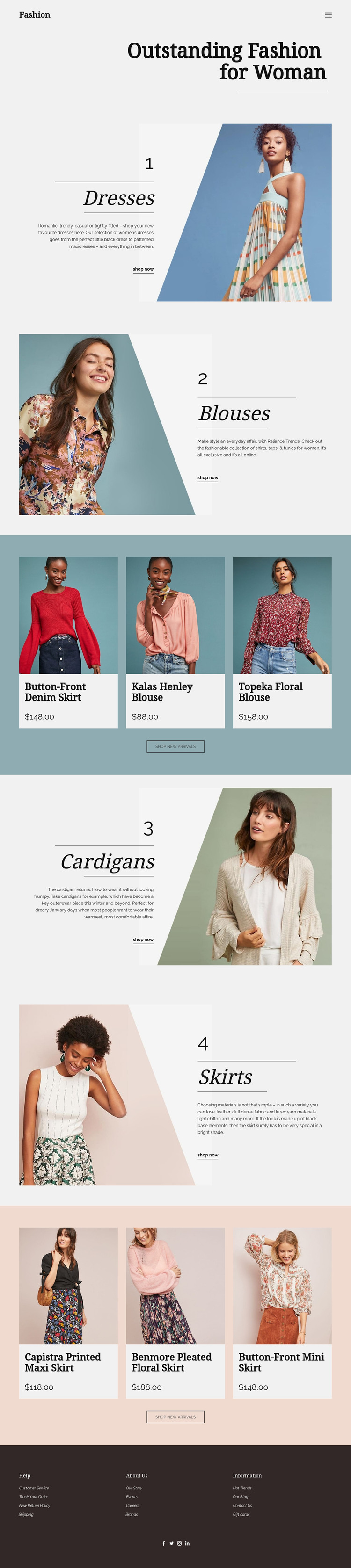
The page divides its fashion content into clear page-oriented areas. Dresses, Blouses, Cardigans, and Skirts each have a dedicated promotional panel with an image, numbered label, editorial text, and shopping link. That separation provides a useful basis for permanent category content in a WordPress-managed project, while keeping the four areas visibly connected through the same typography, spacing, and accent treatment.
The two product bands offer a different content relationship. Each contains three featured product cards and a centered shop-new-arrivals button, so they can be understood as curated highlights placed alongside the broader category presentation. If the project later adds regularly updated fashion content, announcements, or additional product-related material, those areas could be interpreted around WordPress-managed content without claiming that posts, categories, or store integrations already exist in this template.
The header and footer provide shared site elements around the page content. The compact navigation establishes movement between content areas, while the footer groups Help, About Us, Information, and social links for recurring site support. A WordPress implementation can therefore preserve the design’s page-level category logic and editorial retail character while managing the content through the CMS. The important connection is between permanent fashion sections, repeated featured-item areas, and shared navigation—not simply the substitution of a CMS name.
Customize with Nicepage
Open this ready-made template in the WordPress Website Builder and customize it visually in the Nicepage editor. Replace demo content, edit page sections, and adapt the design to your project without rebuilding the template from scratch.
Manage and Edit This Theme in WordPress
Customize and Install the WordPress Theme
Start with this ready-made theme instead of building the WordPress design from scratch. Customize its layout, content, typography, images, sections, and other design elements visually in Nicepage editor, then export and install the WordPress Theme, Plugin, and Pages on your WordPress site. The Nicepage WordPress Plugin lets you continue working with the site after installation.
Edit the Theme Directly in WordPress
After installation, you can edit the WordPress Theme directly in WordPress with the Nicepage WordPress Plugin. Use Site Style to customize site Colors, Fonts, Header, Footer, Blog, and Post Page Templates while working within your WordPress website.
Edit WordPress Pages Visually
Use the Nicepage WordPress Plugin to edit page content directly from the WordPress admin area. Open a WordPress Page with Nicepage and visually change its text, images, sections, and other page elements while continuing to manage the Page through WordPress.
WordPress Content and Theme Integration
Use the customized theme with WordPress Pages, Posts, Blog and Post Templates, menus, widgets, and other CMS-managed content. Shared theme elements such as Colors, Fonts, Header, Footer, Blog, and Post Page Templates can be managed as part of the overall site design, while WordPress provides the CMS environment for managing site content.
This workflow combines a ready-made WordPress Theme with visual customization, direct theme editing in WordPress, and continued content management through the Nicepage WordPress Plugin.





















