More on social media WordPress Theme


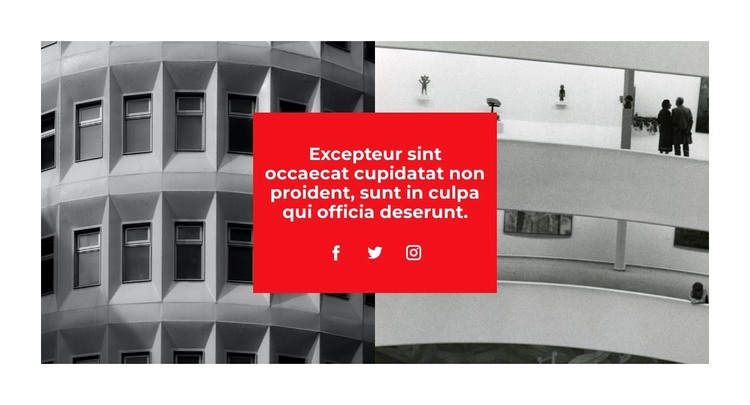
A Centered Social Statement for WordPress Page Content
The block reads as stable page content because its message, imagery, and social destinations are contained in one deliberate visual unit. Two monochrome architectural photographs sit side by side, creating a wide background with consistent geometric texture. Across their meeting point, the red rectangular panel establishes a central reading area. The single white heading carries the statement, while the Facebook, Twitter, and Instagram links extend that message toward social destinations without adding another content column.
For a WordPress-managed page, this arrangement can function as a reusable thematic section alongside other permanent content. It is particularly suited to a page that needs an architectural visual cue and a concise social connection point, while other blocks handle detailed descriptions, galleries, contact information, or navigation. The section remains focused because the social links are grouped with the heading instead of competing with the two large images.
The strong contrast also gives the content a recognizable page-level marker. Monochrome photography recedes into the background, the red panel draws attention to the central statement, and generous white margins prevent the composition from feeling crowded. This makes the block useful as a visual pause or introduction within a broader WordPress page. Its role is to provide one cohesive publishable content area, not to represent the complete theme or site around it.
Customize with Nicepage
Open this ready-made template in the WordPress Website Builder and customize it visually in the Nicepage editor. Replace demo content, edit page sections, and adapt the design to your project without rebuilding the template from scratch.
Edit Template Offline
2. Create a new page or select existing
3. Click Add new block, search for id 2067943 and click enter
Edit Template Online
Create Awesome Websites


Free Nicepage Builder
Keywords
Manage and Edit This Theme in WordPress
Customize and Install the WordPress Theme
Start with this ready-made theme instead of building the WordPress design from scratch. Customize its layout, content, typography, images, sections, and other design elements visually in Nicepage editor, then export and install the WordPress Theme, Plugin, and Pages on your WordPress site. The Nicepage WordPress Plugin lets you continue working with the site after installation.
Edit the Theme Directly in WordPress
After installation, you can edit the WordPress Theme directly in WordPress with the Nicepage WordPress Plugin. Use Site Style to customize site Colors, Fonts, Header, Footer, Blog, and Post Page Templates while working within your WordPress website.
Edit WordPress Pages Visually
Use the Nicepage WordPress Plugin to edit page content directly from the WordPress admin area. Open a WordPress Page with Nicepage and visually change its text, images, sections, and other page elements while continuing to manage the Page through WordPress.
WordPress Content and Theme Integration
Use the customized theme with WordPress Pages, Posts, Blog and Post Templates, menus, widgets, and other CMS-managed content. Shared theme elements such as Colors, Fonts, Header, Footer, Blog, and Post Page Templates can be managed as part of the overall site design, while WordPress provides the CMS environment for managing site content.
This workflow combines a ready-made WordPress Theme with visual customization, direct theme editing in WordPress, and continued content management through the Nicepage WordPress Plugin.