Architecture ideal studio WordPress Theme


Edit Template Offline
2. Create new page and search for id 124018
Edit Template Online
Create Awesome Websites


Free Nicepage Builder
Keywords
Visual Work and Repeated Updates Support Page-Based WordPress Content
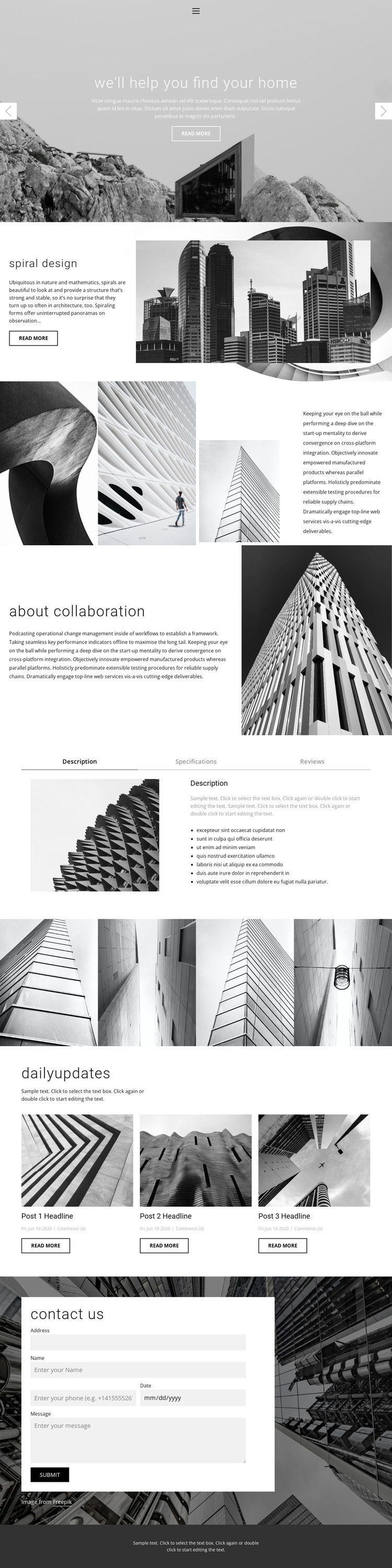
The Spiral design and About collaboration sections provide two distinct page-oriented content areas. Each combines explanatory text with an architectural image, allowing a WordPress project to separate a featured concept from collaboration information while keeping both inside the same visual system. The four-image gallery adds a concentrated presentation area for architectural work, giving the design a clear visual subject beyond the opening carousel.
The three repeated update cards are especially useful as a relationship between permanent presentation and changing content. Their sample headlines, dates, comment counts, and body text are structural evidence only, but the repeated card arrangement demonstrates a place where project updates or other publishable material could appear after replacement with verified content. The Description, Specifications, and Reviews tabs offer a separate compact information pattern, keeping related details together instead of requiring every item to become a visible standalone section.
The contact form remains a page-level inquiry area, while the navigation and footer provide shared framing around the content. A WordPress Plugin can support editing page content in a WordPress environment, but the template analysis does not prove that WordPress Posts, categories, or blog content already exist. The stronger interpretation comes from the confirmed structure: permanent concept and collaboration sections, repeated visual work, recurring update cards, organized tabs, and contact access. Those relationships let the design accommodate both stable page content and future editorial additions without reducing the theme to a CMS name swap.
Customize with Nicepage
Open this ready-made template in the WordPress Website Builder and customize it visually in the Nicepage editor. Replace demo content, edit page sections, and adapt the design to your project without rebuilding the template from scratch.
Manage and Edit This Theme in WordPress
Customize and Install the WordPress Theme
Start with this ready-made theme instead of building the WordPress design from scratch. Customize its layout, content, typography, images, sections, and other design elements visually in Nicepage editor, then export and install the WordPress Theme, Plugin, and Pages on your WordPress site. The Nicepage WordPress Plugin lets you continue working with the site after installation.
Edit the Theme Directly in WordPress
After installation, you can edit the WordPress Theme directly in WordPress with the Nicepage WordPress Plugin. Use Site Style to customize site Colors, Fonts, Header, Footer, Blog, and Post Page Templates while working within your WordPress website.
Edit WordPress Pages Visually
Use the Nicepage WordPress Plugin to edit page content directly from the WordPress admin area. Open a WordPress Page with Nicepage and visually change its text, images, sections, and other page elements while continuing to manage the Page through WordPress.
WordPress Content and Theme Integration
Use the customized theme with WordPress Pages, Posts, Blog and Post Templates, menus, widgets, and other CMS-managed content. Shared theme elements such as Colors, Fonts, Header, Footer, Blog, and Post Page Templates can be managed as part of the overall site design, while WordPress provides the CMS environment for managing site content.
This workflow combines a ready-made WordPress Theme with visual customization, direct theme editing in WordPress, and continued content management through the Nicepage WordPress Plugin.