We creates sustainable buildings WordPress Theme


Edit Template Offline
2. Create new page and search for id 142463
Edit Template Online
Create Awesome Websites


Free Nicepage Builder
Keywords
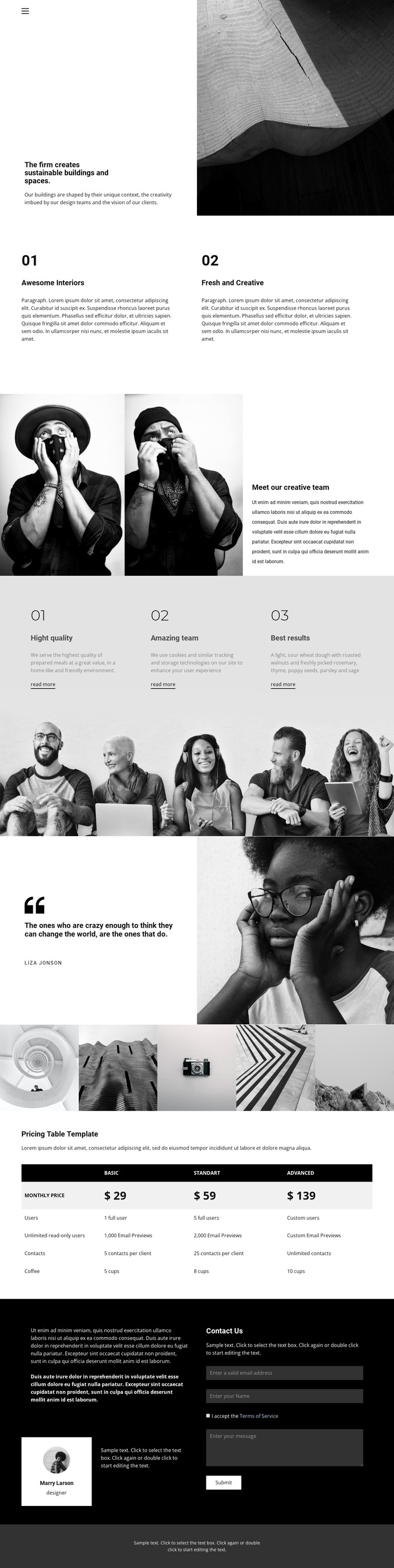
Team portraits and project imagery give permanent content a visual framework
The opening statement and architectural image provide a natural page-oriented introduction for a WordPress-managed site, while the two numbered capability cards create concise permanent content about interiors and creative work. The creative team section then adds two portraits beside explanatory copy, giving people-focused information a defined place rather than mixing it into the opening message. These areas can remain part of the theme's visual framework while their text and images are adapted to the actual architecture practice.
The five-image project gallery supplies a distinct visual content area, and the three repeated quality panels offer another pattern for presenting service-related information. The attributed quotation and testimonial material add social context, but they are treated as displayed content rather than verified client claims. At the bottom, the plan comparison table organizes three named options and feature rows before the dark contact area places an inquiry form beside testimonial content. This combination gives a WordPress project clear page content to maintain and expand without claiming that blog posts or other CMS records already exist. Demo prices, names, and sample copy should be replaced with real information while the underlying hierarchy of introduction, capabilities, people, projects, comparison, and contact remains useful.
Customize with Nicepage
Open this ready-made template in the WordPress Website Builder and customize it visually in the Nicepage editor. Replace demo content, edit page sections, and adapt the design to your project without rebuilding the template from scratch.
Manage and Edit This Theme in WordPress
Customize and Install the WordPress Theme
Start with this ready-made theme instead of building the WordPress design from scratch. Customize its layout, content, typography, images, sections, and other design elements visually in Nicepage editor, then export and install the WordPress Theme, Plugin, and Pages on your WordPress site. The Nicepage WordPress Plugin lets you continue working with the site after installation.
Edit the Theme Directly in WordPress
After installation, you can edit the WordPress Theme directly in WordPress with the Nicepage WordPress Plugin. Use Site Style to customize site Colors, Fonts, Header, Footer, Blog, and Post Page Templates while working within your WordPress website.
Edit WordPress Pages Visually
Use the Nicepage WordPress Plugin to edit page content directly from the WordPress admin area. Open a WordPress Page with Nicepage and visually change its text, images, sections, and other page elements while continuing to manage the Page through WordPress.
WordPress Content and Theme Integration
Use the customized theme with WordPress Pages, Posts, Blog and Post Templates, menus, widgets, and other CMS-managed content. Shared theme elements such as Colors, Fonts, Header, Footer, Blog, and Post Page Templates can be managed as part of the overall site design, while WordPress provides the CMS environment for managing site content.
This workflow combines a ready-made WordPress Theme with visual customization, direct theme editing in WordPress, and continued content management through the Nicepage WordPress Plugin.