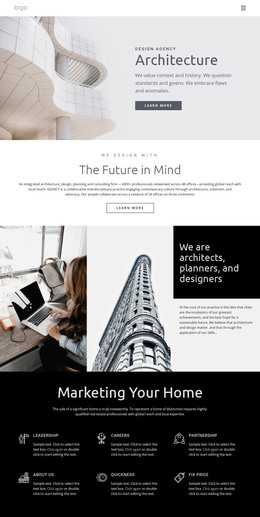
Urban architecture WordPress Theme



Edit Template Offline
2. Create new page and search for id 1174968
Edit Template Online
Create Awesome Websites


Free Nicepage Builder
Keywords
Service categories and equipment content create clear WordPress page areas
The Business Architecture introduction gives the page a stable subject area, while the experience section supplies more specific content about construction production equipment and consulting. Its listed capabilities include component production equipment, wall panel framing and sheathing equipment, linear saws, material handling systems, waste reduction equipment, and plant layout expertise. These details can be treated as structured page content in a WordPress project, with the visual layout keeping related information together rather than presenting one undifferentiated block.
The six service categories provide a different editorial grouping: Marketing, Research, Prototyping, Consulting, Support 24/7, and Development. Their repeated cards create a useful content pattern for presenting related offerings while preserving the page’s visual direction. The gallery statement and architectural collage add a project-oriented area, and the interior-design section contributes a more focused subject through Elements and Principles of Interior Design and Proportion and Scale. This combination leaves room for permanent explanatory content without claiming that blog posts or other dynamic structures already exist.
Navigation, social links, and the contact region connect these content areas into a recognizable site experience. The three contact cards provide address, phone, and email channels, although the displayed values are sample content and should be replaced. A WordPress theme interpretation is therefore grounded in how the page separates capabilities, services, visual material, and contact information for ongoing content management—not simply in changing the CMS name.
Customize with Nicepage
Open this ready-made template in the WordPress Website Builder and customize it visually in the Nicepage editor. Replace demo content, edit page sections, and adapt the design to your project without rebuilding the template from scratch.
Manage and Edit This Theme in WordPress
Customize and Install the WordPress Theme
Start with this ready-made theme instead of building the WordPress design from scratch. Customize its layout, content, typography, images, sections, and other design elements visually in Nicepage editor, then export and install the WordPress Theme, Plugin, and Pages on your WordPress site. The Nicepage WordPress Plugin lets you continue working with the site after installation.
Edit the Theme Directly in WordPress
After installation, you can edit the WordPress Theme directly in WordPress with the Nicepage WordPress Plugin. Use Site Style to customize site Colors, Fonts, Header, Footer, Blog, and Post Page Templates while working within your WordPress website.
Edit WordPress Pages Visually
Use the Nicepage WordPress Plugin to edit page content directly from the WordPress admin area. Open a WordPress Page with Nicepage and visually change its text, images, sections, and other page elements while continuing to manage the Page through WordPress.
WordPress Content and Theme Integration
Use the customized theme with WordPress Pages, Posts, Blog and Post Templates, menus, widgets, and other CMS-managed content. Shared theme elements such as Colors, Fonts, Header, Footer, Blog, and Post Page Templates can be managed as part of the overall site design, while WordPress provides the CMS environment for managing site content.
This workflow combines a ready-made WordPress Theme with visual customization, direct theme editing in WordPress, and continued content management through the Nicepage WordPress Plugin.