Hiking path faq WordPress Theme


Counter-Based Page Content With a Strong Image Anchor
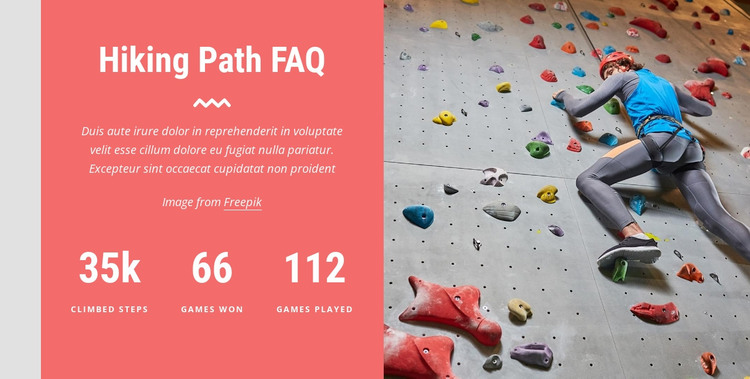
The left panel reads as stable page content because its heading, explanatory paragraph, and three labeled counters are grouped into one concise information unit. The labels for climbed steps, games won, and games played provide the section’s content categories, while the visible figures of 35k, 66, and 112 are sample values that can be adapted to the project. The Freepik image credit remains part of the panel, keeping attribution associated with the section’s visual material.
Within a WordPress-managed page, this arrangement can work as a reusable statistics area for hiking, climbing, or wider sports content. It does not need to carry the whole page narrative: an earlier section can introduce the activity, while this block summarizes selected figures and a later section can provide galleries, details, or contact information. The three counters create a quick reading rhythm, and the bold white type helps the figures remain distinct from the supporting paragraph.
The right-side climbing photograph acts as the visual anchor for the page section. Its indoor wall and multicolored holds reinforce the activity theme without adding another text-heavy region, while the coral panel supplies a consistent field for the counters. This makes the block suitable for permanent or reusable page content whose visual treatment can remain consistent as the surrounding WordPress project develops.
Customize with Nicepage
Open this ready-made template in the WordPress Website Builder and customize it visually in the Nicepage editor. Replace demo content, edit page sections, and adapt the design to your project without rebuilding the template from scratch.
Edit Template Offline
2. Create a new page or select existing
3. Click Add new block, search for id 985397 and click enter
Edit Template Online
Create Awesome Websites


Free Nicepage Builder
Keywords
Manage and Edit This Theme in WordPress
Customize and Install the WordPress Theme
Start with this ready-made theme instead of building the WordPress design from scratch. Customize its layout, content, typography, images, sections, and other design elements visually in Nicepage editor, then export and install the WordPress Theme, Plugin, and Pages on your WordPress site. The Nicepage WordPress Plugin lets you continue working with the site after installation.
Edit the Theme Directly in WordPress
After installation, you can edit the WordPress Theme directly in WordPress with the Nicepage WordPress Plugin. Use Site Style to customize site Colors, Fonts, Header, Footer, Blog, and Post Page Templates while working within your WordPress website.
Edit WordPress Pages Visually
Use the Nicepage WordPress Plugin to edit page content directly from the WordPress admin area. Open a WordPress Page with Nicepage and visually change its text, images, sections, and other page elements while continuing to manage the Page through WordPress.
WordPress Content and Theme Integration
Use the customized theme with WordPress Pages, Posts, Blog and Post Templates, menus, widgets, and other CMS-managed content. Shared theme elements such as Colors, Fonts, Header, Footer, Blog, and Post Page Templates can be managed as part of the overall site design, while WordPress provides the CMS environment for managing site content.
This workflow combines a ready-made WordPress Theme with visual customization, direct theme editing in WordPress, and continued content management through the Nicepage WordPress Plugin.