Boost your power with sports WordPress Theme


Edit Template Offline
2. Create new page and search for id 18199
Edit Template Online
Create Awesome Websites


Free Nicepage Builder
Keywords
Training Pages and Product Content Share One Fitness Theme
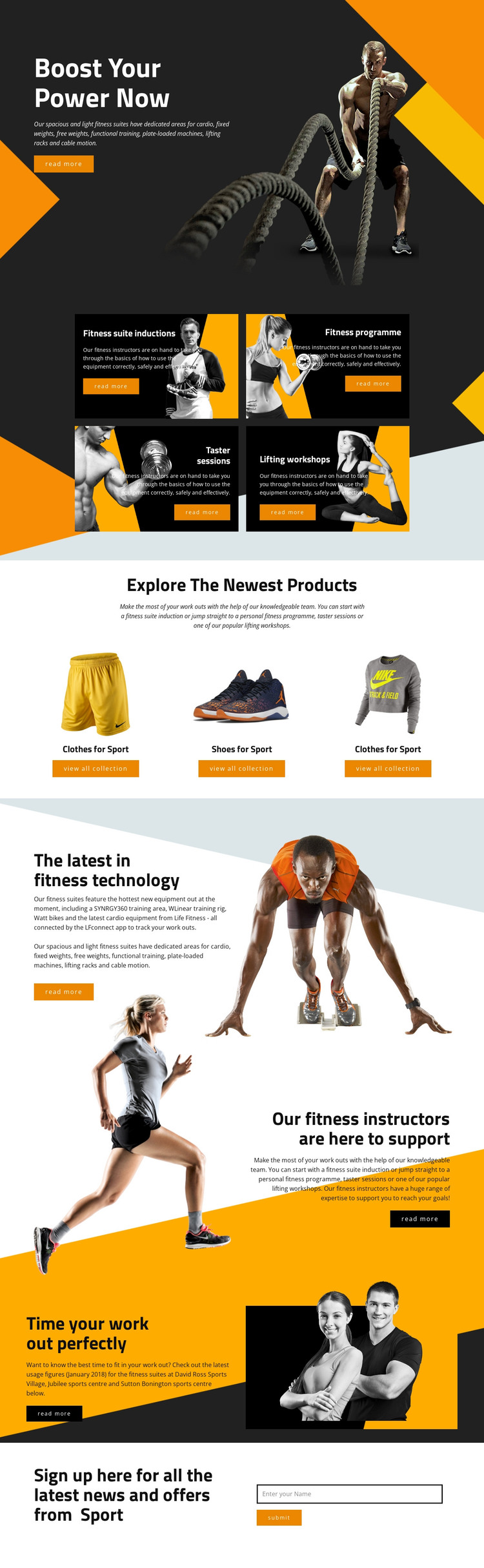
The four training cards provide a natural page-oriented content group for a fitness project. Each card names a distinct offering—suite inductions, a fitness programme, taster sessions, or lifting workshops—while the repeated layout keeps these related subjects visually consistent. The three product panels create a second content relationship, allowing sports clothing and footwear to be presented as category-led material beside, but not confused with, the training offer.
The page also contains publishable informational themes around connected fitness technology, instructor support, and facility usage timing. Equipment references such as Watt bikes, SYNRGY360, the WLinear training rig, and the LFconnect app give those subjects concrete editorial context. The references to three sports centres can likewise support location-focused content planning, without claiming that WordPress location pages or posts already exist in the template.
The final subscription area gives permanent page content a recurring updates function through its news-and-offers heading, name field, and submit action. In a WordPress-managed project, these service, product, support, and facility areas can remain within one visual system as content develops. The theme’s value comes from mapping distinct fitness subjects to reusable page content, rather than from merely adding a CMS label to the existing layout.
Customize with Nicepage
Open this ready-made template in the WordPress Website Builder and customize it visually in the Nicepage editor. Replace demo content, edit page sections, and adapt the design to your project without rebuilding the template from scratch.
Manage and Edit This Theme in WordPress
Customize and Install the WordPress Theme
Start with this ready-made theme instead of building the WordPress design from scratch. Customize its layout, content, typography, images, sections, and other design elements visually in Nicepage editor, then export and install the WordPress Theme, Plugin, and Pages on your WordPress site. The Nicepage WordPress Plugin lets you continue working with the site after installation.
Edit the Theme Directly in WordPress
After installation, you can edit the WordPress Theme directly in WordPress with the Nicepage WordPress Plugin. Use Site Style to customize site Colors, Fonts, Header, Footer, Blog, and Post Page Templates while working within your WordPress website.
Edit WordPress Pages Visually
Use the Nicepage WordPress Plugin to edit page content directly from the WordPress admin area. Open a WordPress Page with Nicepage and visually change its text, images, sections, and other page elements while continuing to manage the Page through WordPress.
WordPress Content and Theme Integration
Use the customized theme with WordPress Pages, Posts, Blog and Post Templates, menus, widgets, and other CMS-managed content. Shared theme elements such as Colors, Fonts, Header, Footer, Blog, and Post Page Templates can be managed as part of the overall site design, while WordPress provides the CMS environment for managing site content.
This workflow combines a ready-made WordPress Theme with visual customization, direct theme editing in WordPress, and continued content management through the Nicepage WordPress Plugin.