Sport athletic club WordPress Theme


Edit Template Offline
2. Create new page and search for id 120232
Edit Template Online
Create Awesome Websites


Free Nicepage Builder
Keywords
Page content moves from club introduction to membership and contact
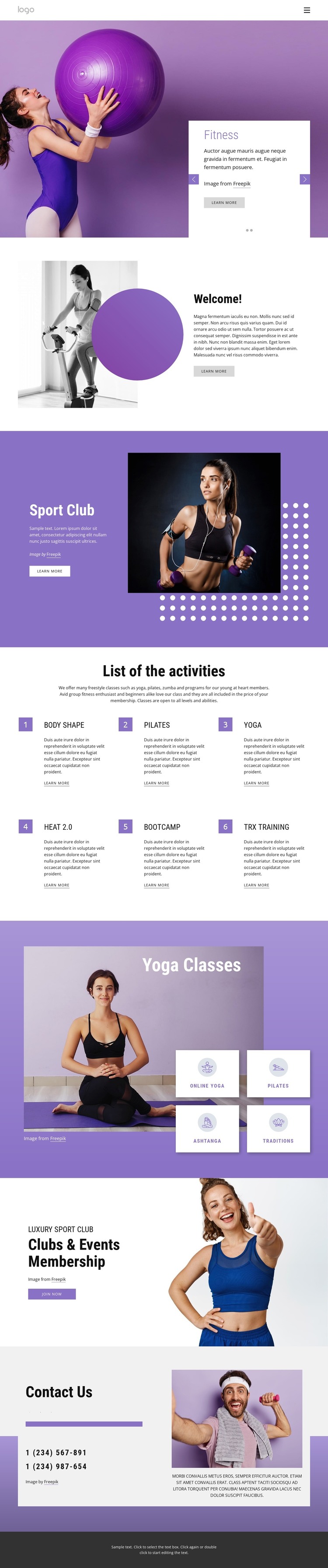
The page separates its permanent informational content into recognizable areas that can be interpreted within a WordPress-managed site. The Fitness and Gym slider provides the opening presentation, while the Welcome and Sport Club sections give the club a broader introduction through image-and-text relationships. This page-oriented content can establish the central identity before visitors reach more specific program information.
The repeated activity list is particularly useful as a content grouping. Body Shape, Pilates, Yoga, Heat 2.0, Bootcamp, and TRX training appear as six named entries, creating a clear overview of the available activities. The four yoga category tiles—Online Yoga, Pilates, Ashtanga, and Traditions—add another grouping for more focused class content. Together, the two areas provide different levels of information without presenting sample descriptions as verified service details.
The membership section gives the design a direct participation context through its Clubs & Events Membership heading, lifestyle image, and Join now action. At the end, Contact Us combines social icons for Facebook, Twitter, and Instagram with two displayed phone numbers, supporting text, and an image. Those page areas can remain visually connected while a WordPress project develops additional content around the club’s activities or announcements. The core value is therefore the mapping between the existing design’s content regions and an environment where ongoing page content can continue within the same visual direction.
Customize with Nicepage
Open this ready-made template in the WordPress Website Builder and customize it visually in the Nicepage editor. Replace demo content, edit page sections, and adapt the design to your project without rebuilding the template from scratch.
Manage and Edit This Theme in WordPress
Customize and Install the WordPress Theme
Start with this ready-made theme instead of building the WordPress design from scratch. Customize its layout, content, typography, images, sections, and other design elements visually in Nicepage editor, then export and install the WordPress Theme, Plugin, and Pages on your WordPress site. The Nicepage WordPress Plugin lets you continue working with the site after installation.
Edit the Theme Directly in WordPress
After installation, you can edit the WordPress Theme directly in WordPress with the Nicepage WordPress Plugin. Use Site Style to customize site Colors, Fonts, Header, Footer, Blog, and Post Page Templates while working within your WordPress website.
Edit WordPress Pages Visually
Use the Nicepage WordPress Plugin to edit page content directly from the WordPress admin area. Open a WordPress Page with Nicepage and visually change its text, images, sections, and other page elements while continuing to manage the Page through WordPress.
WordPress Content and Theme Integration
Use the customized theme with WordPress Pages, Posts, Blog and Post Templates, menus, widgets, and other CMS-managed content. Shared theme elements such as Colors, Fonts, Header, Footer, Blog, and Post Page Templates can be managed as part of the overall site design, while WordPress provides the CMS environment for managing site content.
This workflow combines a ready-made WordPress Theme with visual customization, direct theme editing in WordPress, and continued content management through the Nicepage WordPress Plugin.