Crossfit classes for all levels WordPress Theme


Edit Template Offline
2. Create new page and search for id 4373869
Edit Template Online
Create Awesome Websites


Free Nicepage Builder
Keywords
Recurring Class Content Fits a WordPress-Oriented Site Structure
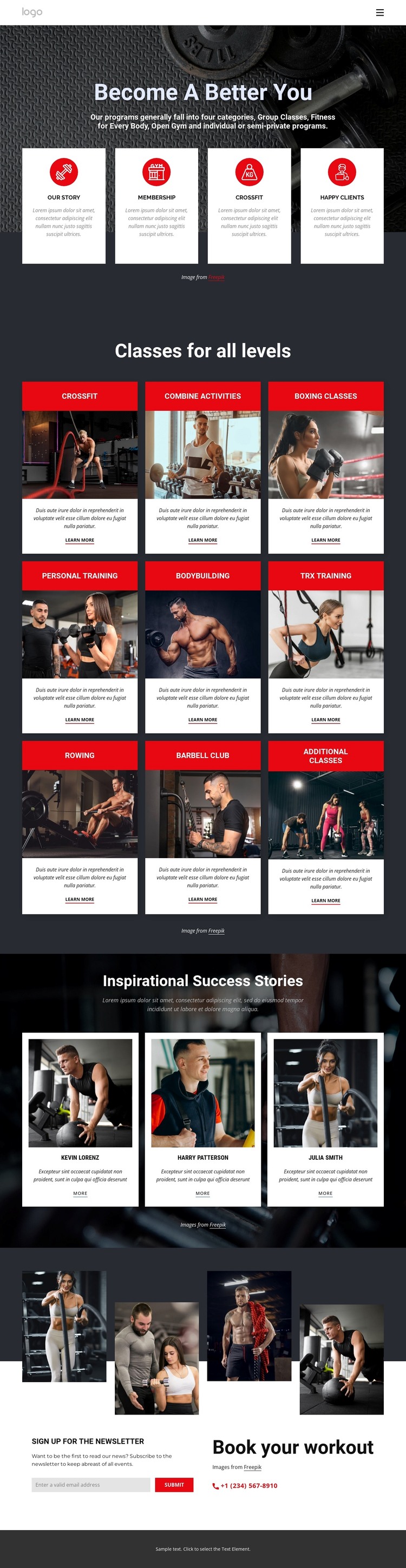
The repeated class catalog gives this design a useful relationship between permanent fitness information and content that may grow over time. Nine categories are presented through a shared card pattern with a title band, image, description, and “Learn more” link. That consistency makes the class area suitable for organizing page-oriented training information while preserving a common visual direction. The individual categories can remain distinct without making the overall theme feel fragmented.
The three success-story profiles provide a different content role. Portraits, short statements, and “More” links create a compact area for member-focused material, complementing the practical class descriptions with a human perspective. The page also separates newsletter subscription from workout booking: the first supports recurring communication, while the second gives visitors a direct contact route for training interest. This distinction helps a WordPress-managed project keep informational content and response-oriented content visually coordinated but functionally different. The mobile navigation and shared footer-oriented structure support access to the page’s main areas, while the dark charcoal backgrounds, red accents, white cards, and bold condensed headings establish the theme character around them. The design can therefore accommodate fitness page content and potentially related updates without claiming that blog posts, categories, or other CMS structures already exist. Its main strength is the relationship between recurring class information, member stories, and direct contact content within one consistent theme.
Customize with Nicepage
Open this ready-made template in the WordPress Website Builder and customize it visually in the Nicepage editor. Replace demo content, edit page sections, and adapt the design to your project without rebuilding the template from scratch.
Manage and Edit This Theme in WordPress
Customize and Install the WordPress Theme
Start with this ready-made theme instead of building the WordPress design from scratch. Customize its layout, content, typography, images, sections, and other design elements visually in Nicepage editor, then export and install the WordPress Theme, Plugin, and Pages on your WordPress site. The Nicepage WordPress Plugin lets you continue working with the site after installation.
Edit the Theme Directly in WordPress
After installation, you can edit the WordPress Theme directly in WordPress with the Nicepage WordPress Plugin. Use Site Style to customize site Colors, Fonts, Header, Footer, Blog, and Post Page Templates while working within your WordPress website.
Edit WordPress Pages Visually
Use the Nicepage WordPress Plugin to edit page content directly from the WordPress admin area. Open a WordPress Page with Nicepage and visually change its text, images, sections, and other page elements while continuing to manage the Page through WordPress.
WordPress Content and Theme Integration
Use the customized theme with WordPress Pages, Posts, Blog and Post Templates, menus, widgets, and other CMS-managed content. Shared theme elements such as Colors, Fonts, Header, Footer, Blog, and Post Page Templates can be managed as part of the overall site design, while WordPress provides the CMS environment for managing site content.
This workflow combines a ready-made WordPress Theme with visual customization, direct theme editing in WordPress, and continued content management through the Nicepage WordPress Plugin.