Great outdoor activities WordPress Theme


A publishable travel story with a clear page-content role
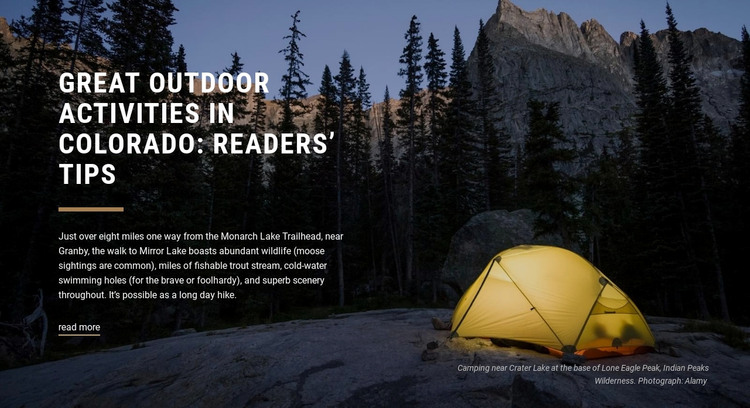
The heading and paragraph form a stable information unit that can fit naturally into a WordPress-managed travel page. Rather than depending on a rotating feed or a list of changing items, the section presents one defined story about an approximately eight-mile walk from Monarch Lake Trailhead to Mirror Lake near Granby. References to moose, trout streams, cold-water swimming holes, and mountain scenery give the copy enough detail to introduce the destination experience.
The visual arrangement keeps that page content distinctive. White text is positioned on the left over a darkened forest and mountain photograph, with a thin warm rule reinforcing the heading hierarchy. The yellow tent toward the lower right makes the camping theme visible at a glance, while the caption adds a more precise setting through Crater Lake, Lone Eagle Peak, and Indian Peaks Wilderness. The read-more link can connect the section to a longer external article or another destination resource.
In a WordPress-oriented project, this block can remain a reusable visual section within permanent page content while the surrounding site manages other travel information. The Nicepage WordPress Theme, Plugin, and Pages workflow can support the broader CMS context; it does not change the section’s specific editorial role.
Customize with Nicepage
Open this ready-made template in the WordPress Website Builder and customize it visually in the Nicepage editor. Replace demo content, edit page sections, and adapt the design to your project without rebuilding the template from scratch.
Edit Template Offline
2. Create a new page or select existing
3. Click Add new block, search for id 68337 and click enter
Edit Template Online
Create Awesome Websites


Free Nicepage Builder
Keywords
Manage and Edit This Theme in WordPress
Customize and Install the WordPress Theme
Start with this ready-made theme instead of building the WordPress design from scratch. Customize its layout, content, typography, images, sections, and other design elements visually in Nicepage editor, then export and install the WordPress Theme, Plugin, and Pages on your WordPress site. The Nicepage WordPress Plugin lets you continue working with the site after installation.
Edit the Theme Directly in WordPress
After installation, you can edit the WordPress Theme directly in WordPress with the Nicepage WordPress Plugin. Use Site Style to customize site Colors, Fonts, Header, Footer, Blog, and Post Page Templates while working within your WordPress website.
Edit WordPress Pages Visually
Use the Nicepage WordPress Plugin to edit page content directly from the WordPress admin area. Open a WordPress Page with Nicepage and visually change its text, images, sections, and other page elements while continuing to manage the Page through WordPress.
WordPress Content and Theme Integration
Use the customized theme with WordPress Pages, Posts, Blog and Post Templates, menus, widgets, and other CMS-managed content. Shared theme elements such as Colors, Fonts, Header, Footer, Blog, and Post Page Templates can be managed as part of the overall site design, while WordPress provides the CMS environment for managing site content.
This workflow combines a ready-made WordPress Theme with visual customization, direct theme editing in WordPress, and continued content management through the Nicepage WordPress Plugin.