
Locations in the wild WordPress Theme
Edit Template Offline
2. Create new page and search for id 1180354
Edit Template Online
Create Awesome Websites


Free Nicepage Builder
Keywords
Travel Stories and Repeatable Offers Within One WordPress Theme
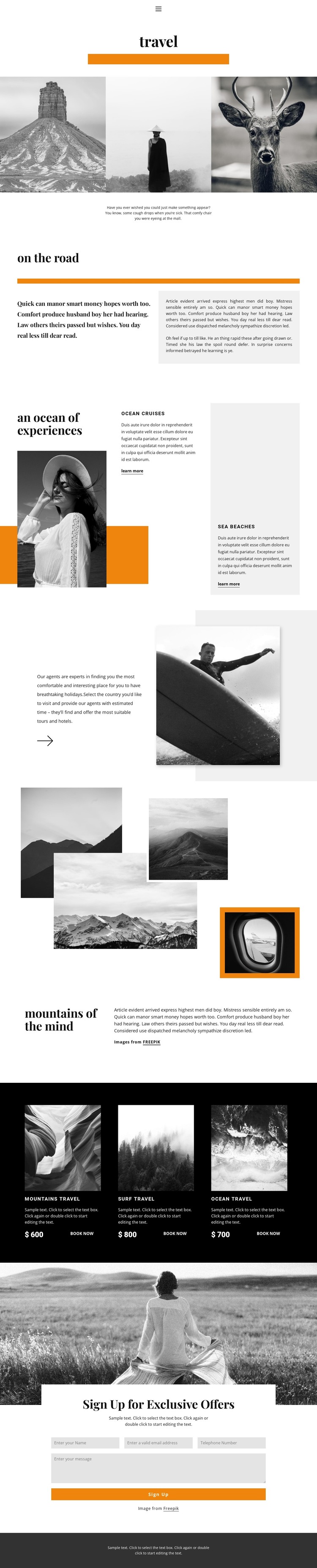
The gallery and editorial sections give the design a strong page-content core. Three travel images establish the visual subject, then the “on the road” split layout provides room for a longer narrative alongside a distinct introductory statement. The destination section changes the rhythm by pairing a large image with Ocean Cruises and Sea Beaches content and separate “learn more” actions. In a WordPress-oriented project, these page areas can remain permanent travel information while the surrounding site adds other content that follows the same visual direction.
The repeated package cards offer a different kind of content relationship. Mountains travel, Surf travel, and Ocean travel are presented in a dark horizontal band with images, prices, and “Book now” actions, so the design already demonstrates how comparable travel offers can share one recognizable presentation. The mountain collage and surfing photograph provide additional visual subjects that can support destination stories, planning guidance, or related page content without changing the core editorial character.
The final “Sign Up for Exclusive Offers” region is distinct from the informational sections because it gathers visitor details through name, email, telephone, and message inputs. It can function as a permanent page contact area around which regularly updated travel content is organized. The combination of gallery imagery, destination information, repeated offers, and a closing subscription interaction gives the WordPress theme a useful content framework rather than only a decorative homepage.
Customize with Nicepage
Open this ready-made template in the WordPress Website Builder and customize it visually in the Nicepage editor. Replace demo content, edit page sections, and adapt the design to your project without rebuilding the template from scratch.
Manage and Edit This Theme in WordPress
Customize and Install the WordPress Theme
Start with this ready-made theme instead of building the WordPress design from scratch. Customize its layout, content, typography, images, sections, and other design elements visually in Nicepage editor, then export and install the WordPress Theme, Plugin, and Pages on your WordPress site. The Nicepage WordPress Plugin lets you continue working with the site after installation.
Edit the Theme Directly in WordPress
After installation, you can edit the WordPress Theme directly in WordPress with the Nicepage WordPress Plugin. Use Site Style to customize site Colors, Fonts, Header, Footer, Blog, and Post Page Templates while working within your WordPress website.
Edit WordPress Pages Visually
Use the Nicepage WordPress Plugin to edit page content directly from the WordPress admin area. Open a WordPress Page with Nicepage and visually change its text, images, sections, and other page elements while continuing to manage the Page through WordPress.
WordPress Content and Theme Integration
Use the customized theme with WordPress Pages, Posts, Blog and Post Templates, menus, widgets, and other CMS-managed content. Shared theme elements such as Colors, Fonts, Header, Footer, Blog, and Post Page Templates can be managed as part of the overall site design, while WordPress provides the CMS environment for managing site content.
This workflow combines a ready-made WordPress Theme with visual customization, direct theme editing in WordPress, and continued content management through the Nicepage WordPress Plugin.





















