Original holiday travel WordPress Theme


Edit Template Offline
2. Create new page and search for id 16634
Edit Template Online
Create Awesome Websites


Free Nicepage Builder
Keywords
Trip Inspiration and Company Content Fit a WordPress-Oriented Theme
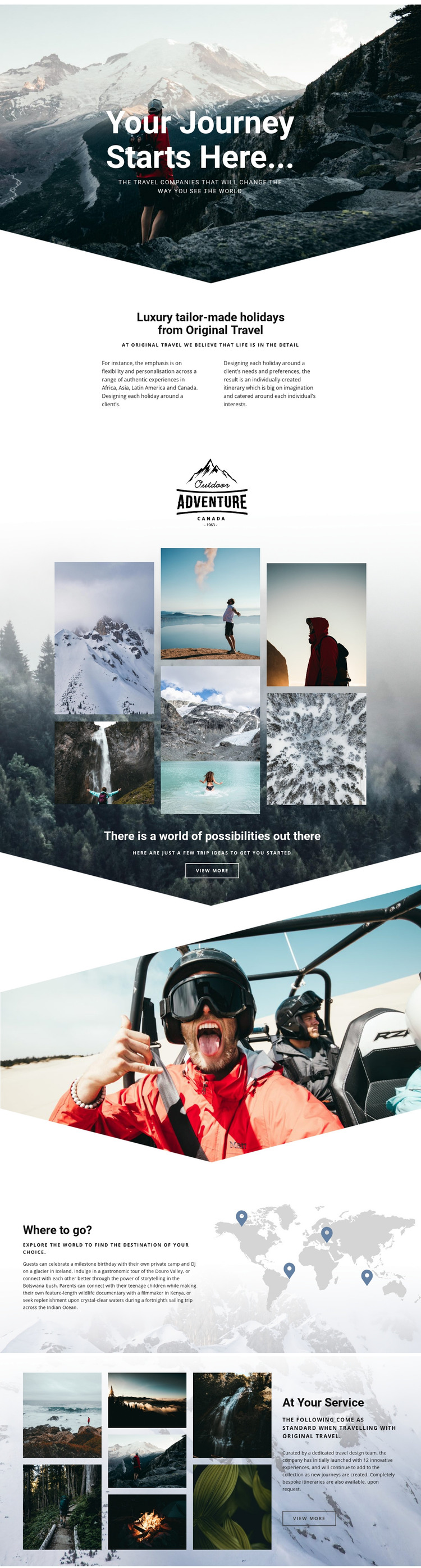
The design separates permanent company information from content that could naturally be expanded over time. The About Us section gives the page a stable foundation by identifying Original Travel and explaining its luxury tailor-made holiday approach. The gallery then introduces a more publishable kind of content: visual trip ideas that can be developed into focused destination or journey presentations while keeping the same image-led character.
The world map section provides another useful relationship for a WordPress-managed travel site. It connects destination exploration with named places and regions, including Africa, Asia, Latin America, Canada, Iceland, Botswana, Kenya, and the Indian Ocean. These references are verified content in the design, but they should not be treated as proof that WordPress Posts, categories, or destination templates already exist. Instead, they show where page-oriented and regularly updated travel content could fit within the established layout.
The closing “At Your Service” section shifts attention from places to assistance. Information about a dedicated travel design team, innovative experiences, and bespoke itineraries can support a service-oriented content area alongside destination material. This interpretation differs from a simple static presentation because it considers how company pages, travel inspiration, destination information, and service content can remain connected through one theme direction. The mountain imagery, map graphic, collages, and editorial spacing give WordPress-managed content a consistent visual setting without requiring the design to be rebuilt around a different identity.
Customize with Nicepage
Open this ready-made template in the WordPress Website Builder and customize it visually in the Nicepage editor. Replace demo content, edit page sections, and adapt the design to your project without rebuilding the template from scratch.
Manage and Edit This Theme in WordPress
Customize and Install the WordPress Theme
Start with this ready-made theme instead of building the WordPress design from scratch. Customize its layout, content, typography, images, sections, and other design elements visually in Nicepage editor, then export and install the WordPress Theme, Plugin, and Pages on your WordPress site. The Nicepage WordPress Plugin lets you continue working with the site after installation.
Edit the Theme Directly in WordPress
After installation, you can edit the WordPress Theme directly in WordPress with the Nicepage WordPress Plugin. Use Site Style to customize site Colors, Fonts, Header, Footer, Blog, and Post Page Templates while working within your WordPress website.
Edit WordPress Pages Visually
Use the Nicepage WordPress Plugin to edit page content directly from the WordPress admin area. Open a WordPress Page with Nicepage and visually change its text, images, sections, and other page elements while continuing to manage the Page through WordPress.
WordPress Content and Theme Integration
Use the customized theme with WordPress Pages, Posts, Blog and Post Templates, menus, widgets, and other CMS-managed content. Shared theme elements such as Colors, Fonts, Header, Footer, Blog, and Post Page Templates can be managed as part of the overall site design, while WordPress provides the CMS environment for managing site content.
This workflow combines a ready-made WordPress Theme with visual customization, direct theme editing in WordPress, and continued content management through the Nicepage WordPress Plugin.