Adventure holidays and tours WordPress Theme


Edit Template Offline
2. Create new page and search for id 843521
Edit Template Online
Create Awesome Websites


Free Nicepage Builder
Keywords
Service Cards and Audience Content Create Clear WordPress Page Areas
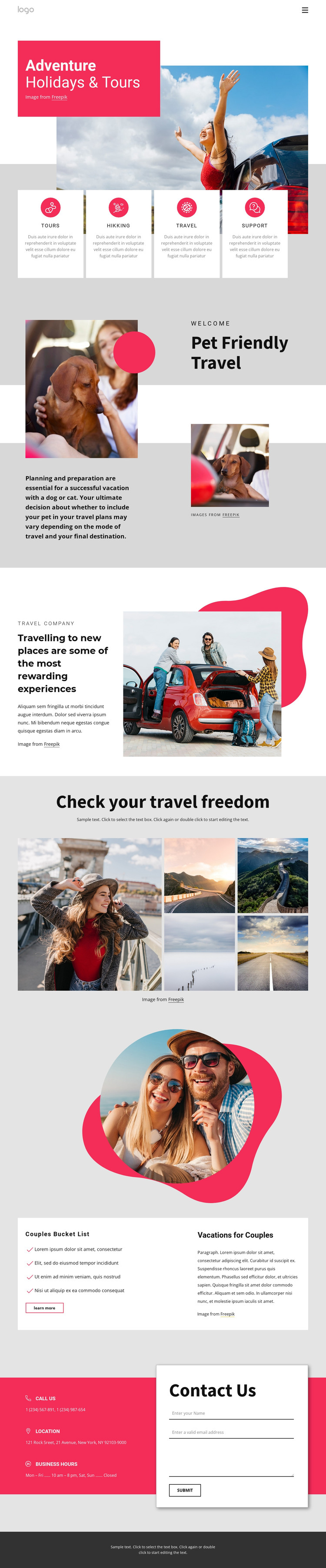
The four repeated cards provide a useful page-oriented content grouping for tours, hiking, travel, and support. Their shared structure makes them distinct from the hero while keeping the categories visually related. The pet-friendly travel section and the couple-vacation section add more specific content areas that could remain permanent pages or featured sections within a WordPress-managed travel project, without claiming that WordPress Posts or categories already exist in the template.
The company-introduction block supplies positioning content, and the five-image gallery gives the design a strong visual area for destinations or travel experiences. Together, these sections create a balance between explanatory information and image-led content. Navigation connects the page’s major themes, while the final Contact Us region gives the site a practical inquiry area: the form is paired with separate cards for calls, location, and business hours. This relationship is relevant to a WordPress theme because permanent travel information, repeated service content, and later editorial additions can share the same visual direction. A WordPress project could therefore preserve the established hierarchy while managing page content in the CMS, rather than treating the design as only a static image arrangement.
Customize with Nicepage
Open this ready-made template in the WordPress Website Builder and customize it visually in the Nicepage editor. Replace demo content, edit page sections, and adapt the design to your project without rebuilding the template from scratch.
Manage and Edit This Theme in WordPress
Customize and Install the WordPress Theme
Start with this ready-made theme instead of building the WordPress design from scratch. Customize its layout, content, typography, images, sections, and other design elements visually in Nicepage editor, then export and install the WordPress Theme, Plugin, and Pages on your WordPress site. The Nicepage WordPress Plugin lets you continue working with the site after installation.
Edit the Theme Directly in WordPress
After installation, you can edit the WordPress Theme directly in WordPress with the Nicepage WordPress Plugin. Use Site Style to customize site Colors, Fonts, Header, Footer, Blog, and Post Page Templates while working within your WordPress website.
Edit WordPress Pages Visually
Use the Nicepage WordPress Plugin to edit page content directly from the WordPress admin area. Open a WordPress Page with Nicepage and visually change its text, images, sections, and other page elements while continuing to manage the Page through WordPress.
WordPress Content and Theme Integration
Use the customized theme with WordPress Pages, Posts, Blog and Post Templates, menus, widgets, and other CMS-managed content. Shared theme elements such as Colors, Fonts, Header, Footer, Blog, and Post Page Templates can be managed as part of the overall site design, while WordPress provides the CMS environment for managing site content.
This workflow combines a ready-made WordPress Theme with visual customization, direct theme editing in WordPress, and continued content management through the Nicepage WordPress Plugin.