
Future travel experience WordPress Theme


Edit Template Offline
2. Create new page and search for id 18604
Edit Template Online
Create Awesome Websites


Free Nicepage Builder
Keywords
Page-oriented travel content fits a visual WordPress theme structure
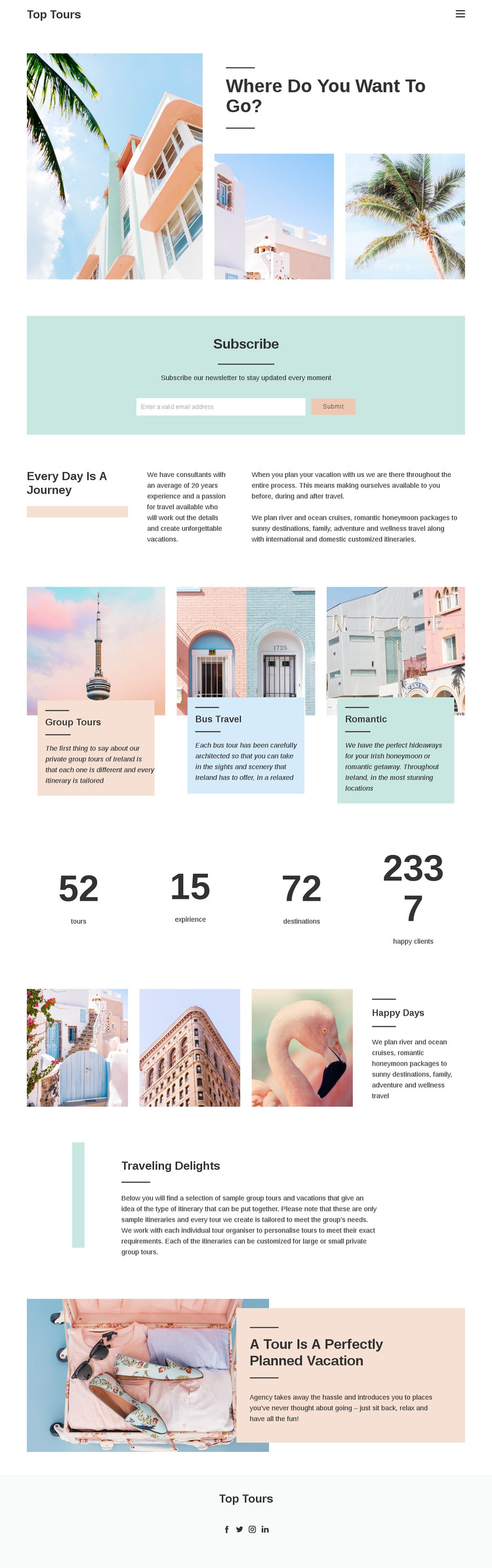
The design separates permanent travel information into clear page-oriented areas. The destination hero and “Every day is a journey” introduction can frame the main travel offer, while the three repeated cards organize Group Tours, Bus Travel, and Romantic travel as distinct content themes. Their shared image-and-text treatment is useful for keeping related page content visually coordinated, but the analysis does not establish that WordPress Posts, categories, or blog structures already exist.
The newsletter panel provides a separate subscription area, and the later “Traveling delights” section gives customized itineraries a different editorial role from the service cards. The “Happy days” image group and the overlapping vacation photograph can support visual storytelling around those permanent pages, while the four displayed highlights add a compact information block between service and imagery content. At the site level, the compact header and centered footer create shared elements that can carry navigation, branding, and social destinations across related travel pages. This makes the design suitable for a WordPress-oriented project where page content, images, and recurring service information remain within one theme direction. Any future editorial or frequently updated content would need to be added separately; it should not be presented as an existing component of this verified template.
Customize with Nicepage
Open this ready-made template in the WordPress Website Builder and customize it visually in the Nicepage editor. Replace demo content, edit page sections, and adapt the design to your project without rebuilding the template from scratch.
Manage and Edit This Theme in WordPress
Customize and Install the WordPress Theme
Start with this ready-made theme instead of building the WordPress design from scratch. Customize its layout, content, typography, images, sections, and other design elements visually in Nicepage editor, then export and install the WordPress Theme, Plugin, and Pages on your WordPress site. The Nicepage WordPress Plugin lets you continue working with the site after installation.
Edit the Theme Directly in WordPress
After installation, you can edit the WordPress Theme directly in WordPress with the Nicepage WordPress Plugin. Use Site Style to customize site Colors, Fonts, Header, Footer, Blog, and Post Page Templates while working within your WordPress website.
Edit WordPress Pages Visually
Use the Nicepage WordPress Plugin to edit page content directly from the WordPress admin area. Open a WordPress Page with Nicepage and visually change its text, images, sections, and other page elements while continuing to manage the Page through WordPress.
WordPress Content and Theme Integration
Use the customized theme with WordPress Pages, Posts, Blog and Post Templates, menus, widgets, and other CMS-managed content. Shared theme elements such as Colors, Fonts, Header, Footer, Blog, and Post Page Templates can be managed as part of the overall site design, while WordPress provides the CMS environment for managing site content.
This workflow combines a ready-made WordPress Theme with visual customization, direct theme editing in WordPress, and continued content management through the Nicepage WordPress Plugin.





















