
Travel Personal Diary WordPress Theme
Edit Template Offline
2. Create new page and search for id 6650047
Edit Template Online
Create Awesome Websites


Free Nicepage Builder
Keywords
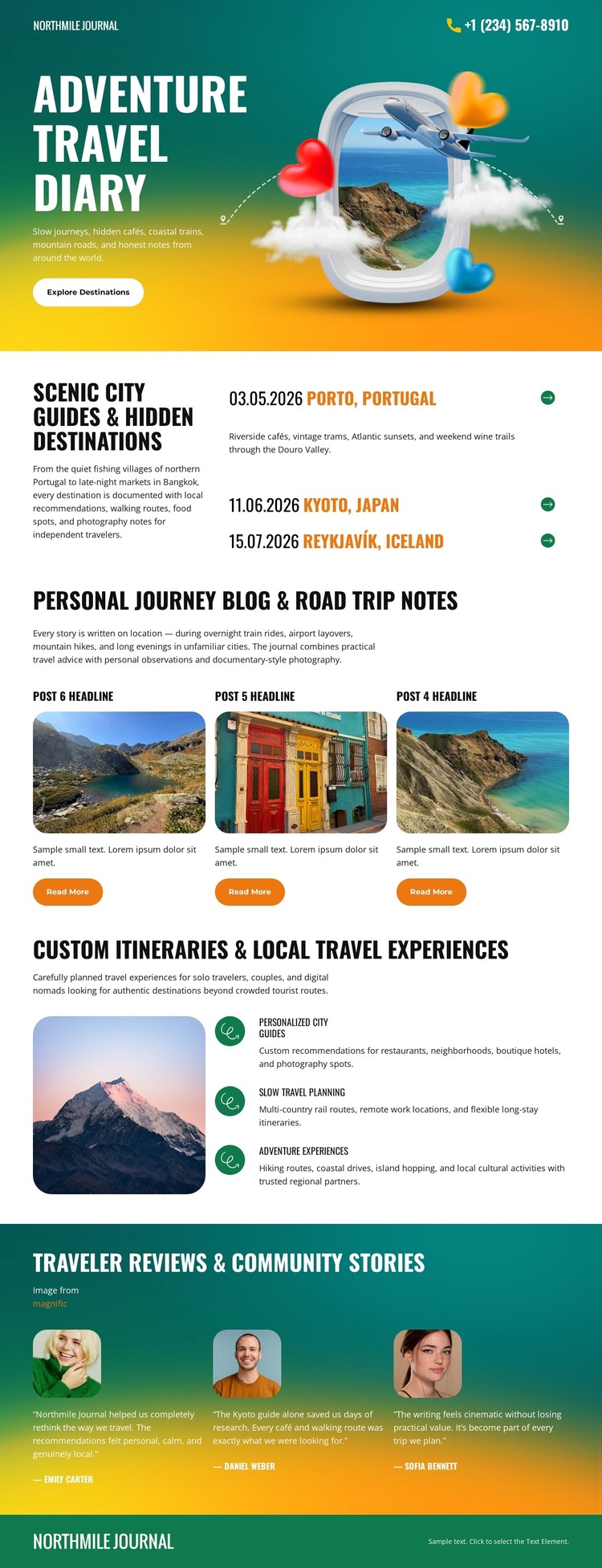
Story Cards and Destination Pages Fit a Publishable Travel Theme
The page separates enduring destination information from recurring narrative content in a way that suits a WordPress-oriented travel project. The guide section presents Porto, Tokyo, and Reykjavik as identifiable location entries, giving page-oriented destination material a clear visual home. Beneath it, three repeated image-led story cards introduce personal journey and road-trip notes, each with a Read More action that naturally distinguishes a brief from a fuller travel story.
The itinerary area contributes another type of permanent content. A mountain photograph is paired with descriptions of personalized itineraries, local travel experiences, and outdoor activities, so practical planning information can sit beside editorial storytelling without being confused with it. Three portrait-led traveler reviews then provide a separate community-content pattern, while the shared color fields and footer identity keep those areas connected.
This structure can support a WordPress theme interpretation without claiming that Posts, categories, or blog templates already exist in the analyzed page. The verified design supplies the relationships: destinations are grouped as guide content, story cards repeat as publishable-looking entries, and reviews occupy their own visual region. That makes the theme suitable for projects that may combine relatively stable travel pages with regularly updated stories, while retaining the energetic journal character across shared site areas.
Customize with Nicepage
Open this ready-made template in the WordPress Website Builder and customize it visually in the Nicepage editor. Replace demo content, edit page sections, and adapt the design to your project without rebuilding the template from scratch.
Manage and Edit This Theme in WordPress
Customize and Install the WordPress Theme
Start with this ready-made theme instead of building the WordPress design from scratch. Customize its layout, content, typography, images, sections, and other design elements visually in Nicepage editor, then export and install the WordPress Theme, Plugin, and Pages on your WordPress site. The Nicepage WordPress Plugin lets you continue working with the site after installation.
Edit the Theme Directly in WordPress
After installation, you can edit the WordPress Theme directly in WordPress with the Nicepage WordPress Plugin. Use Site Style to customize site Colors, Fonts, Header, Footer, Blog, and Post Page Templates while working within your WordPress website.
Edit WordPress Pages Visually
Use the Nicepage WordPress Plugin to edit page content directly from the WordPress admin area. Open a WordPress Page with Nicepage and visually change its text, images, sections, and other page elements while continuing to manage the Page through WordPress.
WordPress Content and Theme Integration
Use the customized theme with WordPress Pages, Posts, Blog and Post Templates, menus, widgets, and other CMS-managed content. Shared theme elements such as Colors, Fonts, Header, Footer, Blog, and Post Page Templates can be managed as part of the overall site design, while WordPress provides the CMS environment for managing site content.
This workflow combines a ready-made WordPress Theme with visual customization, direct theme editing in WordPress, and continued content management through the Nicepage WordPress Plugin.





















