
Travel in Paradise WordPress Theme


Edit Template Offline
2. Create new page and search for id 28973
Edit Template Online
Create Awesome Websites


Free Nicepage Builder
Keywords
Travel content separates service pages from editorial material
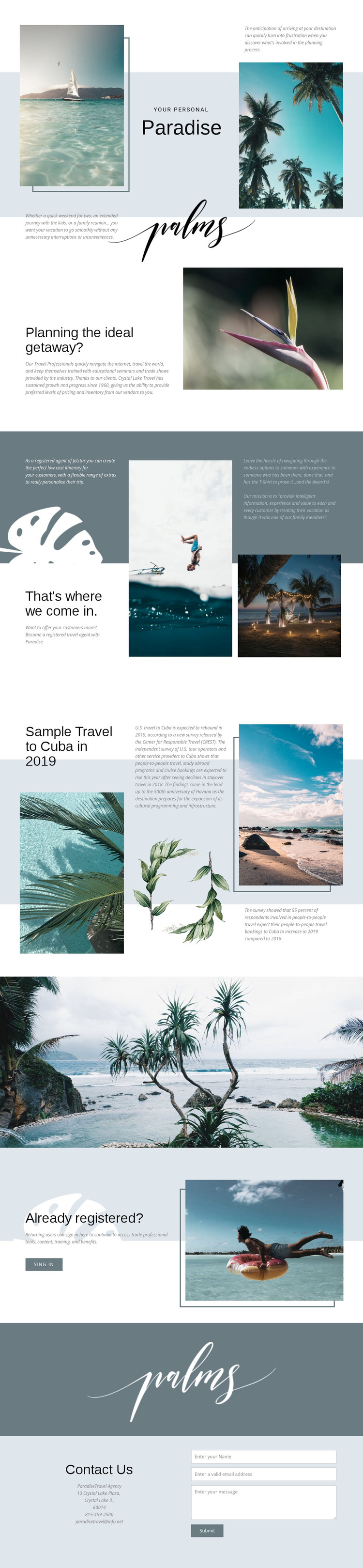
The design offers several clear content roles for a WordPress-managed travel site without requiring unsupported assumptions about existing posts or blog structures. The planning section can carry permanent information about vacation support, while the registered-agent proposition can represent a more specific service or professional resource area. Their different purposes are already visible in the page, so they can remain distinct when the project organizes its content for visitors and travel professionals.
The Cuba and Havana feature provides a separate editorial direction. Its destination-specific heading, article copy, botanical artwork, and supporting photographs create a natural model for travel stories or featured destination content, while the main Paradise and planning sections retain their role as core page information. The registered-user prompt adds another content relationship by addressing returning users through a sign-in action rather than repeating the general inquiry message.
The contact area completes the permanent information structure with a telephone number, email address, and fields for name, email, and message. These details can remain part of the main travel presentation while other content areas develop around the same visual language. In a WordPress project, the design therefore provides a useful separation between core service information, destination-led content, account access, and contact. The WordPress Plugin can support direct theme editing, but the template analysis itself confirms only the page areas described above.
Customize with Nicepage
Open this ready-made template in the WordPress Website Builder and customize it visually in the Nicepage editor. Replace demo content, edit page sections, and adapt the design to your project without rebuilding the template from scratch.
Manage and Edit This Theme in WordPress
Customize and Install the WordPress Theme
Start with this ready-made theme instead of building the WordPress design from scratch. Customize its layout, content, typography, images, sections, and other design elements visually in Nicepage editor, then export and install the WordPress Theme, Plugin, and Pages on your WordPress site. The Nicepage WordPress Plugin lets you continue working with the site after installation.
Edit the Theme Directly in WordPress
After installation, you can edit the WordPress Theme directly in WordPress with the Nicepage WordPress Plugin. Use Site Style to customize site Colors, Fonts, Header, Footer, Blog, and Post Page Templates while working within your WordPress website.
Edit WordPress Pages Visually
Use the Nicepage WordPress Plugin to edit page content directly from the WordPress admin area. Open a WordPress Page with Nicepage and visually change its text, images, sections, and other page elements while continuing to manage the Page through WordPress.
WordPress Content and Theme Integration
Use the customized theme with WordPress Pages, Posts, Blog and Post Templates, menus, widgets, and other CMS-managed content. Shared theme elements such as Colors, Fonts, Header, Footer, Blog, and Post Page Templates can be managed as part of the overall site design, while WordPress provides the CMS environment for managing site content.
This workflow combines a ready-made WordPress Theme with visual customization, direct theme editing in WordPress, and continued content management through the Nicepage WordPress Plugin.





















