Mountain Adventure WordPress Theme


Edit Template Offline
2. Create new page and search for id 19154
Edit Template Online
Create Awesome Websites


Free Nicepage Builder
Keywords
Tour Discovery Areas Give WordPress Content a Clear Visual Home
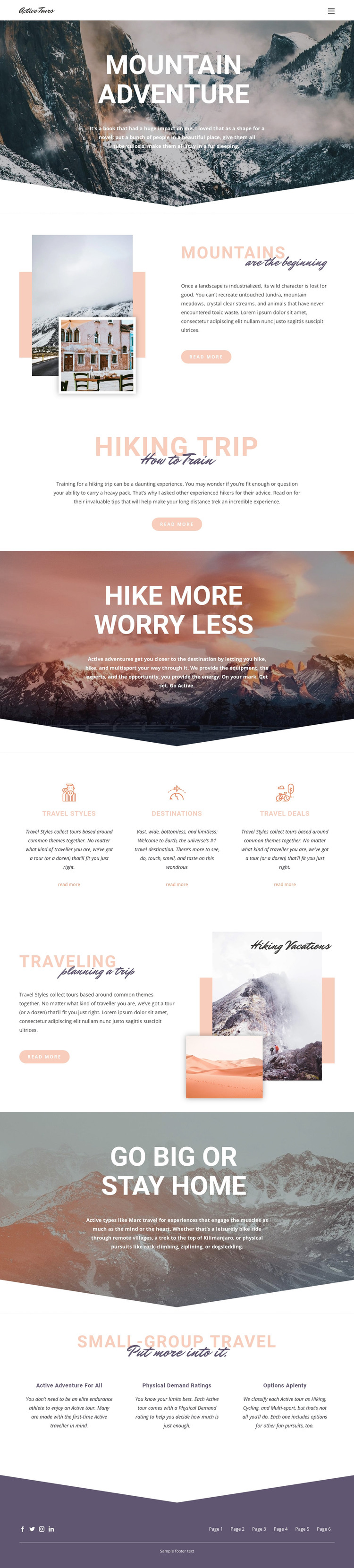
The design separates several kinds of permanent travel information into recognizable page areas. Mountains introduces the subject through landscape preservation and exploration, Hiking Trip provides preparation-oriented content, and Traveling frames the experience around planning. These sections can support page-oriented content while keeping each topic connected to the same mountain photography, bold heading treatment, and spacious editorial layout.
The Travel Styles, Destinations, and Travel Deals block offers a different relationship between content and presentation. Three peer columns make the categories easy to distinguish, so a WordPress-managed project could use them as entry points for related tour information without changing the page’s core visual language. The Small-group travel section adds another reusable content grouping through Active adventure for all, Physical Demand ratings, and Options aplenty. Those statements provide a natural place for regularly revised descriptions or supporting details, while the surrounding layout remains stable.
The page’s navigation, footer, and social links also create shared site regions around the content. Facebook, Twitter, Instagram, and LinkedIn links are verified components of the current design, so they can remain part of the broader communication structure rather than being treated as isolated decoration. The result is a theme-oriented foundation where travel pages, category information, planning content, and social connections can develop within one recognizable mountain-focused system.
Customize with Nicepage
Open this ready-made template in the WordPress Website Builder and customize it visually in the Nicepage editor. Replace demo content, edit page sections, and adapt the design to your project without rebuilding the template from scratch.
Manage and Edit This Theme in WordPress
Customize and Install the WordPress Theme
Start with this ready-made theme instead of building the WordPress design from scratch. Customize its layout, content, typography, images, sections, and other design elements visually in Nicepage editor, then export and install the WordPress Theme, Plugin, and Pages on your WordPress site. The Nicepage WordPress Plugin lets you continue working with the site after installation.
Edit the Theme Directly in WordPress
After installation, you can edit the WordPress Theme directly in WordPress with the Nicepage WordPress Plugin. Use Site Style to customize site Colors, Fonts, Header, Footer, Blog, and Post Page Templates while working within your WordPress website.
Edit WordPress Pages Visually
Use the Nicepage WordPress Plugin to edit page content directly from the WordPress admin area. Open a WordPress Page with Nicepage and visually change its text, images, sections, and other page elements while continuing to manage the Page through WordPress.
WordPress Content and Theme Integration
Use the customized theme with WordPress Pages, Posts, Blog and Post Templates, menus, widgets, and other CMS-managed content. Shared theme elements such as Colors, Fonts, Header, Footer, Blog, and Post Page Templates can be managed as part of the overall site design, while WordPress provides the CMS environment for managing site content.
This workflow combines a ready-made WordPress Theme with visual customization, direct theme editing in WordPress, and continued content management through the Nicepage WordPress Plugin.