Fun Challenge Ahead WordPress Theme


The Split Quiz Reads as Stable Page Content in WordPress
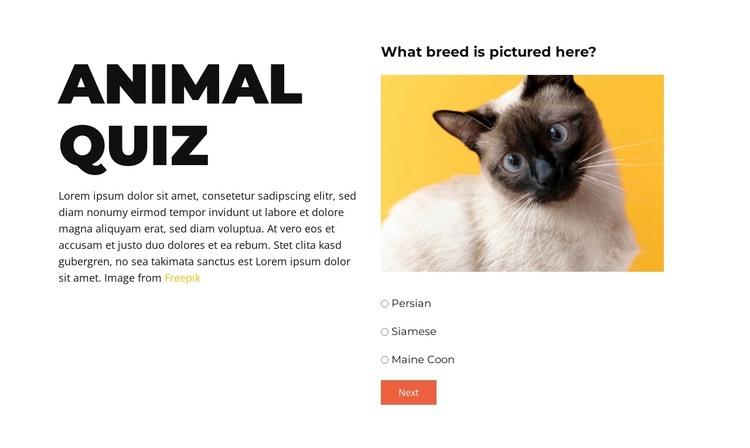
The “Animal Quiz” heading and supporting copy form a stable introductory content group, while the right-hand panel holds the activity itself. Its prompt, “What breed is pictured here?”, is followed by an animal image, a radio-choice group, and a Next control. Three sequential steps use this same arrangement, so the section can retain a consistent visual and content role when placed among other page sections managed in a WordPress-oriented project.
The visible step includes a Siamese cat image and answer choices such as Persian, Siamese, and Maine Coon. These elements make the block suitable for publishable page content connected to pets, animals, education, or entertainment without requiring the surrounding site to be treated as part of the quiz. The two-column split also keeps the explanatory material separate from the question interface, which helps the section remain readable when other content is added around it.
Within a WordPress Theme context, the block can serve as one reusable visual section on a page while the wider project manages its other content through WordPress and Nicepage. The section itself remains focused on the quiz: its images, prompts, answer groups, and step navigation. Page structure, editorial additions, and broader theme styling belong to the containing site. This separation allows the quiz content to keep its own hierarchy while fitting a larger publishable page.
Customize with Nicepage
Open this ready-made template in the WordPress Website Builder and customize it visually in the Nicepage editor. Replace demo content, edit page sections, and adapt the design to your project without rebuilding the template from scratch.
Edit Template Offline
2. Create a new page or select existing
3. Click Add new block, search for id 6539402 and click enter
Edit Template Online
Create Awesome Websites


Free Nicepage Builder
Keywords
Manage and Edit This Theme in WordPress
Customize and Install the WordPress Theme
Start with this ready-made theme instead of building the WordPress design from scratch. Customize its layout, content, typography, images, sections, and other design elements visually in Nicepage editor, then export and install the WordPress Theme, Plugin, and Pages on your WordPress site. The Nicepage WordPress Plugin lets you continue working with the site after installation.
Edit the Theme Directly in WordPress
After installation, you can edit the WordPress Theme directly in WordPress with the Nicepage WordPress Plugin. Use Site Style to customize site Colors, Fonts, Header, Footer, Blog, and Post Page Templates while working within your WordPress website.
Edit WordPress Pages Visually
Use the Nicepage WordPress Plugin to edit page content directly from the WordPress admin area. Open a WordPress Page with Nicepage and visually change its text, images, sections, and other page elements while continuing to manage the Page through WordPress.
WordPress Content and Theme Integration
Use the customized theme with WordPress Pages, Posts, Blog and Post Templates, menus, widgets, and other CMS-managed content. Shared theme elements such as Colors, Fonts, Header, Footer, Blog, and Post Page Templates can be managed as part of the overall site design, while WordPress provides the CMS environment for managing site content.
This workflow combines a ready-made WordPress Theme with visual customization, direct theme editing in WordPress, and continued content management through the Nicepage WordPress Plugin.