
Wildlife and nature WordPress Theme


Edit Template Offline
2. Create new page and search for id 21253
Edit Template Online
Create Awesome Websites


Free Nicepage Builder
Keywords
Image Collections and Editorial Features Support Publishable Content
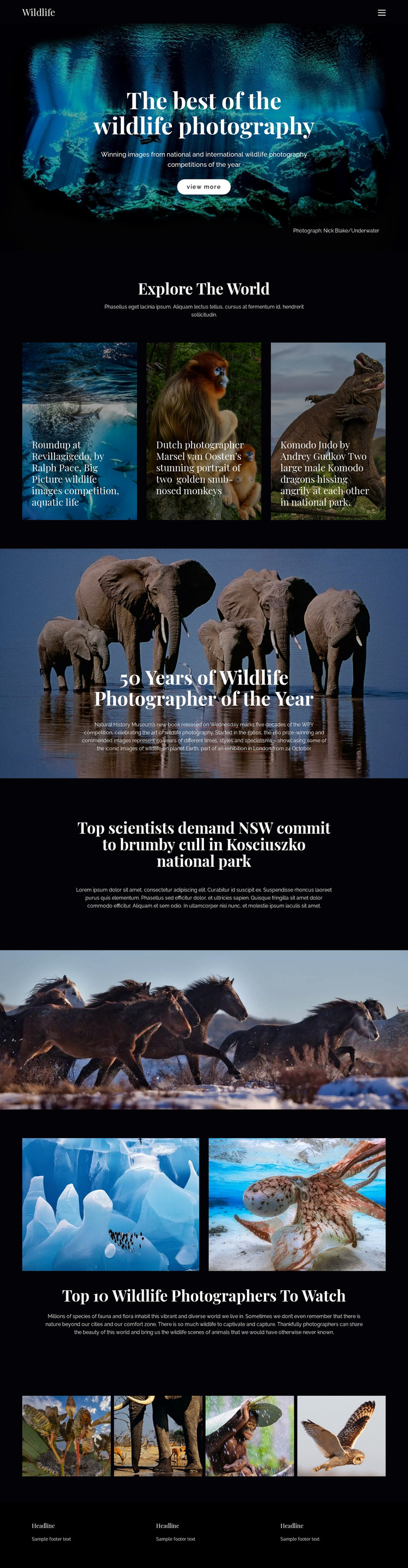
The page’s strongest WordPress-oriented content relationship is between permanent feature areas and material that could be expanded over time. The hero establishes the main wildlife photography presentation, while the three image panels provide a repeatable collection pattern for aquatic life, monkeys, and Komodo dragons. These are useful page-oriented areas for a theme interpretation because their visual roles are clear, even though the analysis does not verify existing WordPress Posts, categories, or blog templates.
The historical competition section and conservation panel offer different editorial directions. The elephant feature can frame long-form background around the Wildlife Photographer of the Year competition, including its history, book reference, and London exhibition. The brumby story gives the design a current conservation angle connected with NSW and Kosciuszko national park. The photographer feature then supports people-focused content, while the horse image and closing gallery provide visual material between text-led areas.
WordPress content can therefore be understood through the template’s page regions: featured photography, recurring image collections, editorial stories, and shared navigation and footer elements. If regularly updated articles or announcements are added later, they can be interpreted around this established visual system rather than forcing a new design language. The theme value comes from coordinating publishable content with the existing image-led presentation, not from claiming that CMS content is already present.
Customize with Nicepage
Open this ready-made template in the WordPress Website Builder and customize it visually in the Nicepage editor. Replace demo content, edit page sections, and adapt the design to your project without rebuilding the template from scratch.
Manage and Edit This Theme in WordPress
Customize and Install the WordPress Theme
Start with this ready-made theme instead of building the WordPress design from scratch. Customize its layout, content, typography, images, sections, and other design elements visually in Nicepage editor, then export and install the WordPress Theme, Plugin, and Pages on your WordPress site. The Nicepage WordPress Plugin lets you continue working with the site after installation.
Edit the Theme Directly in WordPress
After installation, you can edit the WordPress Theme directly in WordPress with the Nicepage WordPress Plugin. Use Site Style to customize site Colors, Fonts, Header, Footer, Blog, and Post Page Templates while working within your WordPress website.
Edit WordPress Pages Visually
Use the Nicepage WordPress Plugin to edit page content directly from the WordPress admin area. Open a WordPress Page with Nicepage and visually change its text, images, sections, and other page elements while continuing to manage the Page through WordPress.
WordPress Content and Theme Integration
Use the customized theme with WordPress Pages, Posts, Blog and Post Templates, menus, widgets, and other CMS-managed content. Shared theme elements such as Colors, Fonts, Header, Footer, Blog, and Post Page Templates can be managed as part of the overall site design, while WordPress provides the CMS environment for managing site content.
This workflow combines a ready-made WordPress Theme with visual customization, direct theme editing in WordPress, and continued content management through the Nicepage WordPress Plugin.





















