
Kate Humble WordPress Theme


Edit Template Offline
2. Create new page and search for id 14119
Edit Template Online
Create Awesome Websites


Free Nicepage Builder
Keywords
Permanent Profile Content Meets Repeatable News and Event Areas
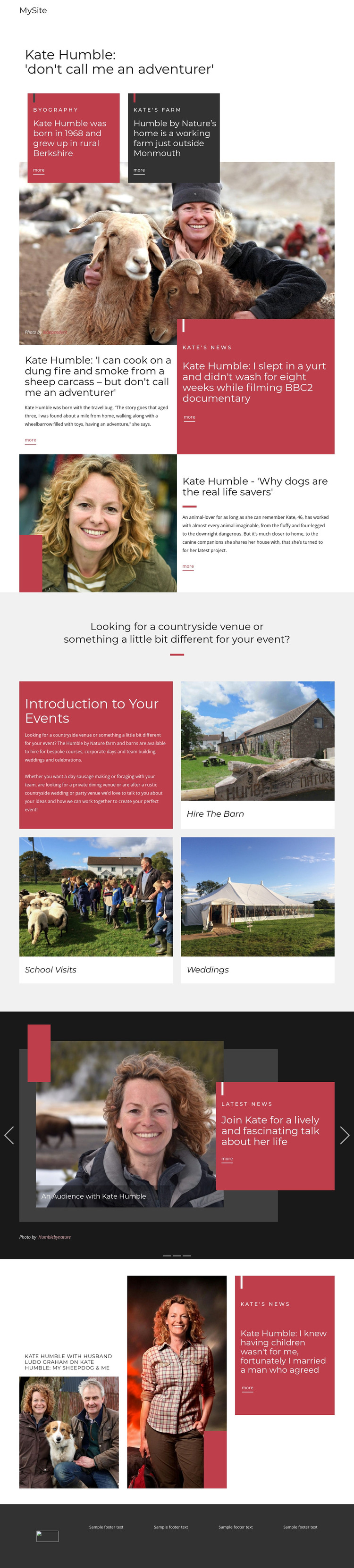
The design contains clear page-oriented content that can be interpreted naturally in a WordPress-managed environment. The biography and farm overview provide permanent profile content, with Kate Humble’s background and Humble by Nature near Monmouth presented in separate but related panels. These sections establish the enduring identity of the site rather than depending on a stream of changing items.
The event area offers another set of stable content categories. Hire The Barn, School Visits, and Weddings appear as three repeated image-led cards beneath an introduction to countryside events. Their shared layout makes the offerings easy to recognize as part of one content group, while each card can be treated as a distinct subject for more detailed page content if the project expands. The design also references bespoke courses and corporate days, giving the event theme additional context without claiming those items have their own completed pages.
The editorial sections and latest-news carousel create a different relationship with content. Adventure, dogs, and family features use article-like headlines, excerpts, photography, and More links, while the three-slide carousel gathers changing media items such as talks, programs, and the Humble Hideaway. This combination lets permanent profile and event information coexist with regularly updated editorial material inside one visual system. The navigation and dark shared footer then connect those areas into a coherent theme rather than treating each content type as a separate design.
Customize with Nicepage
Open this ready-made template in the WordPress Website Builder and customize it visually in the Nicepage editor. Replace demo content, edit page sections, and adapt the design to your project without rebuilding the template from scratch.
Manage and Edit This Theme in WordPress
Customize and Install the WordPress Theme
Start with this ready-made theme instead of building the WordPress design from scratch. Customize its layout, content, typography, images, sections, and other design elements visually in Nicepage editor, then export and install the WordPress Theme, Plugin, and Pages on your WordPress site. The Nicepage WordPress Plugin lets you continue working with the site after installation.
Edit the Theme Directly in WordPress
After installation, you can edit the WordPress Theme directly in WordPress with the Nicepage WordPress Plugin. Use Site Style to customize site Colors, Fonts, Header, Footer, Blog, and Post Page Templates while working within your WordPress website.
Edit WordPress Pages Visually
Use the Nicepage WordPress Plugin to edit page content directly from the WordPress admin area. Open a WordPress Page with Nicepage and visually change its text, images, sections, and other page elements while continuing to manage the Page through WordPress.
WordPress Content and Theme Integration
Use the customized theme with WordPress Pages, Posts, Blog and Post Templates, menus, widgets, and other CMS-managed content. Shared theme elements such as Colors, Fonts, Header, Footer, Blog, and Post Page Templates can be managed as part of the overall site design, while WordPress provides the CMS environment for managing site content.
This workflow combines a ready-made WordPress Theme with visual customization, direct theme editing in WordPress, and continued content management through the Nicepage WordPress Plugin.





















