Fitness, training and nutrition WordPress Theme



Stable Fitness Content Between WordPress Page Sections
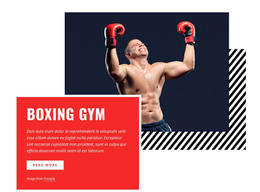
The heading and testimonial give this section two complementary content functions within a WordPress-oriented page: the left side identifies the subject, while the right side adds a personal perspective. Between them, the single fitness photograph occupies the center and extends vertically, creating a visual divider as well as a clear representation of the topic. The three-column horizontal composition keeps these roles distinct, so the section can remain readable as permanent page content while other areas of the site provide further information.
The block’s bright pink-to-blue gradient and white typography also give the content a consistent presentation point. The large condensed heading attracts the first glance, the central image carries the strongest visual presence, and the smaller quote and attribution create a quieter reading zone. In a WordPress-managed site, this arrangement can suit a stable fitness introduction or training-related content area without requiring the quote to be treated as a live review system or the sample attribution as a business claim. The surrounding project can place other page sections around it, while this block preserves its own subject, image, and endorsement relationship. Its static interaction means the full message remains visible together, supporting straightforward page editing and presentation.
Customize with Nicepage
Open this ready-made template in the WordPress Website Builder and customize it visually in the Nicepage editor. Replace demo content, edit page sections, and adapt the design to your project without rebuilding the template from scratch.
Edit Template Offline
2. Create a new page or select existing
3. Click Add new block, search for id 62831 and click enter
Edit Template Online
Create Awesome Websites


Free Nicepage Builder
Keywords
Manage and Edit This Theme in WordPress
Customize and Install the WordPress Theme
Start with this ready-made theme instead of building the WordPress design from scratch. Customize its layout, content, typography, images, sections, and other design elements visually in Nicepage editor, then export and install the WordPress Theme, Plugin, and Pages on your WordPress site. The Nicepage WordPress Plugin lets you continue working with the site after installation.
Edit the Theme Directly in WordPress
After installation, you can edit the WordPress Theme directly in WordPress with the Nicepage WordPress Plugin. Use Site Style to customize site Colors, Fonts, Header, Footer, Blog, and Post Page Templates while working within your WordPress website.
Edit WordPress Pages Visually
Use the Nicepage WordPress Plugin to edit page content directly from the WordPress admin area. Open a WordPress Page with Nicepage and visually change its text, images, sections, and other page elements while continuing to manage the Page through WordPress.
WordPress Content and Theme Integration
Use the customized theme with WordPress Pages, Posts, Blog and Post Templates, menus, widgets, and other CMS-managed content. Shared theme elements such as Colors, Fonts, Header, Footer, Blog, and Post Page Templates can be managed as part of the overall site design, while WordPress provides the CMS environment for managing site content.
This workflow combines a ready-made WordPress Theme with visual customization, direct theme editing in WordPress, and continued content management through the Nicepage WordPress Plugin.