Fitness studio WordPress Theme


Edit Template Offline
2. Create new page and search for id 81178
Edit Template Online
Create Awesome Websites


Free Nicepage Builder
Keywords
Membership Content and Team Imagery Give WordPress Pages Clear Roles
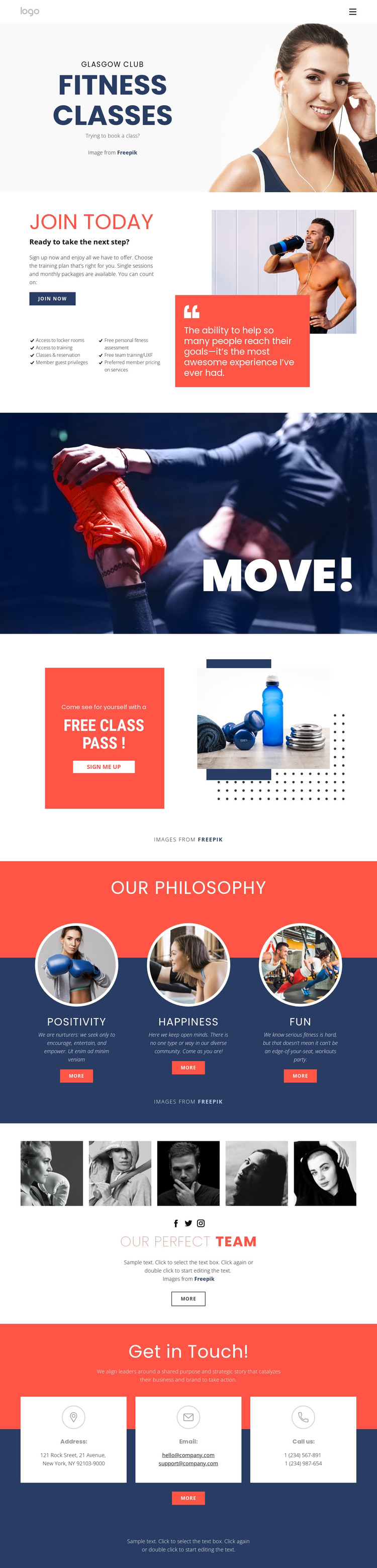
The page-oriented content translates naturally into several permanent fitness-site areas. Join Today provides a substantial membership information section, with practical details covering locker room access, training access, class reservations, guest privileges, fitness assessment, team training, and preferred pricing on services. That content can remain the stable explanatory core of the site, while class and membership wording is updated as the club’s offers change.
The design also separates promotional and people-focused content in ways that suit a WordPress-managed project. Free Class Pass uses a coral offer card and “Sign me up” action, making it a natural campaign or registration-focused page area rather than another copy of the benefits list. Our Philosophy organizes Positivity, Happiness, and Fun into three repeated cards. The five-image team gallery, supporting copy, and Facebook, Twitter, and Instagram links provide a distinct content relationship for introducing the club’s people and social presence.
The contact section adds permanent communication content through address, email, and telephone cards. Together with navigation and the shared dark footer, these areas create a visual system that can surround future page-oriented or regularly updated content without changing the template’s core character. The analysis confirms the content regions, but not the reality of the sample Glasgow Club label, names, address, or contact values.
Customize with Nicepage
Open this ready-made template in the WordPress Website Builder and customize it visually in the Nicepage editor. Replace demo content, edit page sections, and adapt the design to your project without rebuilding the template from scratch.
Manage and Edit This Theme in WordPress
Customize and Install the WordPress Theme
Start with this ready-made theme instead of building the WordPress design from scratch. Customize its layout, content, typography, images, sections, and other design elements visually in Nicepage editor, then export and install the WordPress Theme, Plugin, and Pages on your WordPress site. The Nicepage WordPress Plugin lets you continue working with the site after installation.
Edit the Theme Directly in WordPress
After installation, you can edit the WordPress Theme directly in WordPress with the Nicepage WordPress Plugin. Use Site Style to customize site Colors, Fonts, Header, Footer, Blog, and Post Page Templates while working within your WordPress website.
Edit WordPress Pages Visually
Use the Nicepage WordPress Plugin to edit page content directly from the WordPress admin area. Open a WordPress Page with Nicepage and visually change its text, images, sections, and other page elements while continuing to manage the Page through WordPress.
WordPress Content and Theme Integration
Use the customized theme with WordPress Pages, Posts, Blog and Post Templates, menus, widgets, and other CMS-managed content. Shared theme elements such as Colors, Fonts, Header, Footer, Blog, and Post Page Templates can be managed as part of the overall site design, while WordPress provides the CMS environment for managing site content.
This workflow combines a ready-made WordPress Theme with visual customization, direct theme editing in WordPress, and continued content management through the Nicepage WordPress Plugin.