Keep calm, be healthy WordPress Theme


The right panel keeps publishable guidance easy to maintain
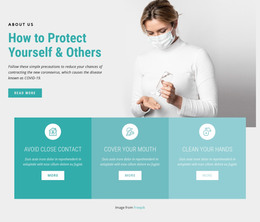
The section reads as stable page content because its message is organized around a durable heading hierarchy rather than a changing list or time-based feed. “Every Mind Matters” introduces the subject, “Do not stay glued to the news” states the central guidance, and the paragraph explains the recommendation to limit outbreak coverage and disable breaking-news alerts. The grayscale portrait of a masked medical professional reinforces the healthcare context while remaining visually separate from the written information.
In a WordPress-managed page, this structure can hold a maintained health guidance passage while the surrounding project handles other content areas. The two-column split gives the image a fixed editorial role and leaves the right panel as the natural place for revising the heading, supporting line, or explanatory copy. Generous whitespace protects readability when the text is updated, and the arrow icon remains a restrained visual accent. The section can therefore fit a permanent information page or educational content area without relying on assumptions about posts, categories, or other publishing structures. Its value lies in the consistent presentation of one focused message, with the portrait and text panel preserving a clear relationship as the surrounding page develops.
Customize with Nicepage
Open this ready-made template in the WordPress Website Builder and customize it visually in the Nicepage editor. Replace demo content, edit page sections, and adapt the design to your project without rebuilding the template from scratch.
Edit Template Offline
2. Create a new page or select existing
3. Click Add new block, search for id 126566 and click enter
Edit Template Online
Create Awesome Websites


Free Nicepage Builder
Keywords
Manage and Edit This Theme in WordPress
Customize and Install the WordPress Theme
Start with this ready-made theme instead of building the WordPress design from scratch. Customize its layout, content, typography, images, sections, and other design elements visually in Nicepage editor, then export and install the WordPress Theme, Plugin, and Pages on your WordPress site. The Nicepage WordPress Plugin lets you continue working with the site after installation.
Edit the Theme Directly in WordPress
After installation, you can edit the WordPress Theme directly in WordPress with the Nicepage WordPress Plugin. Use Site Style to customize site Colors, Fonts, Header, Footer, Blog, and Post Page Templates while working within your WordPress website.
Edit WordPress Pages Visually
Use the Nicepage WordPress Plugin to edit page content directly from the WordPress admin area. Open a WordPress Page with Nicepage and visually change its text, images, sections, and other page elements while continuing to manage the Page through WordPress.
WordPress Content and Theme Integration
Use the customized theme with WordPress Pages, Posts, Blog and Post Templates, menus, widgets, and other CMS-managed content. Shared theme elements such as Colors, Fonts, Header, Footer, Blog, and Post Page Templates can be managed as part of the overall site design, while WordPress provides the CMS environment for managing site content.
This workflow combines a ready-made WordPress Theme with visual customization, direct theme editing in WordPress, and continued content management through the Nicepage WordPress Plugin.