Cycling News WordPress Theme


Edit Template Offline
2. Create new page and search for id 14633
Edit Template Online
Create Awesome Websites


Free Nicepage Builder
Keywords
Editorial Story Areas Give BikeBoard a Clear WordPress Content Direction
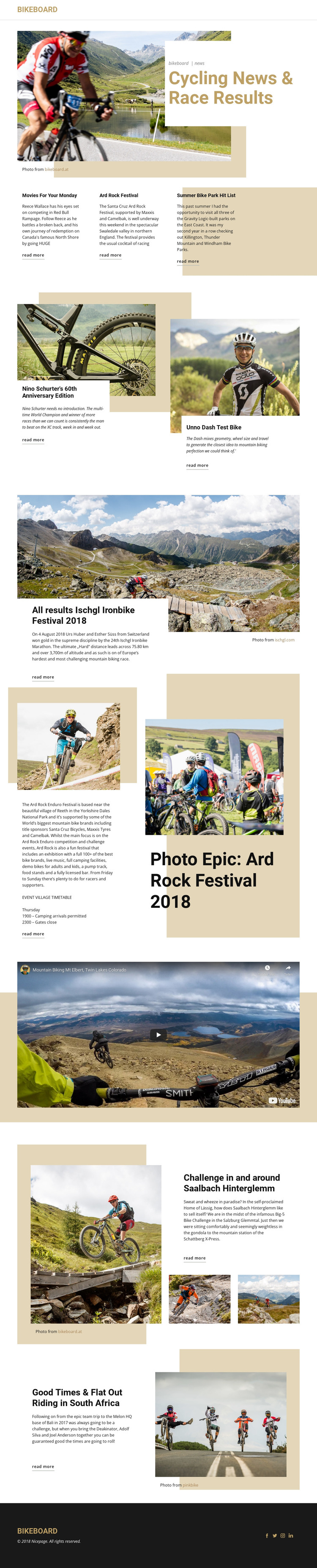
The page’s strongest WordPress-oriented quality comes from the way it separates permanent publication identity from recurring editorial subjects. BikeBoard branding and navigation form the shared framework, while the hero establishes the main news context. The three featured links can introduce current stories, and the larger article panels provide different presentation models for equipment features, race reporting, festival coverage, and destination writing. This distinction is useful when a content-driven site needs several types of cycling material to remain visually related without appearing identical.
The Ischgl Ironbike section is especially suited to structured race-result content because its wide image, headline, summary, and read-more action form a focused story unit. Ard Rock combines photographs, descriptive copy, and an event village timetable reference, giving event coverage a different editorial relationship. The Saalbach Hinterglemm and South Africa features extend the content direction toward riding challenges and destinations, while the embedded video area supports media-led publication content. These interpretations do not claim that WordPress posts or categories already exist in the template; they describe how the verified areas could be organized in a managed content environment.
The repeated visual language also matters for a theme: white article cards, bold headings, large imagery, and the dark BikeBoard footer can keep page-oriented content recognizable as the site grows. The result is a theme foundation for cycling news and related editorial material, with room for regularly updated stories while preserving the established publication character.
Customize with Nicepage
Open this ready-made template in the WordPress Website Builder and customize it visually in the Nicepage editor. Replace demo content, edit page sections, and adapt the design to your project without rebuilding the template from scratch.
Manage and Edit This Theme in WordPress
Customize and Install the WordPress Theme
Start with this ready-made theme instead of building the WordPress design from scratch. Customize its layout, content, typography, images, sections, and other design elements visually in Nicepage editor, then export and install the WordPress Theme, Plugin, and Pages on your WordPress site. The Nicepage WordPress Plugin lets you continue working with the site after installation.
Edit the Theme Directly in WordPress
After installation, you can edit the WordPress Theme directly in WordPress with the Nicepage WordPress Plugin. Use Site Style to customize site Colors, Fonts, Header, Footer, Blog, and Post Page Templates while working within your WordPress website.
Edit WordPress Pages Visually
Use the Nicepage WordPress Plugin to edit page content directly from the WordPress admin area. Open a WordPress Page with Nicepage and visually change its text, images, sections, and other page elements while continuing to manage the Page through WordPress.
WordPress Content and Theme Integration
Use the customized theme with WordPress Pages, Posts, Blog and Post Templates, menus, widgets, and other CMS-managed content. Shared theme elements such as Colors, Fonts, Header, Footer, Blog, and Post Page Templates can be managed as part of the overall site design, while WordPress provides the CMS environment for managing site content.
This workflow combines a ready-made WordPress Theme with visual customization, direct theme editing in WordPress, and continued content management through the Nicepage WordPress Plugin.