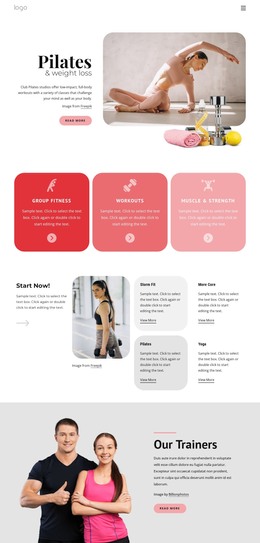
Group fitness classes and more WordPress Theme



Edit Template Offline
2. Create new page and search for id 1644885
Edit Template Online
Create Awesome Websites


Free Nicepage Builder
Keywords
Class and Facility Content Give the Theme Clear Page Roles
The three offering cards provide a natural starting point for permanent fitness page content. Group Fitness, Workouts, and Muscle & Strength are presented as related but separate categories, so a WordPress-managed project could interpret them as page sections or as subjects for expanded content without claiming that those CMS structures already exist. The four numbered cards offer a second content pattern for concise explanations, principles, or supporting information.
The design also separates promotional and facility-oriented material. The club membership invitation and Pilates Classes section use image-led text cards and Learn more buttons, making them suitable areas for page content that explains services or membership options. The six-image Our Gym gallery shifts attention toward the physical environment, while the Group Fitness Classes section combines a heading, supporting lists, a What We Do card, an image, and a call to action. These relationships give the theme several content roles beyond a single generic fitness statement.
The final Gym and Fitness panel brings together descriptive text, a large image, and displayed metrics labeled members, classes, and awards. Those values should be treated as template structure until replaced or verified, while the surrounding content area can remain part of the visual system. Navigation and the dark footer provide shared site elements around which WordPress Pages or other approved content can be organized.
Customize with Nicepage
Open this ready-made template in the WordPress Website Builder and customize it visually in the Nicepage editor. Replace demo content, edit page sections, and adapt the design to your project without rebuilding the template from scratch.
Manage and Edit This Theme in WordPress
Customize and Install the WordPress Theme
Start with this ready-made theme instead of building the WordPress design from scratch. Customize its layout, content, typography, images, sections, and other design elements visually in Nicepage editor, then export and install the WordPress Theme, Plugin, and Pages on your WordPress site. The Nicepage WordPress Plugin lets you continue working with the site after installation.
Edit the Theme Directly in WordPress
After installation, you can edit the WordPress Theme directly in WordPress with the Nicepage WordPress Plugin. Use Site Style to customize site Colors, Fonts, Header, Footer, Blog, and Post Page Templates while working within your WordPress website.
Edit WordPress Pages Visually
Use the Nicepage WordPress Plugin to edit page content directly from the WordPress admin area. Open a WordPress Page with Nicepage and visually change its text, images, sections, and other page elements while continuing to manage the Page through WordPress.
WordPress Content and Theme Integration
Use the customized theme with WordPress Pages, Posts, Blog and Post Templates, menus, widgets, and other CMS-managed content. Shared theme elements such as Colors, Fonts, Header, Footer, Blog, and Post Page Templates can be managed as part of the overall site design, while WordPress provides the CMS environment for managing site content.
This workflow combines a ready-made WordPress Theme with visual customization, direct theme editing in WordPress, and continued content management through the Nicepage WordPress Plugin.