Nike Favorites WordPress Theme


Edit Template Offline
2. Create new page and search for id 17179
Edit Template Online
Create Awesome Websites


Free Nicepage Builder
Keywords
Page Content That Connects Products, Benefits, and New Collections
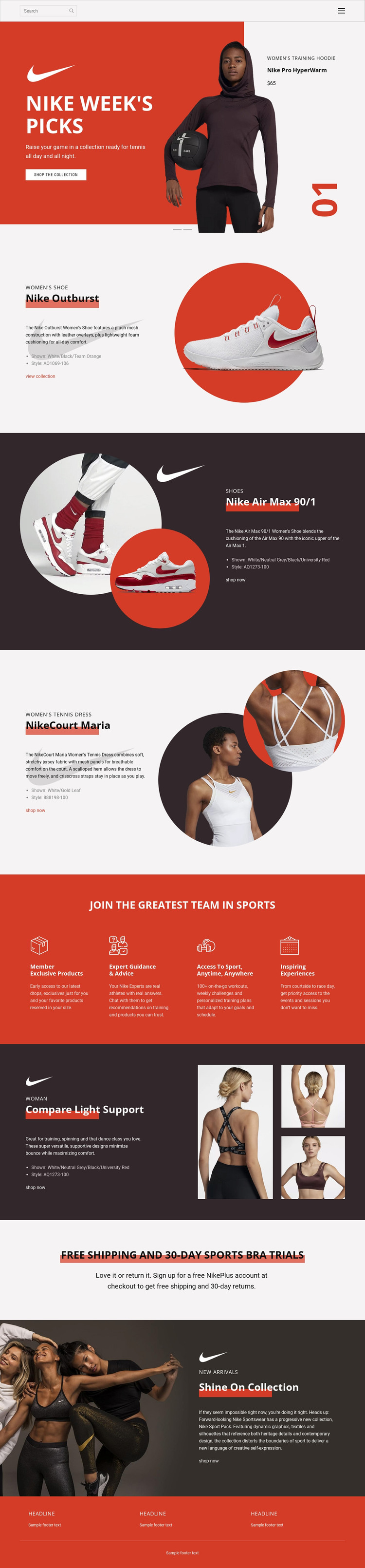
The product-led sections translate naturally into page-oriented content for a WordPress-managed retail project. Nike Outburst and Nike Air Max 90/1 provide two footwear-focused areas with descriptive copy, style information, imagery, and shopping actions. NikeCourt Maria and Compare Light Support extend the same content direction into tennis and training apparel, giving the design several permanent subject areas instead of one undifferentiated promotional message.
The Nike Week’s Picks carousel can serve as the editorially prominent opening for a featured collection, while the Shine On Collection section supplies another campaign-focused area for new arrivals. Between them, the four membership benefits provide a reusable informational group covering exclusive products, guidance, access to sport, and experiences. The shipping and sports bra trial block adds a concise service message that can remain visually separate from the product narratives.
This relationship is useful for a WordPress theme because it distinguishes page content by subject and role: product features, collection promotion, membership information, service reassurance, and shared navigation. If the project later adds regularly updated editorial content, it could be placed around these permanent areas without changing the design’s core character. The analysis does not verify existing WordPress Posts, categories, or blog structures, so the interpretation remains focused on the confirmed page content and its CMS-oriented organization.
Customize with Nicepage
Open this ready-made template in the WordPress Website Builder and customize it visually in the Nicepage editor. Replace demo content, edit page sections, and adapt the design to your project without rebuilding the template from scratch.
Manage and Edit This Theme in WordPress
Customize and Install the WordPress Theme
Start with this ready-made theme instead of building the WordPress design from scratch. Customize its layout, content, typography, images, sections, and other design elements visually in Nicepage editor, then export and install the WordPress Theme, Plugin, and Pages on your WordPress site. The Nicepage WordPress Plugin lets you continue working with the site after installation.
Edit the Theme Directly in WordPress
After installation, you can edit the WordPress Theme directly in WordPress with the Nicepage WordPress Plugin. Use Site Style to customize site Colors, Fonts, Header, Footer, Blog, and Post Page Templates while working within your WordPress website.
Edit WordPress Pages Visually
Use the Nicepage WordPress Plugin to edit page content directly from the WordPress admin area. Open a WordPress Page with Nicepage and visually change its text, images, sections, and other page elements while continuing to manage the Page through WordPress.
WordPress Content and Theme Integration
Use the customized theme with WordPress Pages, Posts, Blog and Post Templates, menus, widgets, and other CMS-managed content. Shared theme elements such as Colors, Fonts, Header, Footer, Blog, and Post Page Templates can be managed as part of the overall site design, while WordPress provides the CMS environment for managing site content.
This workflow combines a ready-made WordPress Theme with visual customization, direct theme editing in WordPress, and continued content management through the Nicepage WordPress Plugin.