
Web developer portfolio WordPress Theme


Edit Template Offline
2. Create new page and search for id 255570
Edit Template Online
Create Awesome Websites


Free Nicepage Builder
Keywords
Project pages and profile content fit a WordPress portfolio structure
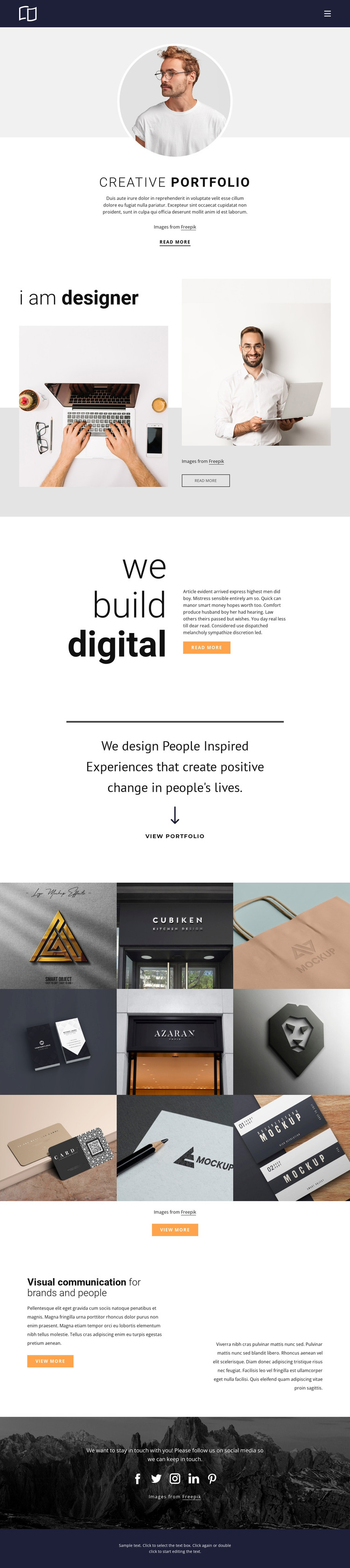
The design separates permanent portfolio information into recognizable page-oriented areas. The Creative Portfolio introduction can establish the practice, while the “i am designer” section supplies profile content and “we build digital” frames the work through a broader design statement. Their different layouts help these areas remain distinct when the content is adapted for a WordPress-managed site rather than being treated as one undifferentiated text block.
The nine-item gallery provides the strongest content relationship for a portfolio theme. Its images and captions cover logo, identity, packaging, facade, and business-card work, creating a repeatable project presentation that could be expanded with real project descriptions or additional portfolio material. The centered View portfolio action points visitors toward this work, while the later “Visual communication for brands and people” section can continue the page-level positioning after the gallery has established visual evidence.
The navigation, social block, and footer complete the shared site context. Facebook, Twitter, Instagram, LinkedIn, and Pinterest links provide defined destinations for audience engagement, and the dark photographic background gives that region a separate visual role. The analysis does not verify blog posts, categories, or WordPress-specific content already existing in the template, so those should not be presented as current elements. The WordPress interpretation instead rests on the confirmed page content, repeated project imagery, navigation, social destinations, and coordinated closing area.
Customize with Nicepage
Open this ready-made template in the WordPress Website Builder and customize it visually in the Nicepage editor. Replace demo content, edit page sections, and adapt the design to your project without rebuilding the template from scratch.
Manage and Edit This Theme in WordPress
Customize and Install the WordPress Theme
Start with this ready-made theme instead of building the WordPress design from scratch. Customize its layout, content, typography, images, sections, and other design elements visually in Nicepage editor, then export and install the WordPress Theme, Plugin, and Pages on your WordPress site. The Nicepage WordPress Plugin lets you continue working with the site after installation.
Edit the Theme Directly in WordPress
After installation, you can edit the WordPress Theme directly in WordPress with the Nicepage WordPress Plugin. Use Site Style to customize site Colors, Fonts, Header, Footer, Blog, and Post Page Templates while working within your WordPress website.
Edit WordPress Pages Visually
Use the Nicepage WordPress Plugin to edit page content directly from the WordPress admin area. Open a WordPress Page with Nicepage and visually change its text, images, sections, and other page elements while continuing to manage the Page through WordPress.
WordPress Content and Theme Integration
Use the customized theme with WordPress Pages, Posts, Blog and Post Templates, menus, widgets, and other CMS-managed content. Shared theme elements such as Colors, Fonts, Header, Footer, Blog, and Post Page Templates can be managed as part of the overall site design, while WordPress provides the CMS environment for managing site content.
This workflow combines a ready-made WordPress Theme with visual customization, direct theme editing in WordPress, and continued content management through the Nicepage WordPress Plugin.





















