
Web designer business card WordPress Theme


Edit Template Offline
2. Create new page and search for id 3444952
Edit Template Online
Create Awesome Websites


Free Nicepage Builder
Keywords
Permanent Profile Content Meets Publishable Project Presentation
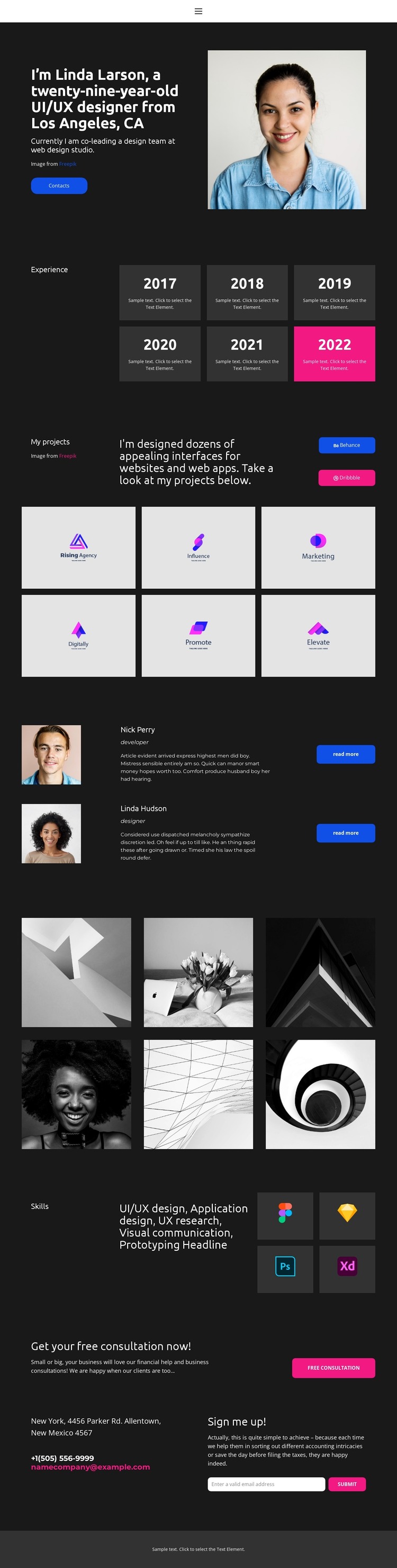
The profile introduction, experience timeline, and Skills section provide durable page-oriented content for a WordPress-managed portfolio. The designer identity can be presented alongside portrait imagery and a Contacts action, while the six year cards summarize experience in a compact format. The named capabilities—UI/UX design, application design, UX research, visual communication, and prototyping—give the site a stable service vocabulary that can remain connected to the visual system.
Project material supplies a different content relationship. Six project-category tiles, Behance and Dribbble links, and six gallery images create a presentation area that can be expanded with real case studies or updated work while preserving the page’s dark portfolio character. The two collaborator profiles add recurring people-focused content, with portraits, roles, descriptions, and Read more actions providing a clear place for related information.
The closing consultation and email signup section connects permanent service content with visitor response. Contact details and the free consultation action can remain part of the page foundation while the signup form supports ongoing communication. WordPress Pages may be a natural interpretation for the profile and service areas, but the template analysis does not establish that Posts, categories, or blog content already exist. The important theme relationship is between stable portfolio information, changeable project presentation, collaborator content, and the final contact region.
Customize with Nicepage
Open this ready-made template in the WordPress Website Builder and customize it visually in the Nicepage editor. Replace demo content, edit page sections, and adapt the design to your project without rebuilding the template from scratch.
Manage and Edit This Theme in WordPress
Customize and Install the WordPress Theme
Start with this ready-made theme instead of building the WordPress design from scratch. Customize its layout, content, typography, images, sections, and other design elements visually in Nicepage editor, then export and install the WordPress Theme, Plugin, and Pages on your WordPress site. The Nicepage WordPress Plugin lets you continue working with the site after installation.
Edit the Theme Directly in WordPress
After installation, you can edit the WordPress Theme directly in WordPress with the Nicepage WordPress Plugin. Use Site Style to customize site Colors, Fonts, Header, Footer, Blog, and Post Page Templates while working within your WordPress website.
Edit WordPress Pages Visually
Use the Nicepage WordPress Plugin to edit page content directly from the WordPress admin area. Open a WordPress Page with Nicepage and visually change its text, images, sections, and other page elements while continuing to manage the Page through WordPress.
WordPress Content and Theme Integration
Use the customized theme with WordPress Pages, Posts, Blog and Post Templates, menus, widgets, and other CMS-managed content. Shared theme elements such as Colors, Fonts, Header, Footer, Blog, and Post Page Templates can be managed as part of the overall site design, while WordPress provides the CMS environment for managing site content.
This workflow combines a ready-made WordPress Theme with visual customization, direct theme editing in WordPress, and continued content management through the Nicepage WordPress Plugin.





















