Elevate your brand with us WordPress Theme


Edit Template Offline
2. Create new page and search for id 6058706
Edit Template Online
Create Awesome Websites


Free Nicepage Builder
Keywords
Service Pages, Portfolio Content, and Contact Areas Fit WordPress Management
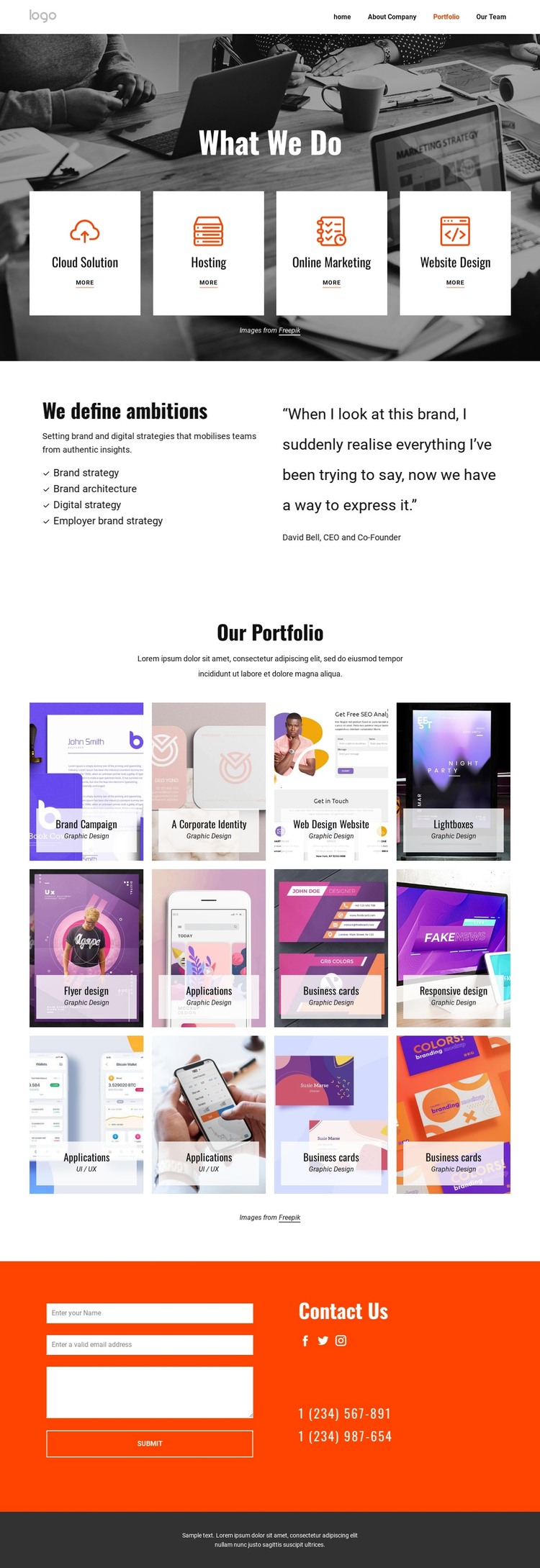
The page-oriented content gives this design a useful basis for a WordPress-managed creative-services site. Its navigation names Home, About Company, Portfolio, and Our Team, while the opening service cards divide the offer into Cloud Solution, Hosting, Online Marketing, and Website Design. These areas can be interpreted as permanent page content because each one communicates a distinct part of the service presentation rather than behaving like one undifferentiated paragraph.
The split strategy section adds reusable informational content around Brand strategy, Brand architecture, Digital strategy, and Employer brand strategy. Testimonial content appears alongside that list, creating a relationship between strategic explanation and supporting evidence. The twelve-item portfolio gallery then supplies a substantial visual content area, with captions such as Graphic Design and UI / UX helping distinguish different kinds of work. If the project later adds regularly updated editorial material, the existing page structure can continue to provide a consistent visual context without claiming that posts or blog templates are already present.
The final Contact Us region gathers the form, three social links, and two telephone numbers into a clear page endpoint. This separation between service information, strategic content, visual work, and inquiry content suits a WordPress interpretation because the design can organize permanent pages and future content around recognizable sections. Nicepage's WordPress Plugin can serve as an optional bridge for working with the theme directly in WordPress, but the template-specific value remains its content structure.
Customize with Nicepage
Open this ready-made template in the WordPress Website Builder and customize it visually in the Nicepage editor. Replace demo content, edit page sections, and adapt the design to your project without rebuilding the template from scratch.
Manage and Edit This Theme in WordPress
Customize and Install the WordPress Theme
Start with this ready-made theme instead of building the WordPress design from scratch. Customize its layout, content, typography, images, sections, and other design elements visually in Nicepage editor, then export and install the WordPress Theme, Plugin, and Pages on your WordPress site. The Nicepage WordPress Plugin lets you continue working with the site after installation.
Edit the Theme Directly in WordPress
After installation, you can edit the WordPress Theme directly in WordPress with the Nicepage WordPress Plugin. Use Site Style to customize site Colors, Fonts, Header, Footer, Blog, and Post Page Templates while working within your WordPress website.
Edit WordPress Pages Visually
Use the Nicepage WordPress Plugin to edit page content directly from the WordPress admin area. Open a WordPress Page with Nicepage and visually change its text, images, sections, and other page elements while continuing to manage the Page through WordPress.
WordPress Content and Theme Integration
Use the customized theme with WordPress Pages, Posts, Blog and Post Templates, menus, widgets, and other CMS-managed content. Shared theme elements such as Colors, Fonts, Header, Footer, Blog, and Post Page Templates can be managed as part of the overall site design, while WordPress provides the CMS environment for managing site content.
This workflow combines a ready-made WordPress Theme with visual customization, direct theme editing in WordPress, and continued content management through the Nicepage WordPress Plugin.