
Ideas in creative portfolio WordPress Theme


Edit Template Offline
2. Create new page and search for id 104927
Edit Template Online
Create Awesome Websites


Free Nicepage Builder
Keywords
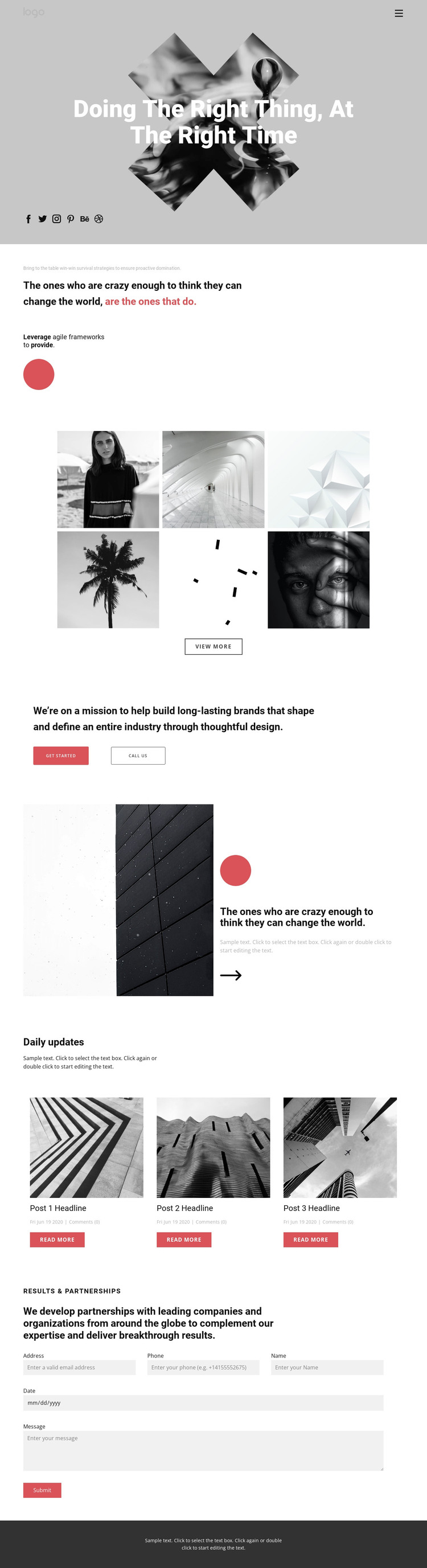
Portfolio Content and Daily Updates Share One Visual Direction
The six-image gallery and the three repeated Daily updates cards give the design two different content roles. The gallery works as relatively permanent portfolio presentation, while the article cards provide a repeatable editorial pattern with images, headlines, metadata, and Read More actions. In a WordPress-oriented project, that distinction can help separate enduring agency work from content that may be published or refreshed over time, without claiming that a blog or post structure already exists in the template.
The hero, positioning statement, mission section, and split quote feature provide the page-oriented content around those areas. They explain the agency’s visual position and partnership approach, while the Get started and Call us buttons create direct routes toward contact. At the bottom, Results & Partnerships places the inquiry form beside a clear partnership message, giving the page a practical response area that remains connected to the brand narrative.
The compact header, social links, and dark footer can act as shared visual anchors if the project grows beyond this page. The main benefit is continuity: portfolio imagery, editorial cards, statements, and inquiry content already use the same monochrome, coral-accented design language. A Nicepage WordPress Plugin can support editing WordPress content within the CMS environment, but the important template-specific value is the relationship between permanent agency presentation and recurring editorial material, not a generic CMS workflow.
Customize with Nicepage
Open this ready-made template in the WordPress Website Builder and customize it visually in the Nicepage editor. Replace demo content, edit page sections, and adapt the design to your project without rebuilding the template from scratch.
Manage and Edit This Theme in WordPress
Customize and Install the WordPress Theme
Start with this ready-made theme instead of building the WordPress design from scratch. Customize its layout, content, typography, images, sections, and other design elements visually in Nicepage editor, then export and install the WordPress Theme, Plugin, and Pages on your WordPress site. The Nicepage WordPress Plugin lets you continue working with the site after installation.
Edit the Theme Directly in WordPress
After installation, you can edit the WordPress Theme directly in WordPress with the Nicepage WordPress Plugin. Use Site Style to customize site Colors, Fonts, Header, Footer, Blog, and Post Page Templates while working within your WordPress website.
Edit WordPress Pages Visually
Use the Nicepage WordPress Plugin to edit page content directly from the WordPress admin area. Open a WordPress Page with Nicepage and visually change its text, images, sections, and other page elements while continuing to manage the Page through WordPress.
WordPress Content and Theme Integration
Use the customized theme with WordPress Pages, Posts, Blog and Post Templates, menus, widgets, and other CMS-managed content. Shared theme elements such as Colors, Fonts, Header, Footer, Blog, and Post Page Templates can be managed as part of the overall site design, while WordPress provides the CMS environment for managing site content.
This workflow combines a ready-made WordPress Theme with visual customization, direct theme editing in WordPress, and continued content management through the Nicepage WordPress Plugin.





















