Reach Your Sport Goals WordPress Theme


Edit Template Offline
2. Create new page and search for id 60211
Edit Template Online
Create Awesome Websites


Free Nicepage Builder
Keywords
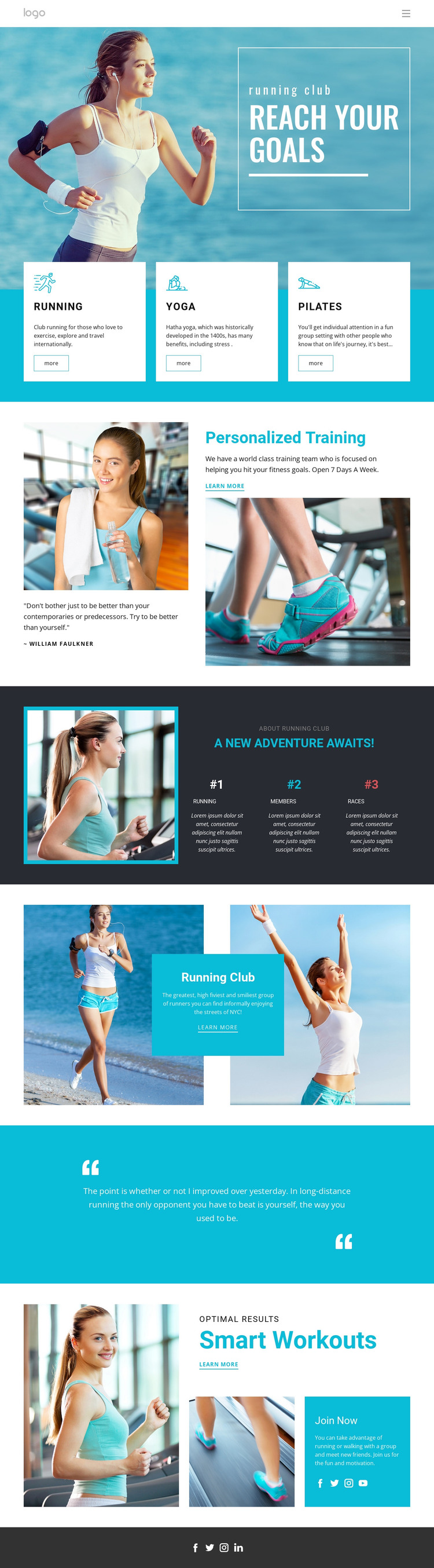
Running Activities and Club Sections Shape the WordPress Content Base
The three activity cards give the design a clear set of permanent page areas for Running, Yoga, and Pilates. Each offering has its own visual space, so a WordPress project can keep activity information distinct while maintaining the shared turquoise and white presentation. The Personalized Training section adds a separate content role: its alternating image-and-text arrangement can support a focused explanation of training without being confused with the broader activity overview.
The Running Club section and the Smart Workouts block extend the page beyond a simple service list. One presents group identity through outdoor fitness imagery and a centered text panel; the other combines workout messaging with a Join Now invitation. Together, they create page-oriented content that can remain central to the site while additional editorial or membership material is introduced around it. The metric panels in the dark section should be treated as structural content placeholders, not verified club achievements.
A WordPress theme interpretation is especially useful here because the design already separates recurring content roles: activities, training, club information, motivation, and membership response. Navigation, mobile navigation, and the social-link footer provide shared site regions that can connect those areas with future content. The result is a fitness-focused visual system for WordPress-managed pages, without claiming that blog posts or other CMS content already exist in the template.
Customize with Nicepage
Open this ready-made template in the WordPress Website Builder and customize it visually in the Nicepage editor. Replace demo content, edit page sections, and adapt the design to your project without rebuilding the template from scratch.
Manage and Edit This Theme in WordPress
Customize and Install the WordPress Theme
Start with this ready-made theme instead of building the WordPress design from scratch. Customize its layout, content, typography, images, sections, and other design elements visually in Nicepage editor, then export and install the WordPress Theme, Plugin, and Pages on your WordPress site. The Nicepage WordPress Plugin lets you continue working with the site after installation.
Edit the Theme Directly in WordPress
After installation, you can edit the WordPress Theme directly in WordPress with the Nicepage WordPress Plugin. Use Site Style to customize site Colors, Fonts, Header, Footer, Blog, and Post Page Templates while working within your WordPress website.
Edit WordPress Pages Visually
Use the Nicepage WordPress Plugin to edit page content directly from the WordPress admin area. Open a WordPress Page with Nicepage and visually change its text, images, sections, and other page elements while continuing to manage the Page through WordPress.
WordPress Content and Theme Integration
Use the customized theme with WordPress Pages, Posts, Blog and Post Templates, menus, widgets, and other CMS-managed content. Shared theme elements such as Colors, Fonts, Header, Footer, Blog, and Post Page Templates can be managed as part of the overall site design, while WordPress provides the CMS environment for managing site content.
This workflow combines a ready-made WordPress Theme with visual customization, direct theme editing in WordPress, and continued content management through the Nicepage WordPress Plugin.