Ski Resorts WordPress Theme


Edit Template Offline
2. Create new page and search for id 16827
Edit Template Online
Create Awesome Websites


Free Nicepage Builder
Keywords
Experience and destination content fits a managed vacation site
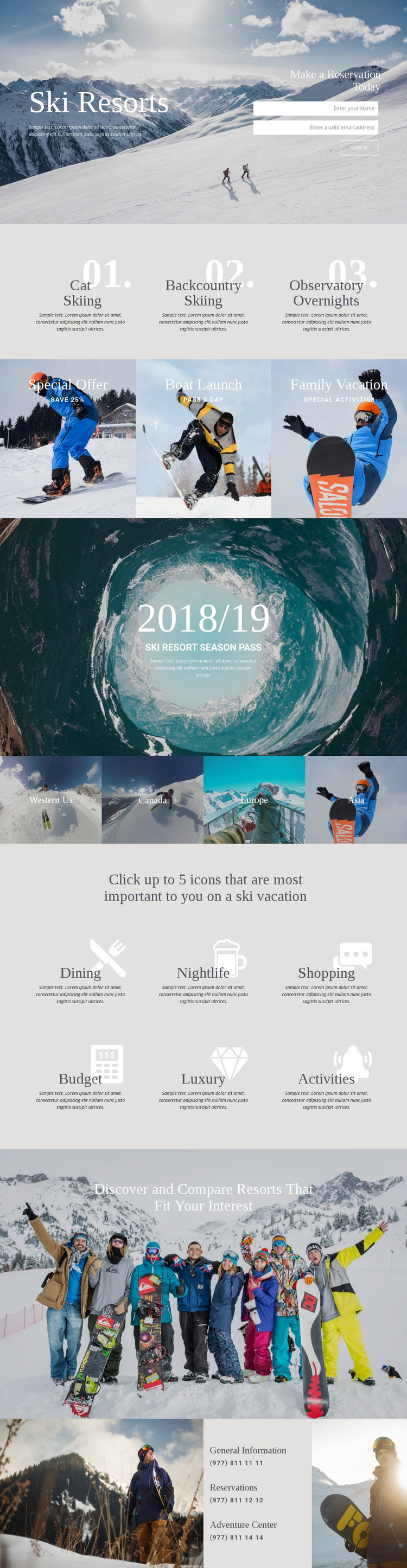
The design separates permanent resort information into clear page-oriented groups. Cat Skiing, Backcountry Skiing, and Observatory Overnights form one experience set, while Western Us, Canada, Europe, and Asia form a distinct regional set. That separation gives a WordPress-oriented project useful content relationships to maintain: activities can be described independently from destinations, while both can remain within the same visual direction. The three offer panels add another layer for promotional vacation content through Special Offer, Boat Launch, and Family Vacation.
The reservation form and the final contact panel provide practical page content around those discovery areas. General Information, Reservations, and Adventure Center entries can be treated as stable contact subjects, while the six preference labels create a visitor-facing way to frame Dining, Nightlife, Shopping, Budget, Luxury, and Activities. The design therefore suits a managed site where permanent pages and changing vacation information need to coexist, although the analysis does not verify existing WordPress Posts, categories, or blog structures. If the project later publishes announcements or resort updates, those additions would need to be configured separately rather than assumed from this page. The WordPress theme interpretation comes from the template’s content organization: experience information, destination choices, promotional panels, reservation response, and shared visual presentation already give managed page content a coherent place within the site.
Customize with Nicepage
Open this ready-made template in the WordPress Website Builder and customize it visually in the Nicepage editor. Replace demo content, edit page sections, and adapt the design to your project without rebuilding the template from scratch.
Manage and Edit This Theme in WordPress
Customize and Install the WordPress Theme
Start with this ready-made theme instead of building the WordPress design from scratch. Customize its layout, content, typography, images, sections, and other design elements visually in Nicepage editor, then export and install the WordPress Theme, Plugin, and Pages on your WordPress site. The Nicepage WordPress Plugin lets you continue working with the site after installation.
Edit the Theme Directly in WordPress
After installation, you can edit the WordPress Theme directly in WordPress with the Nicepage WordPress Plugin. Use Site Style to customize site Colors, Fonts, Header, Footer, Blog, and Post Page Templates while working within your WordPress website.
Edit WordPress Pages Visually
Use the Nicepage WordPress Plugin to edit page content directly from the WordPress admin area. Open a WordPress Page with Nicepage and visually change its text, images, sections, and other page elements while continuing to manage the Page through WordPress.
WordPress Content and Theme Integration
Use the customized theme with WordPress Pages, Posts, Blog and Post Templates, menus, widgets, and other CMS-managed content. Shared theme elements such as Colors, Fonts, Header, Footer, Blog, and Post Page Templates can be managed as part of the overall site design, while WordPress provides the CMS environment for managing site content.
This workflow combines a ready-made WordPress Theme with visual customization, direct theme editing in WordPress, and continued content management through the Nicepage WordPress Plugin.