Reebok WordPress Theme


Edit Template Offline
2. Create new page and search for id 18116
Edit Template Online
Create Awesome Websites


Free Nicepage Builder
Keywords
Product Pages and Editorial Content Can Share One Sportswear System
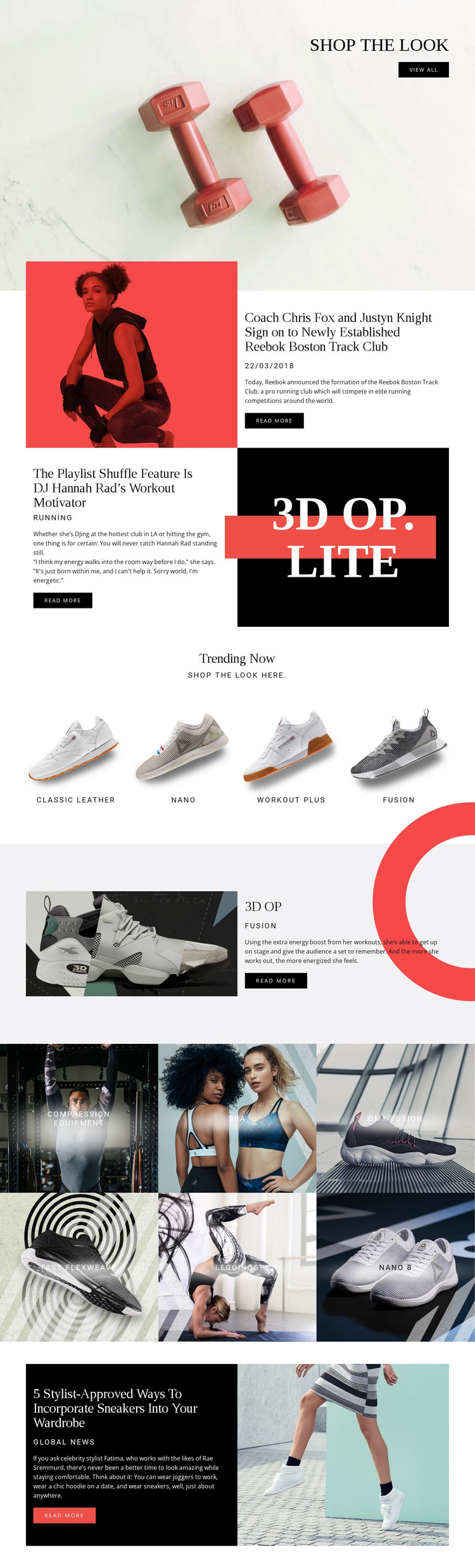
The page contains clear permanent content areas that suit a WordPress-oriented publishing environment. Product presentation begins with shop the look and continues through the four-item Trending Now group, where Classic Leather, nano, workout plus, and fusion appear as distinct product choices. The 3D OP section provides a different content model: one product receives larger imagery, a category label, descriptive copy, and an action. The six-tile gallery then broadens the category view with compression equipment, bra, dmx fusion, fast flexweave, leggings, and nano 8.
Alongside those page-oriented product areas, the design contains three editorial features with read more actions. The Boston Track Club story, Playlist Shuffle workout feature, and sneaker-wardrobe article can be interpreted as recurring content subjects without claiming that a blog or post structure is already present. Their image-and-text presentation gives regularly updated material a visual relationship to the permanent shopping sections.
This combination is useful for a managed site because product information, editorial content, and shared navigation can remain within one recognizable design direction as the project grows. The WordPress interpretation comes from the page’s division between product-oriented areas and publishable story content, not simply from replacing the design’s terminology with a CMS name.
Customize with Nicepage
Open this ready-made template in the WordPress Website Builder and customize it visually in the Nicepage editor. Replace demo content, edit page sections, and adapt the design to your project without rebuilding the template from scratch.
Manage and Edit This Theme in WordPress
Customize and Install the WordPress Theme
Start with this ready-made theme instead of building the WordPress design from scratch. Customize its layout, content, typography, images, sections, and other design elements visually in Nicepage editor, then export and install the WordPress Theme, Plugin, and Pages on your WordPress site. The Nicepage WordPress Plugin lets you continue working with the site after installation.
Edit the Theme Directly in WordPress
After installation, you can edit the WordPress Theme directly in WordPress with the Nicepage WordPress Plugin. Use Site Style to customize site Colors, Fonts, Header, Footer, Blog, and Post Page Templates while working within your WordPress website.
Edit WordPress Pages Visually
Use the Nicepage WordPress Plugin to edit page content directly from the WordPress admin area. Open a WordPress Page with Nicepage and visually change its text, images, sections, and other page elements while continuing to manage the Page through WordPress.
WordPress Content and Theme Integration
Use the customized theme with WordPress Pages, Posts, Blog and Post Templates, menus, widgets, and other CMS-managed content. Shared theme elements such as Colors, Fonts, Header, Footer, Blog, and Post Page Templates can be managed as part of the overall site design, while WordPress provides the CMS environment for managing site content.
This workflow combines a ready-made WordPress Theme with visual customization, direct theme editing in WordPress, and continued content management through the Nicepage WordPress Plugin.