World Cup WordPress Theme


Edit Template Offline
2. Create new page and search for id 14097
Edit Template Online
Create Awesome Websites


Free Nicepage Builder
Keywords
Reference Guides and Recurring Stories Share One Sports Theme
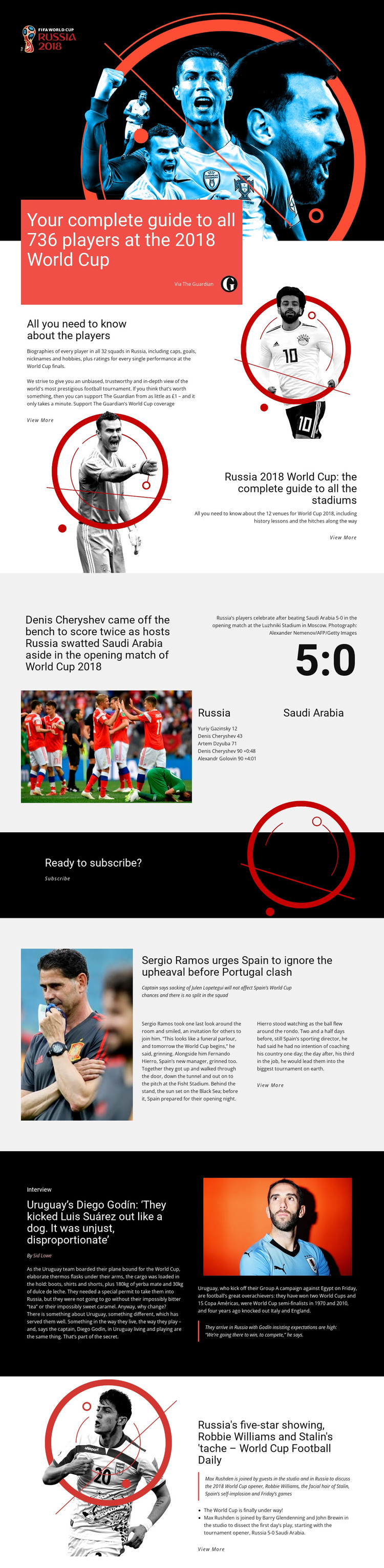
The player and stadium areas provide two different kinds of permanent editorial content for a WordPress-oriented project. One explains coverage of 736 players across 32 squads, while the other focuses on 12 World Cup venues. Their relationship is useful because it separates reference information about people from reference information about places, while the same visual direction keeps both areas recognizable as part of one publication.
The match-report grid introduces a more time-sensitive content pattern. Its Russia–Saudi Arabia 5:0 result, scorer details, photograph, and Luzhniki Stadium caption show how a specific story can sit beside broader guide material. The Spain and Portugal report, Diego Godín interview, and Football Daily feature then add national-team news, interview-led content, and audio discussion as distinct editorial areas. The template does not claim that WordPress Posts or other CMS structures already exist; it supplies the page relationships and presentation cues.
The Subscribe block can remain a separate audience-support area, while View More links distinguish summaries from deeper coverage. In a WordPress-managed site, this design can therefore bring permanent guides and regularly updated sports stories into one visual system. The emphasis is on content continuity: different publishing subjects can share the same editorial character without flattening their individual formats.
Customize with Nicepage
Open this ready-made template in the WordPress Website Builder and customize it visually in the Nicepage editor. Replace demo content, edit page sections, and adapt the design to your project without rebuilding the template from scratch.
Manage and Edit This Theme in WordPress
Customize and Install the WordPress Theme
Start with this ready-made theme instead of building the WordPress design from scratch. Customize its layout, content, typography, images, sections, and other design elements visually in Nicepage editor, then export and install the WordPress Theme, Plugin, and Pages on your WordPress site. The Nicepage WordPress Plugin lets you continue working with the site after installation.
Edit the Theme Directly in WordPress
After installation, you can edit the WordPress Theme directly in WordPress with the Nicepage WordPress Plugin. Use Site Style to customize site Colors, Fonts, Header, Footer, Blog, and Post Page Templates while working within your WordPress website.
Edit WordPress Pages Visually
Use the Nicepage WordPress Plugin to edit page content directly from the WordPress admin area. Open a WordPress Page with Nicepage and visually change its text, images, sections, and other page elements while continuing to manage the Page through WordPress.
WordPress Content and Theme Integration
Use the customized theme with WordPress Pages, Posts, Blog and Post Templates, menus, widgets, and other CMS-managed content. Shared theme elements such as Colors, Fonts, Header, Footer, Blog, and Post Page Templates can be managed as part of the overall site design, while WordPress provides the CMS environment for managing site content.
This workflow combines a ready-made WordPress Theme with visual customization, direct theme editing in WordPress, and continued content management through the Nicepage WordPress Plugin.