Adult Basketball Training WordPress Theme


Edit Template Offline
2. Create new page and search for id 6641393
Edit Template Online
Create Awesome Websites


Free Nicepage Builder
Keywords
Program Content and Player Feedback Fit a Managed Coaching Site
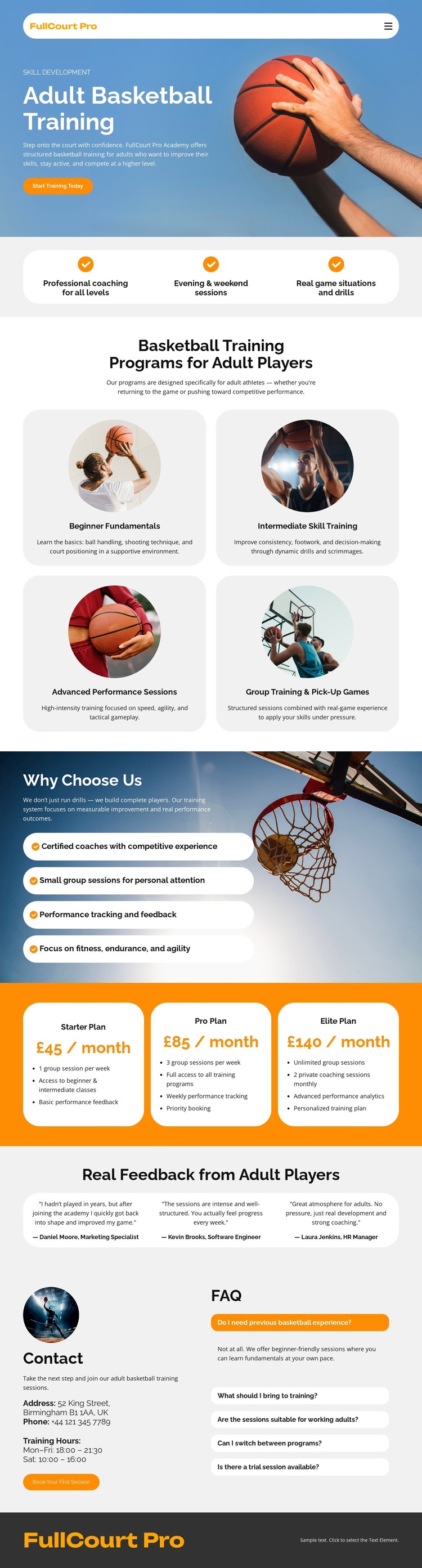
The four training categories provide page-oriented content areas for a WordPress-managed coaching site. They distinguish Beginner Fundamentals, Intermediate Skill Training, Advanced Performance Sessions, and Group Training and Pick-Up Games, giving the service a natural structure for permanent information rather than one undifferentiated description. The three benefit statements can introduce that content with a concise summary of coaching, scheduling, and game-based practice.
The three monthly plans create another reusable content group. Starter, Pro, and Elite cards contain plan names, prices, feature lists, and action buttons, so visitors can compare the offer after reviewing the training categories. Player testimonials add a different kind of recurring content, while the reasons-to-choose section supplies supporting claims about coaches, group size, performance feedback, fitness, endurance, and agility. These relationships help the design accommodate both stable service information and content that may be updated as the coaching project develops.
The contact and FAQ area provides a practical closing region, combining direct contact details with questions that help visitors decide what to do next. In WordPress, the page could remain centered on permanent training pages and related managed content while preserving its shared palette, imagery, card treatment, and footer identity. This interpretation does not claim that Posts, categories, or WordPress structures already exist in the template; it explains how the verified content areas can work within a WordPress theme.
Customize with Nicepage
Open this ready-made template in the WordPress Website Builder and customize it visually in the Nicepage editor. Replace demo content, edit page sections, and adapt the design to your project without rebuilding the template from scratch.
Manage and Edit This Theme in WordPress
Customize and Install the WordPress Theme
Start with this ready-made theme instead of building the WordPress design from scratch. Customize its layout, content, typography, images, sections, and other design elements visually in Nicepage editor, then export and install the WordPress Theme, Plugin, and Pages on your WordPress site. The Nicepage WordPress Plugin lets you continue working with the site after installation.
Edit the Theme Directly in WordPress
After installation, you can edit the WordPress Theme directly in WordPress with the Nicepage WordPress Plugin. Use Site Style to customize site Colors, Fonts, Header, Footer, Blog, and Post Page Templates while working within your WordPress website.
Edit WordPress Pages Visually
Use the Nicepage WordPress Plugin to edit page content directly from the WordPress admin area. Open a WordPress Page with Nicepage and visually change its text, images, sections, and other page elements while continuing to manage the Page through WordPress.
WordPress Content and Theme Integration
Use the customized theme with WordPress Pages, Posts, Blog and Post Templates, menus, widgets, and other CMS-managed content. Shared theme elements such as Colors, Fonts, Header, Footer, Blog, and Post Page Templates can be managed as part of the overall site design, while WordPress provides the CMS environment for managing site content.
This workflow combines a ready-made WordPress Theme with visual customization, direct theme editing in WordPress, and continued content management through the Nicepage WordPress Plugin.