Surfing WordPress Theme


Edit Template Offline
2. Create new page and search for id 16800
Edit Template Online
Create Awesome Websites


Free Nicepage Builder
Keywords
Service Pages and Editorial Areas Fit the Surfing Content
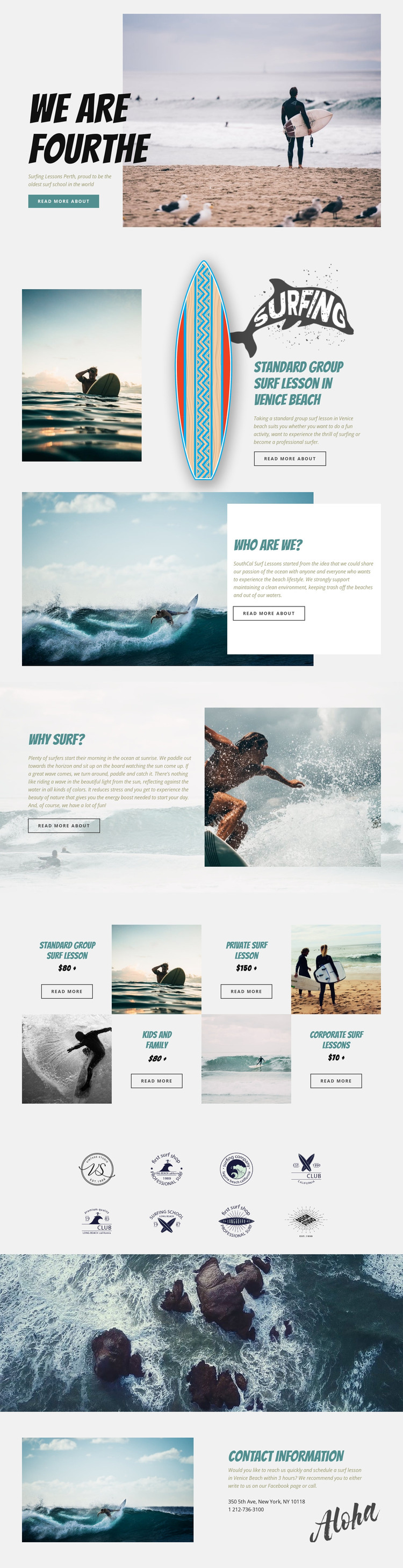
The page-oriented parts of this design give a WordPress project clear permanent content to organize. The hero and featured Venice Beach group lesson can introduce the school and its principal service, while the About Us section provides a natural page area for background information and the school’s clean-beach message. The Why Surf content adds a separate explanatory angle, giving the site more than a simple list of lessons.
The four repeated offering tiles are especially useful as a content pattern. Standard group, private, kids and family, and corporate surf lessons are presented as parallel service subjects, so each can remain a distinct content area while sharing the same visual direction. The eight-logo display can serve as a separate brand or partner section, whereas the closing contact block gathers scheduling instructions, location text, telephone information, and a Venice Beach reference into one practical page area.
This design can therefore support a WordPress-managed content environment through the relationship between permanent school information and recurring service-oriented material. If the project later publishes related articles, announcements, or lesson updates, they could be kept visually consistent with these established page areas, but the template analysis does not prove that posts or blog structures already exist. The central value is the clear mapping from existing surf-school content to pages and reusable content sections, not a claim about an unverified CMS component.
Customize with Nicepage
Open this ready-made template in the WordPress Website Builder and customize it visually in the Nicepage editor. Replace demo content, edit page sections, and adapt the design to your project without rebuilding the template from scratch.
Manage and Edit This Theme in WordPress
Customize and Install the WordPress Theme
Start with this ready-made theme instead of building the WordPress design from scratch. Customize its layout, content, typography, images, sections, and other design elements visually in Nicepage editor, then export and install the WordPress Theme, Plugin, and Pages on your WordPress site. The Nicepage WordPress Plugin lets you continue working with the site after installation.
Edit the Theme Directly in WordPress
After installation, you can edit the WordPress Theme directly in WordPress with the Nicepage WordPress Plugin. Use Site Style to customize site Colors, Fonts, Header, Footer, Blog, and Post Page Templates while working within your WordPress website.
Edit WordPress Pages Visually
Use the Nicepage WordPress Plugin to edit page content directly from the WordPress admin area. Open a WordPress Page with Nicepage and visually change its text, images, sections, and other page elements while continuing to manage the Page through WordPress.
WordPress Content and Theme Integration
Use the customized theme with WordPress Pages, Posts, Blog and Post Templates, menus, widgets, and other CMS-managed content. Shared theme elements such as Colors, Fonts, Header, Footer, Blog, and Post Page Templates can be managed as part of the overall site design, while WordPress provides the CMS environment for managing site content.
This workflow combines a ready-made WordPress Theme with visual customization, direct theme editing in WordPress, and continued content management through the Nicepage WordPress Plugin.