Exhibition of retro cars WordPress Theme


Photographic Page Content With a Clear Memory-Themed Hierarchy
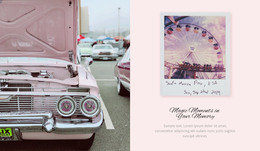
The section’s content hierarchy begins with the large vintage-car photograph on the left, then moves to the square supporting photograph and the centered heading “Magic Moments in Your Memory” on the right. The paragraph beneath the heading provides a defined text area, while the pastel blush background separates that written content from the detailed image treatment. This ordering gives the block a stable reading path: visual subject first, supporting image second, then message and explanation. Its two-column structure keeps the image and text related without merging them into one crowded panel.
For a WordPress Theme context, the block can be treated as reusable visual content inside a managed page rather than as a complete theme itself. It may suit a permanent introduction, a memory-focused story, or a photography presentation where the image relationship is as important as the copy. The centered cursive-style typography gives the heading a personal character, while the muted gray paragraph leaves room for editors to replace sample text with project-specific writing. Because no interactive component is present, the section’s meaning stays available at a glance and does not depend on controls or changing states. Other WordPress-managed content can surround it, but this block retains one focused responsibility: pairing retro-car imagery with a concise, reflective message in a clearly bounded page section.
Customize with Nicepage
Open this ready-made template in the WordPress Website Builder and customize it visually in the Nicepage editor. Replace demo content, edit page sections, and adapt the design to your project without rebuilding the template from scratch.
Edit Template Offline
2. Create a new page or select existing
3. Click Add new block, search for id 54737 and click enter
Edit Template Online
Create Awesome Websites


Free Nicepage Builder
Keywords
Manage and Edit This Theme in WordPress
Customize and Install the WordPress Theme
Start with this ready-made theme instead of building the WordPress design from scratch. Customize its layout, content, typography, images, sections, and other design elements visually in Nicepage editor, then export and install the WordPress Theme, Plugin, and Pages on your WordPress site. The Nicepage WordPress Plugin lets you continue working with the site after installation.
Edit the Theme Directly in WordPress
After installation, you can edit the WordPress Theme directly in WordPress with the Nicepage WordPress Plugin. Use Site Style to customize site Colors, Fonts, Header, Footer, Blog, and Post Page Templates while working within your WordPress website.
Edit WordPress Pages Visually
Use the Nicepage WordPress Plugin to edit page content directly from the WordPress admin area. Open a WordPress Page with Nicepage and visually change its text, images, sections, and other page elements while continuing to manage the Page through WordPress.
WordPress Content and Theme Integration
Use the customized theme with WordPress Pages, Posts, Blog and Post Templates, menus, widgets, and other CMS-managed content. Shared theme elements such as Colors, Fonts, Header, Footer, Blog, and Post Page Templates can be managed as part of the overall site design, while WordPress provides the CMS environment for managing site content.
This workflow combines a ready-made WordPress Theme with visual customization, direct theme editing in WordPress, and continued content management through the Nicepage WordPress Plugin.